


About the Home Screen
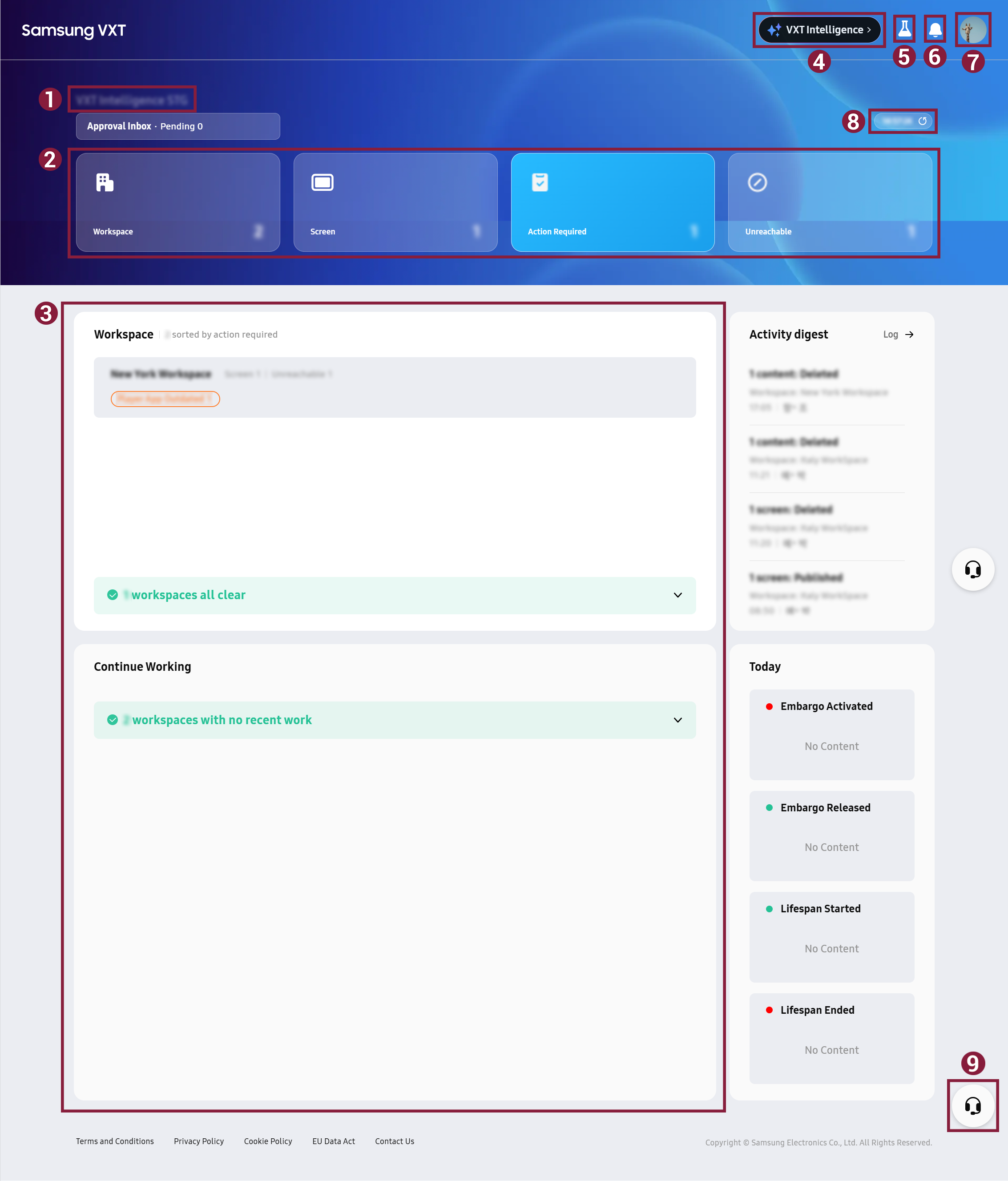
The startup page shown below appears by default when you access VXT CMS. It provides an overview of the organization, including Workspace, Screens, Action Required, Predictive Insights, and Unreachable, as well as role-specific information. Click an item redirects to the corresponding details page.
-
Available VXT CMS functions depend on the user role. For more information about user roles, refer to the following:
-
The menu items displayed when connected to VXT CMS may differ, depending on the user role and rate plan. The description of the Home screen assumes that you are signed in with general administrator privileges, which can access all menu items.
 |
|
No |
Description |
|---|---|
 |
Shows your organization name. |
 |
Shows the overall picture of the organization. |
 |
Shows the activities that took place within the organization. Clicking an information card redirects to the corresponding menu page.
|
 |
Manage VXT CMS using VXT Intelligence.
|
 |
Navigate to VXT Labs to view the beta version with new features. |
 |
RM STATE, Early Warning, and NOTICE features are available.
|
 |
Shows the currently logged-in user's profile. |
 |
View the last update time for screen data, and perform an update. |
 |
Use VXT Assistant to access a chatbot or connect to a customer service representative.
|