Versions Compared

Key

  • This line was added.
  • This line was removed.
  • Formatting was changed.
Comment: Removed translated content for 'de'

...

Sv translation
languageen

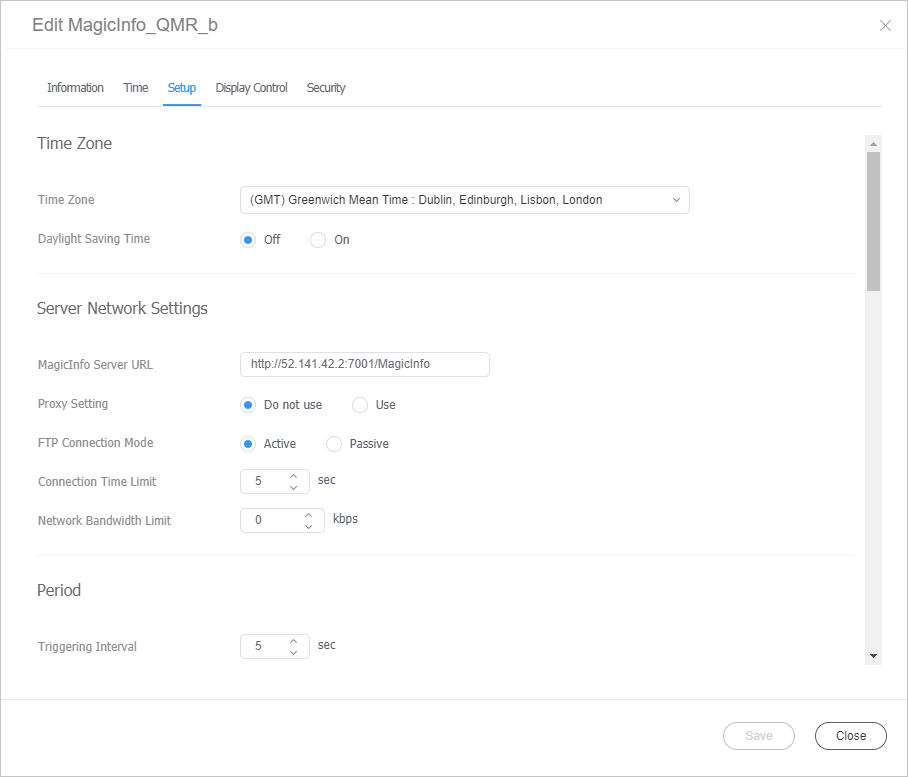
Change the major settings for device management. Click the Settings tab from the edit device info window.

Stylesheet
classscreen
Image RemovedImage Added

Time Zone

  • Time Zone: Select a time zone for each city.
  • Daylight Saving Time: Turn daylight savings time mode on or off. To use daylight savings time mode, configure start and end settings.
Info
titleNote

Daylight Saving Time, also known as Summer Time, is a system that advances clocks one hour forward in summer.

Server Network Settings

  • MagicINFO Sever URL: Set the address of MagicINFO Server.
  • Proxy Setting: Enable or disable the proxy server. Edit the settings if required.
  • FTP Connection Mode: Select the FTP connection mode.
  • Connection Time Limit: Set the time to limit connection to the server.
  • Network Bandwidth Limit: Set the network bandwidth to limit the network traffic.

Period

  • Triggering Interval: Set the triggering interval.
  • Monitoring Interval: Set the monitoring interval.
  • Screen Capture Interval: Set the screen capture interval. The range is 1 to 180 minutes.
  • PDF Conversion Interval: Set the time interval for each device to switch to another page in a distributed PDF document. This option is available when the document contains more than one page.
  • Office Conversion interval: Set the time interval for each device to switch to another page in a distributed Office document. This option is available when the document contains more than one page.
  • System Restart Interval: Set the interval for restarting the system. You can set up to the day and time.

ETC

Screen Rotation: Turn the screen rotation mode on or off.

Manage

Proof of Play Management: Manage the content’s play records on the device.

  • Validity: Set storage period for playback logs.
  • Valid Size: Set storage size for playback logs.
  • Last Check Time: Display the time of last access to playback logs.
  • Refresh: Update a list of playback records.
Info
titleNote

Content files are deleted automatically when the period has expired or the space is full.

Content Download Status

  • Setup: You can set to download the content only from the Edge Server.
  • Interval: Set content downloading intervals.
  • Job Unit: Set the unit for download intervals to seconds or percentage.
  • Download Mode: Configure settings so that specific or all content items are downloaded.

PIN Code

Set the device password (PIN code).