Versions Compared

Key

  • This line was added.
  • This line was removed.
  • Formatting was changed.
Comment: Removed translated content for 'de'
Sv translation
languageko

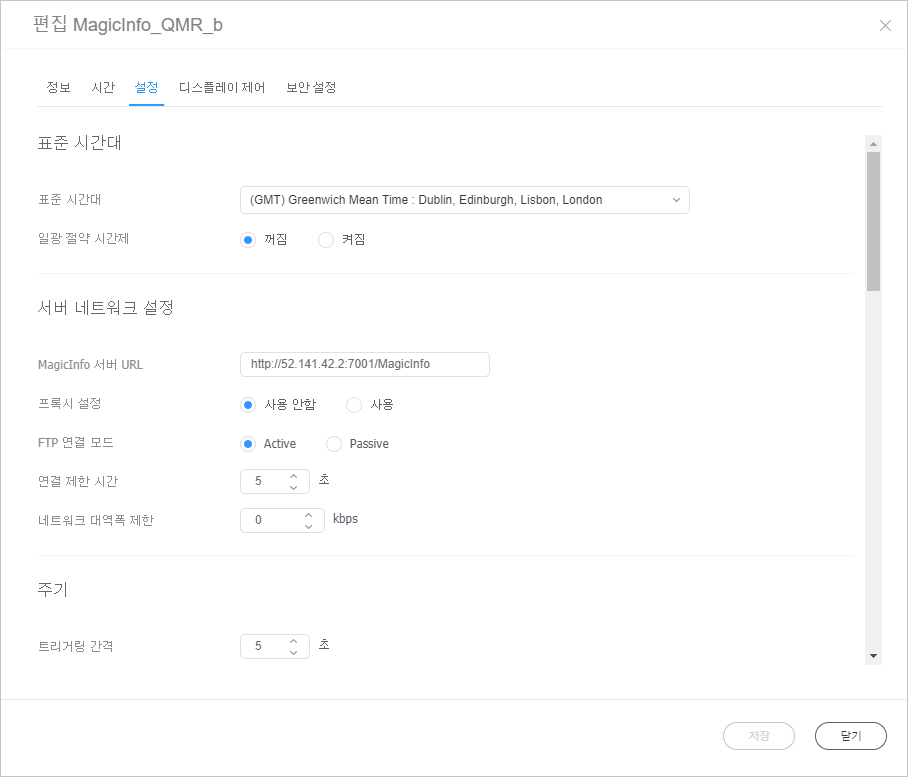
장치 관리를 위한 주요 설정들을 변경할 수 있습니다. 장치 정보 편집 창에서 설정 탭을 클릭하세요.

Stylesheet
classscreen
Image RemovedImage Added

표준 시간대

  • 표준 시간대: 도시별 표준 시간대를 선택할 수 있습니다.
  • 일광 절약 시간제: 일광 절약 시간제 사용 여부를 설정할 수 있습니다. 일광 절약 시간제를 사용할 경우, 시작/종료 정보를 설정하세요.
Info
title참고

일광 절약 시간제(Daylight Savings time)는 흔히 ‘서머타임(Summer time)’이라 부르는 제도로 여름철 낮 시간이 긴 것을 이용해 법령으로 표준시를 1시간 앞당긴 시각을 사용하는 제도입니다.

서버 네트워크 설정

  • MagicINFO 서버 URL: MagicINFO Server 주소를 설정할 수 있습니다.
  • 프록시 설정: 프록시 서버 사용 여부와 설정 값을 수정할 수 있습니다.
  • FTP 연결 모드: FTP 연결 모드를 선택할 수 있습니다.
  • 연결 제한 시간: 서버와의 연결 제한 시간을 설정할 수 있습니다.
  • 네트워크 대역폭 제한: 네트워크 대역폭 값을 설정해 네트워크 트래픽을 규제할 수 있습니다.

주기

  • 트리거링 간격: 트리거링 반복 간격을 설정할 수 있습니다.
  • 모니터링 간격: 모니터링 반복 간격을 설정할 수 있습니다.
  • 화면 캡쳐 주기: 화면 캡쳐 주기를 설정할 수 있습니다. 1~180분까지 설정 가능합니다.
  • PDF 변환 주기: 장치에 배포된 PDF 문서의 페이지가 여러장일 경우, 장치별로 페이지 전환 주기를 설정할 수 있습니다.
  • 오피스 변환 주기: 장치에 배포된 Office 문서의 페이지가 여러장일 경우, 장치별로 페이지 전환 주기를 설정할 수 있습니다.
  • 시스템 재시작 주기: 시스템을 재시작 주기를 설정할 수 있습니다. 요일 및 시간까지 설정 가능합니다.

기타

화면 회전: 장치 화면의 회전 여부를 설정할 수 있습니다.

관리

재생 기록 관리: 장치에서 콘텐츠를 재생한 기록을 관리합니다.

  • 유효 기간일: 재생 기록 보관 기간을 설정할 수 있습니다.
  • 유효 크기: 재생 기록 보관 공간의 크기를 설정할 수 있습니다.
  • 최종 체크 시각: 재생 기록을 마지막으로 확인한 시간이 나타납니다.
  • 새로고침: 재생 기록 목록을 업데이트할 수 있습니다.
Info
title참고

보관 주기가 지나거나, 보관 공간이 꽉 차면 자동으로 삭제됩니다.

콘텐츠 다운로드 상태

  • 설정: 콘텐츠를 Edge Server에서만 다운로드하도록 설정할 수 있습니다.
  • 간격: 콘텐츠를 다운로드하는 간격을 설정할 수 있습니다.
  • 작업 단위: 다운로드 간격의 작업 단위를 초 또는 퍼센트로 설정할 수 있습니다.
  • 다운로드 모드: 특정 또는 전체 콘텐츠를 다운로드할 수 있도록 설정할 수 있습니다.

PIN 코드

장치의 비밀번호(PIN 코드)를 설정할 수 있습니다.

Sv translation
languageen

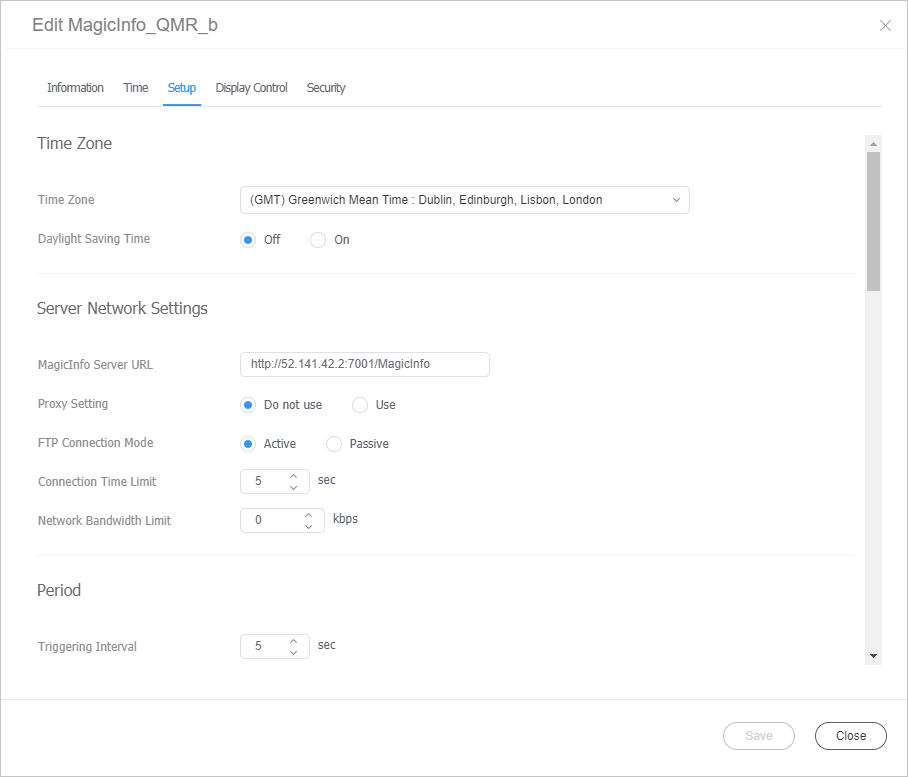
Change the major settings for device management. Click the Settings tab from the edit device info window.

Stylesheet
classscreen
Image RemovedImage Added

Time Zone

  • Time Zone: Select a time zone for each city.
  • Daylight Saving Time: Turn daylight savings time mode on or off. To use daylight savings time mode, configure start and end settings.
Info
titleNote

Daylight Saving Time, also known as Summer Time, is a system that advances clocks one hour forward in summer.

Server Network Settings

  • MagicINFO Sever URL: Set the address of MagicINFO Server.
  • Proxy Setting: Enable or disable the proxy server. Edit the settings if required.
  • FTP Connection Mode: Select the FTP connection mode.
  • Connection Time Limit: Set the time to limit connection to the server.
  • Network Bandwidth Limit: Set the network bandwidth to limit the network traffic.

Period

  • Triggering Interval: Set the triggering interval.
  • Monitoring Interval: Set the monitoring interval.
  • Screen Capture Interval: Set the screen capture interval. The range is 1 to 180 minutes.
  • PDF Conversion Interval: Set the time interval for each device to switch to another page in a distributed PDF document. This option is available when the document contains more than one page.
  • Office Conversion interval: Set the time interval for each device to switch to another page in a distributed Office document. This option is available when the document contains more than one page.
  • System Restart Interval: Set the interval for restarting the system. You can set up to the day and time.

ETC

Screen Rotation: Turn the screen rotation mode on or off.

Manage

Proof of Play Management: Manage the content’s play records on the device.

  • Validity: Set storage period for playback logs.
  • Valid Size: Set storage size for playback logs.
  • Last Check Time: Display the time of last access to playback logs.
  • Refresh: Update a list of playback records.
Info
titleNote

Content files are deleted automatically when the period has expired or the space is full.

Content Download Status

  • Setup: You can set to download the content only from the Edge Server.
  • Interval: Set content downloading intervals.
  • Job Unit: Set the unit for download intervals to seconds or percentage.
  • Download Mode: Configure settings so that specific or all content items are downloaded.

PIN Code

Set the device password (PIN code).