Versions Compared

Key

  • This line was added.
  • This line was removed.
  • Formatting was changed.

...

Sv translation
languagept

Edite as informações da predefinição através de uma das opções seguintes.

  • Opção 1: Selecione uma predefinição na lista de predefinições e clique em Editar.
  • Opção 2: Clique no nome da predefinição na lista de predefinições e edite na janela Editor de predefinições.

Editar a hora da predefinição


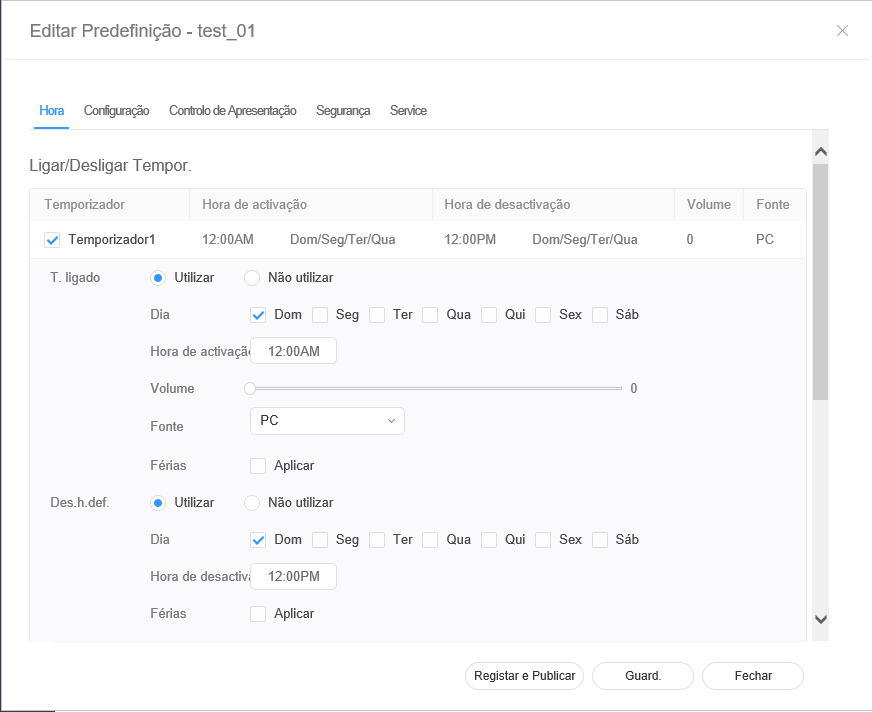
  1. Selecione o separador Hora na janela Editor de predefinições.
  2. Defina o temporizador do dispositivo para ligar e desligar.
  3. Clique num Temporizador da lista de ligar/desligar temporizadores.
  4. Especifique os detalhes do temporizador.
  5. Configure a hora e clique em Guard..
    Clique em Registar e Publicar para aplicar de imediato o valor definido num grupo.

    Stylesheet
    classscreen

T. ligado

Defina a hora para ligar o dispositivo. Para utilizar o temporizador, selecione Utilizar.

  • Dia: defina o dia ou dias da semana nos quais o temporizador será repetido.
  • Hora de ativação: Defina a hora para ligar o dispositivo.
  • Volume: Defina o volume do dispositivo a aplicar ao ligar.
  • Origem: Selecione uma fonte a aplicar ao ligar o dispositivo.
  • Férias: permite especificar se se deverão considerar as férias ou não.
Des.h.def.

Defina a hora para desligar o dispositivo. Para utilizar o temporizador, selecione Utilizar.

  • Dia: defina o dia ou dias da semana nos quais o temporizador será repetido.
  • Hora de desativação: Defina a hora para desligar o dispositivo.
  • Férias: permite especificar se se deverão considerar as férias ou não.
Gestão de fériasFérias: atribua férias para evitar que o dispositivo funcione em dias especificados.

Editar predefinições


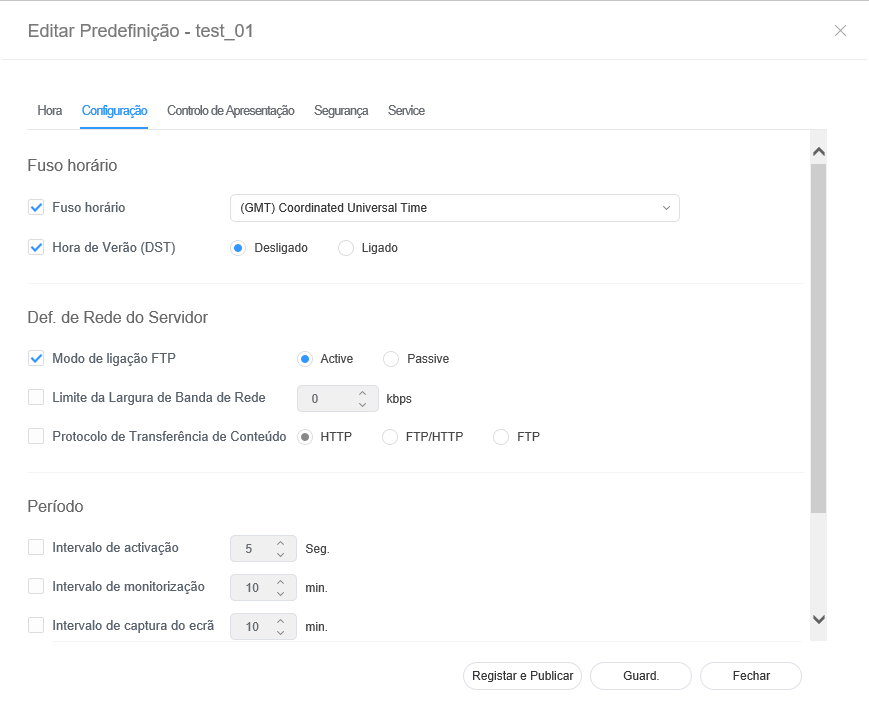
  1. Selecione o separador Configuração na janela Editor de predefinições.
  2. Edite as informações e clique em Guard..
    Clique em Registar e Publicar para aplicar de imediato o valor definido num grupo.

    Stylesheet
    classscreen

Fuso horário
  • Fuso horário: selecione um fuso horário para cada cidade.
  • Hora de Verão (DST): ative ou desative o modo de hora de verão. Para utilizar o modo de hora de verão, configure as definições de início e fim.

    Info
    titleNota

    A hora de Verão é um sistema que adianta os relógios uma hora no Verão.

Def. de Rede do Servidor
  • Modo de ligação FTP: configure o modo de ligação FTP.
  • Limite da Largura de Banda de Rede: permite limitar a largura de banda à qual a rede do servidor se ligará.
  • Protocolo de transferência de conteúdo: configure o modo de transferência.
Período
  • Intervalo de ativação: Especifique o ciclo de activação.
  • Intervalo de monitorização: Especifique o ciclo de monitorização.
  • Intervalo de captura do ecrã: Especifique o ciclo de captura de ecrã.
  • Interv. rein. sistema: especifique o intervalo de reinício do sistema.

Editar o controlo de apresentação predefinido


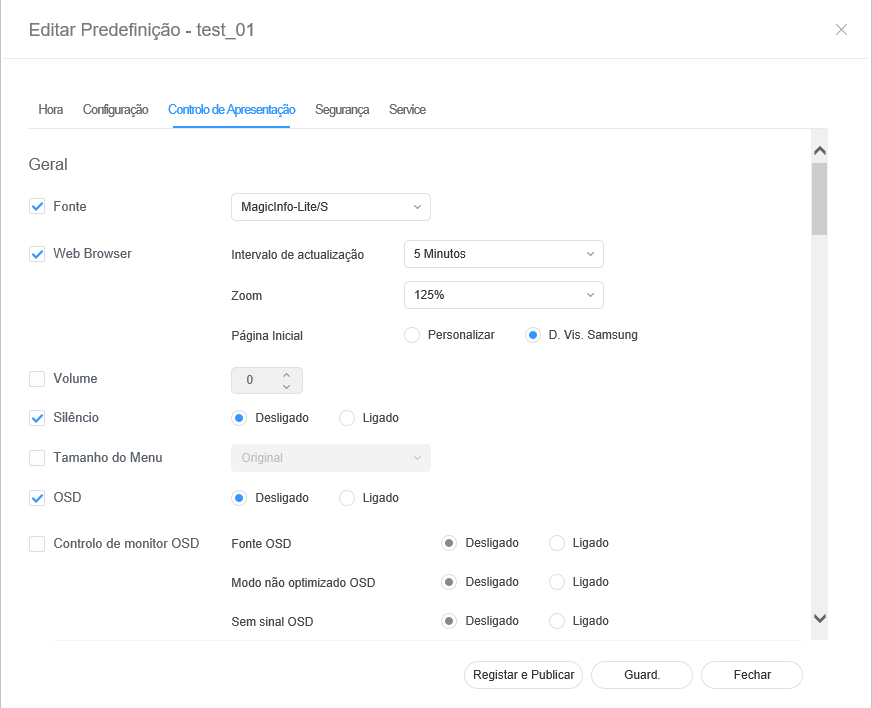
  1. Selecione o separador Controlo de Apresentação na janela Editor de predefinições.
  2. Edite as informações e clique em Guard..
    Clique em Registar e Publicar para aplicar de imediato o valor definido num grupo.

    Stylesheet
    classscreen

Editar predefinições de segurança 


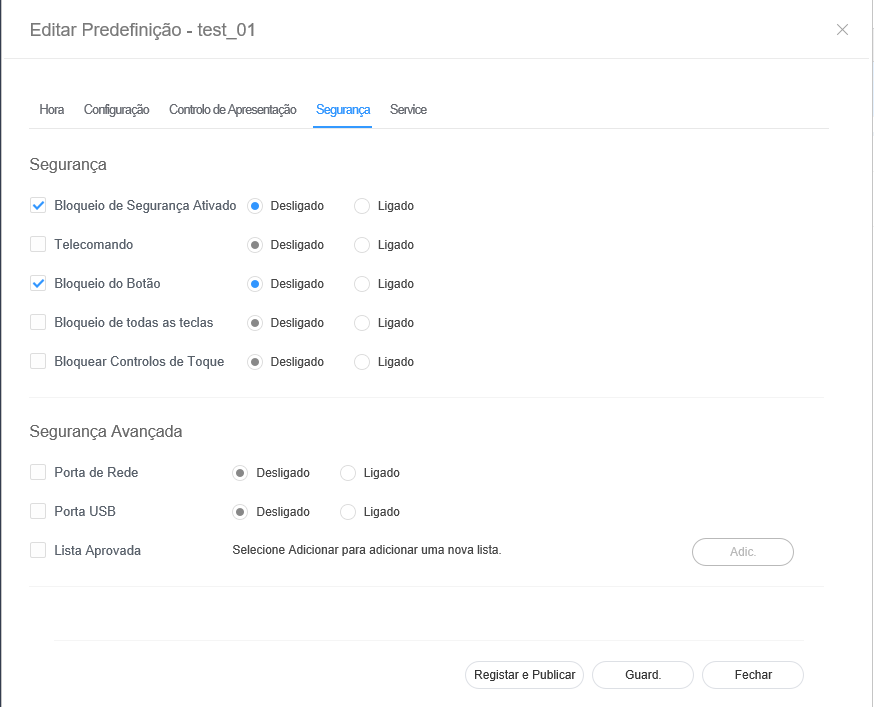
  1. Selecione o separador Segurança na janela de edição da predefinição. 
  2. Edite as informações e clique em Guard..
    Clique em Registar e Publicar para aplicar de imediato o valor definido num grupo.

    Stylesheet
    classscreen


Editing preset settings

  • Select the Setup tab from the preset editor window.
  • Edit information and click Save. Click Register & Publish to immediately apply the set value to a group
    Sv translation
    languagetr

    Edit preset information, using one of the following options.

    • Option 1: Select a preset from the preset list and click Edit.
    • Option 2: Click a preset name from the preset list and edit in the preset editor window.

    Editing preset time

  • Select the Time tab from the preset editor window.
  • Set the timer to automatically turn the device on or off.
  • Click a Timer from the on/off timer list.
  • Configure timer details.
  • Configure the time and click Save. Click Register & Publish to immediately apply the set value to a group

    Aşağıdaki seçeneklerden birini kullanarak ön ayar bilgilerini düzenleyin.

    • Seçenek 1: Ön ayar listesinden bir ön ayar seçip Düzenle öğesine tıklayın.
    • Seçenek 2: Ön ayar listesinden bir ön ayar adına tıklayıp ön ayar düzenleme penceresinde düzenleyin.

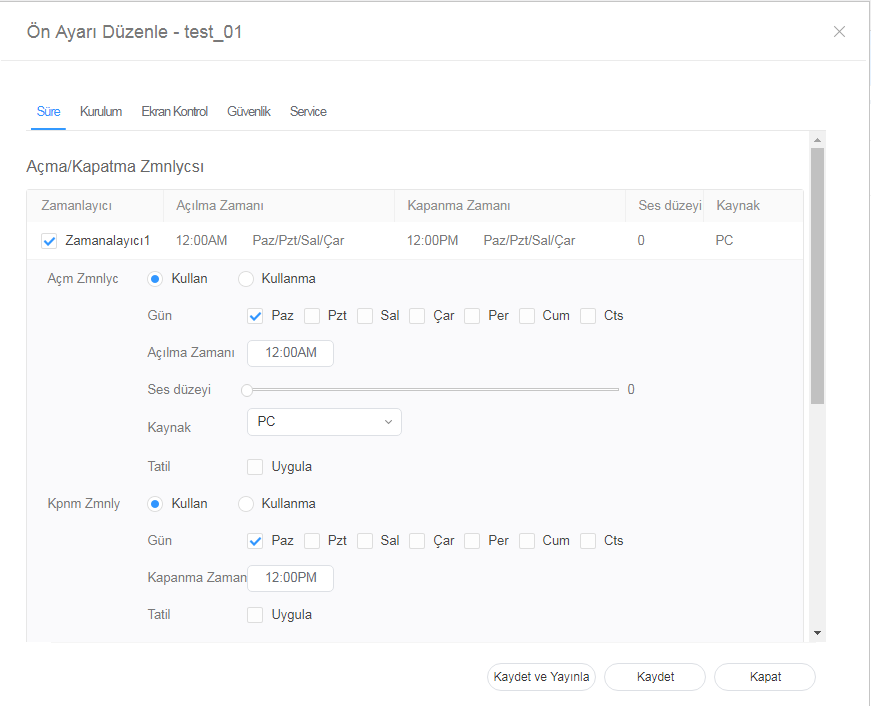
    Ön ayar zamanını düzenleme


    1. Ön ayar düzenleme penceresinde Süre sekmesini seçin.
    2. Aygıtın açılması ve kapanması için zamanlayıcıyı ayarlayın.
    3. Açma/kapanma zamanlayıcı listesinde bir Zamanlayıcı öğesine tıklayın.
    4. Zamanlayıcı ayrıntılarını belirtin.
    5. Süreyi yapılandırın ve Kaydet öğesine tıklayın.
      Ayarlama değerini bir gruba hemen uygulamak için Kaydet ve Yayınla öğesine tıklayın.

      Stylesheet
      classscreen

    On Timer

    Set the time to turn on the device. To use the timer, select Use.

    • Day: Select day(s) of the week to repeat the timer.
    • On Time: Set the time to turn on the device.
    • Volume: Set the device volume to apply when it turns on.
    • Source: Select an input source to apply when the device turns on.
    • Holiday: Specify whether to use holidays.
    Off Timer

    Set the time to automatically turn off the device. To use the timer, select Use.

    • Day: Select day(s) of the week to repeat the timer.
    • Off Time: Set the time to turn off the device.
    • Holiday: Specify whether to use holidays.
    Holiday managementHoliday: Set holidays to prevent the device from operating on specified days.
    Açma Zamanlayıcı

    Aygıtın açılacağı saati ayarlayın. Zamanlayıcıyı kullanmak için Kullan öğesini seçin.

    • Gün: Zamanlayıcının tekrarlanacağı hafta gününü/günlerini ayarlayın.
    • Açılma Zamanı: Aygıtın açılacağı saati ayarlayın.
    • Ses düzeyi: Açıldığında uygulanacak aygıt ses düzeyini ayarlayın.
    • Kaynak: Aygıt açıldığında uygulanacak bir giriş kaynağı ayarlayın.
    • Tatil: Tatillerin kullanıp kullanılmayacağını belirtin.
    Kapanma Zamanlayıcı

    Aygıtın kapanacağı saati ayarlayın. Zamanlayıcıyı kullanmak için Kullan öğesini seçin.

    • Gün: Zamanlayıcının tekrarlanacağı hafta gününü/günlerini ayarlayın.
    • Kapanma Zamanı: Aygıtın kapanacağı saati ayarlayın.
    • Tatil: Tatillerin kullanıp kullanılmayacağını belirtin.
    Tatil yönetimiTatil: Bir aygıtın belirtilen günlerde çalışmasını engellemek için tatil dönemleri belirleyin.

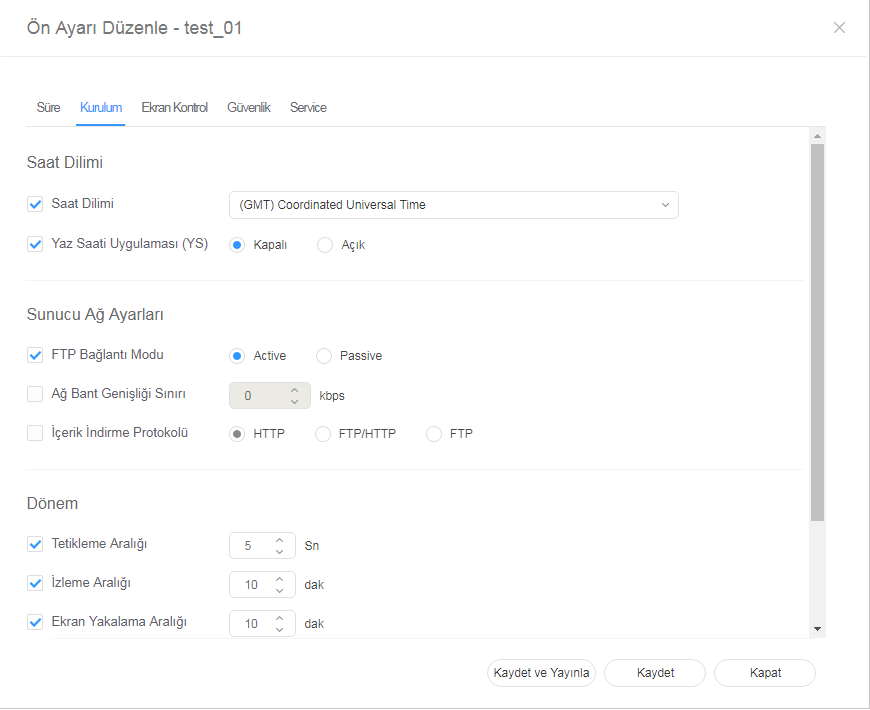
    Ön ayarları düzenleme


    1. Ön ayar düzenleme penceresinde Kurulum sekmesini seçin.
    2. Bilgileri düzenleyip Kaydet öğesine tıklayın.
      Ayarlama değerini bir gruba hemen uygulamak için Kaydet ve Yayınla öğesine tıklayın.

      Stylesheet
      classscreen

    Edit information and click Save. Click Register & Publish to immediately apply the set value to a group
  • Time Zone: Select a time zone for each city.
  • Daylight Saving Time: Turn daylight savings time mode on or off. To use daylight savings time mode, configure start and end settings
    Time ZoneSaat Dilimi
    • Saat Dilimi: Her şehir için bir saat dilimi seçin.
    • Yaz Saati Uygulaması (YS): Yaz saatini uygulaması modunu açar veya kapatırsınız. Yaz saati uygulaması modunu kullanmak için, başlangıç ve bitiş ayarlarını yapılandırın.

      Info
      titleNote

      Daylight Saving Time, also known as Summer Time, is a system that advances clocks one hour forward in summer.

    Server Network Settings
    • FTP Connection Mode: Configure the FTP connection mode.
    • Network Bandwidth Limit: Limit the bandwidth for the server network to connect.
    • Download protocol: Configure the download mode.
    Period
    • Triggering Interval: Specify the triggering cycle.
    • Monitoring Interval: Specify the monitoring cycle.
    • Screen Capture Interval: Specify the screen capture cycle.
    • System Restart Interval: Specify the system restart interval..

    Editing preset display control

  • Select the Display Control tab from the preset editor window.
    • Not

      Yaz Saati Uygulaması yaz aylarında saatleri bir saat ileri alan bir sistemdir.

    Sunucu Ağ Ayarları
    • FTP Bağlantı Modu: FTP bağlantı modunu yapılandırın.
    • Ağ Bant Genişliği Sınırı: Sunucu ağının bağlanması için bant genişliğini sınırlayın.
    • İndirme protokolü: İndirme modunu yapılandırın.
    Süre
    • Tetikleme Aralığı: Tetikleme döngüsünü belirtin.
    • İzleme Aralığı: İzleme döngüsünü belirtin.
    • Ekran Yakalama Aralığı: Ekran yakalama döngüsünü belirtin.
    • Sistem Yeniden Başlatma Aralığı: Sistem yeniden başlatma aralığını belirtin.

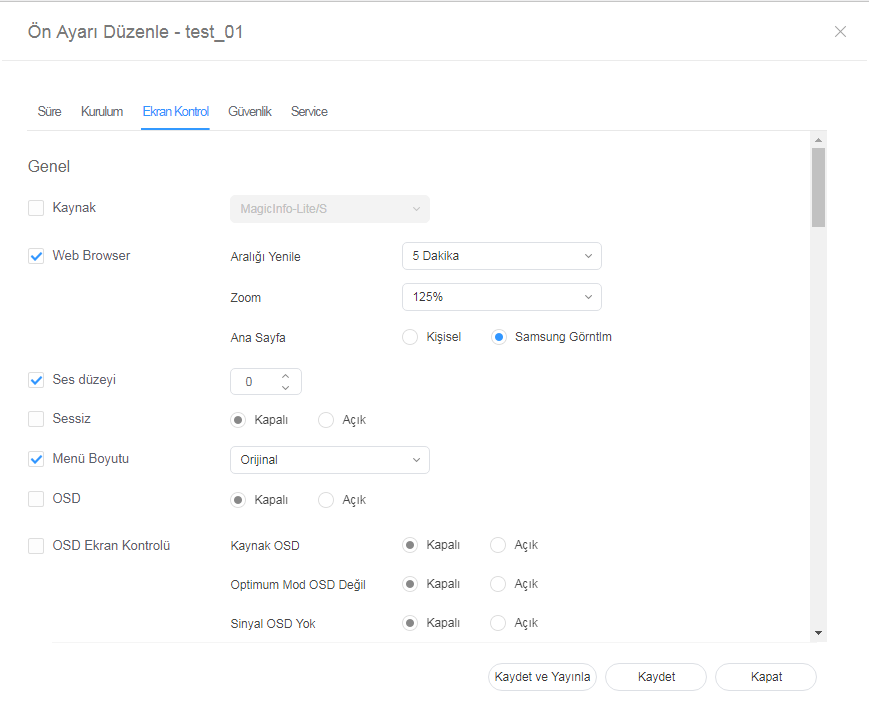
    Ön ayar ekran kontrolünü düzenleme


    1. Ön ayar düzenleme penceresinde Ekran Kontrolü sekmesini seçin.
    2. Bilgileri düzenleyip Kaydet öğesine tıklayın.
      Ayarlama değerini bir gruba hemen uygulamak için Kaydet ve Yayınla öğesine tıklayın.

      Stylesheet
      classscreen

    Editing preset security 

  • Select the Security tab from the edit preset window. 
  • Edit information and click Save. Click Register & Publish to immediately apply the set value to a group

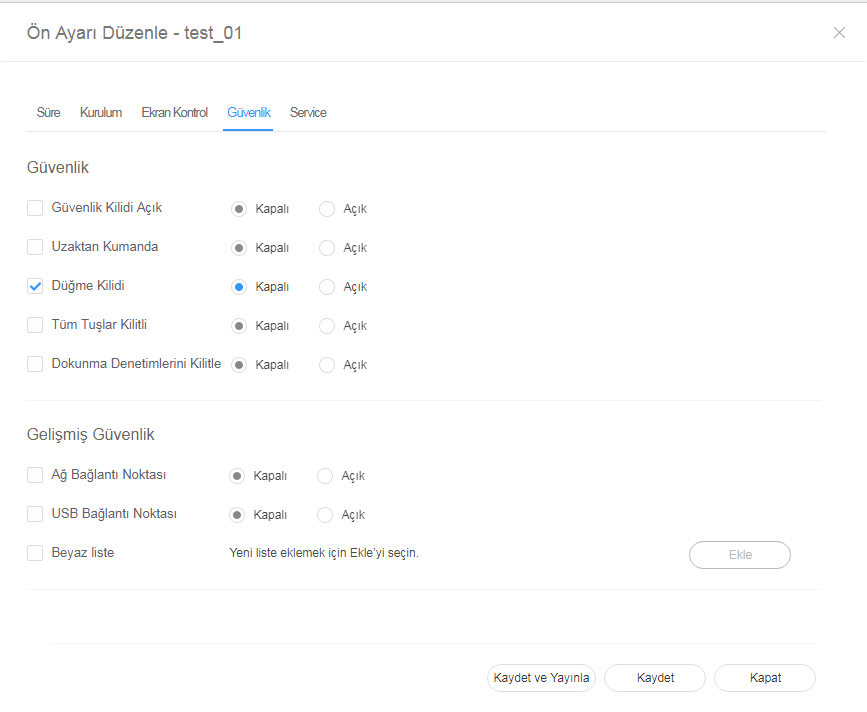
    Ön ayar güvenliğini düzenleme 


    1. Ön ayar düzenleme penceresinde Güvenlik sekmesini seçin. 
    2. Bilgileri düzenleyip Kaydet öğesine tıklayın.
      Ayarlama değerini bir gruba hemen uygulamak için Kaydet ve Yayınla öğesine tıklayın.

      Stylesheet
      classscreen