Versions Compared

Key

  • This line was added.
  • This line was removed.
  • Formatting was changed.

...

Editing preset settings

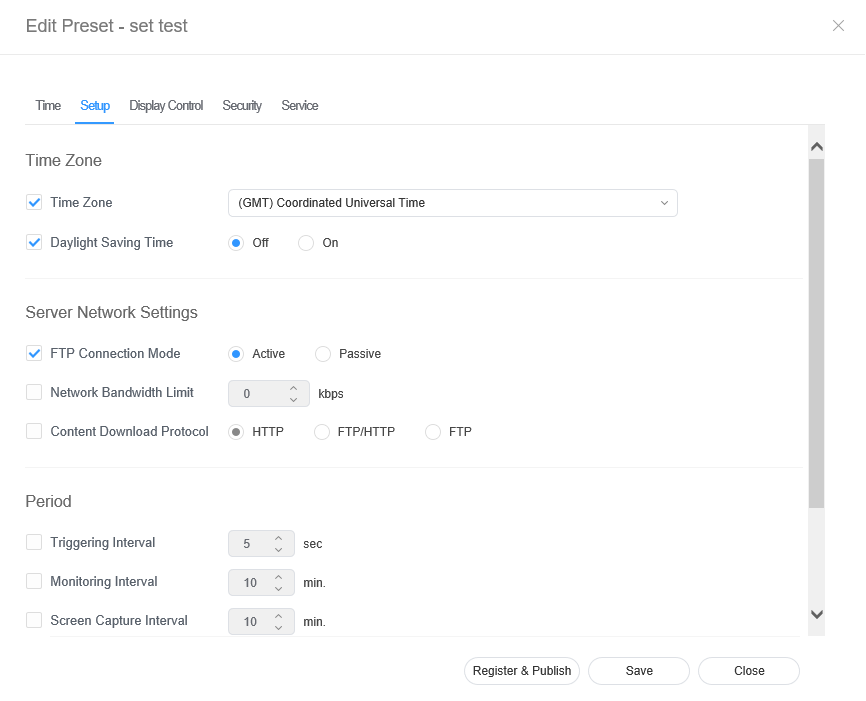
  • Select the Setup tab from the preset editor window.
  • Edit information and click Save. Click Register & Publish to immediately apply the set value to a group.
    Sv translation
    languagear

    حرر معلومات التعيين المسبق باستخدام أحد الخيارات التالية.

    • الخيار 1: حدد تعيينًا مسبقًا من قائمة التعيين المسبق وانقر فوق تحرير.
    • الخيار 2: انقر فوق اسم تعيين مسبق من قائمة التعيين المسبق وعدّله في نافذة تفاصيل محرر التعيين المسبق.

    تحرير وقت التعيين المسبق


    1. حدد علامة تبويب الوقت من نافذة محرر التعيين المسبق.
    2. اضبط الميقاتي لتشغيل الجهاز تلقائيًا أو إيقاف تشغيله.
    3. انقر فوق مؤقت من قائمة تشغيل/إيقاف تشغيل المؤقت.
    4. قم بتكوين تفاصيل الميقاتي.
    5. قم بتكوين الوقت وانقر فوق حفظ.
      انقر فوق التسجيل والنشر لتطبيق قيمة التعيين فورًا على مجموعة.

      Stylesheet
      classscreen

    On Timer

    Set the time to turn on the device. To use the timer, select Use.

    • Day: Select day(s) of the week to repeat the timer.
    • On Time: Set the time to turn on the device.
    • Volume: Set the device volume to apply when it turns on.
    • Source: Select an input source to apply when the device turns on.
    • Holiday: Specify whether to use holidays.
    Off Timer

    Set the time to automatically turn off the device. To use the timer, select Use.

    • Day: Select day(s) of the week to repeat the timer.
    • Off Time: Set the time to turn off the device.
    • Holiday: Specify whether to use holidays.
    Holiday managementHoliday: Set holidays to prevent the device from operating on specified days.
    مؤقت التشغيل

    اضبط وقت تشغيل الجهاز. لاستخدام المؤقت، حدد استخدام.

    • يوم: حدد اليوم (الأيام) في الأسبوع لتكرار الميقاتي.
    • وقت التشغيل: اضبط وقت تشغيل الجهاز.
    • مستوى الصوت: اضبط مستوى صوت الجهاز لتطبيقه عندما يبدأ تشغيله.
    • المصدر: حدد مصدر إدخال لتطبيقه عند تشغيل الجهاز.
    • إجازة: حدّد موعد استخدام العطلات.
    مؤقت الإيقاف

    اضبط وقت إيقاف تشغيل الجهاز تلقائيًا. لاستخدام المؤقت، حدد استخدام.

    • يوم: حدد اليوم (الأيام) في الأسبوع لتكرار الميقاتي.
    • وقت إيقاف التشغيل: اضبط وقت إيقاف تشغيل الجهاز.
    • إجازة: حدّد موعد استخدام العطلات.
    إدارة الإجازاتإجازة: اضبط الإجازات لمنع الجهاز من التشغيل في أيام معينة.

    تحرير إعدادات التعيين المسبق


    1. حدد علامة التبويب إعداد من نافذة محرر التعيين المسبق.
    2. قم بتحرير المعلومات وانقر فوق حفظ. انقر فوق التسجيل والنشر لتطبيق قيمة التعيين فورًا على مجموعة..

      Stylesheet
      classscreen

  • Time Zone: Select a time zone for each city.
  • Daylight Saving Time: Turn daylight savings time mode on or off. To use daylight savings time mode, configure start and end settings
    Time Zoneالمنطقة الزمنية
  • FTP Connection Mode: Configure the FTP connection mode.
  • Network Bandwidth Limit: Limit the bandwidth for the server network to connect
    • المنطقة الزمنية: حدد منطقة زمنية لكل مدينة.
    • التوقيت الصيفي: قم بتشغيل وضع التوقيت الصيفي أو إيقاف تشغيله. لاستخدام وضع التوقيت الصيفي، قم بتكوين إعدادات البدء والإنهاء.

      Info
      titleNote

      Daylight Saving Time, also known as Summer Time, is a system that advances clocks one hour forward in summer.

    Server Network Settings
    • ملاحظة

      توقيت توفير ضوء النهار ـ المعروف أيضًا باسم التوقيت الصيفي ـ نظام لتقديم الساعات بمقدار ساعة للأمام في الصيف.

    إعدادات شبكة خادم
    • وضع توصيل FTP: قم بتكوين وضع توصيل FTP.
    • حد النطاق الترددي للشبكة: قيّد النطاق الترددي لشبكة الخادم المطلوب الاتّصال بها.
    • Download protocol: Configure the download mode.
    Period
    • Triggering Interval: Specify the triggering cycle.
    • Monitoring Interval: Specify the monitoring cycle.
    • Screen Capture Interval: Specify the screen capture cycle.
    • System Restart Interval: Specify the system restart interval..

    Editing preset display control


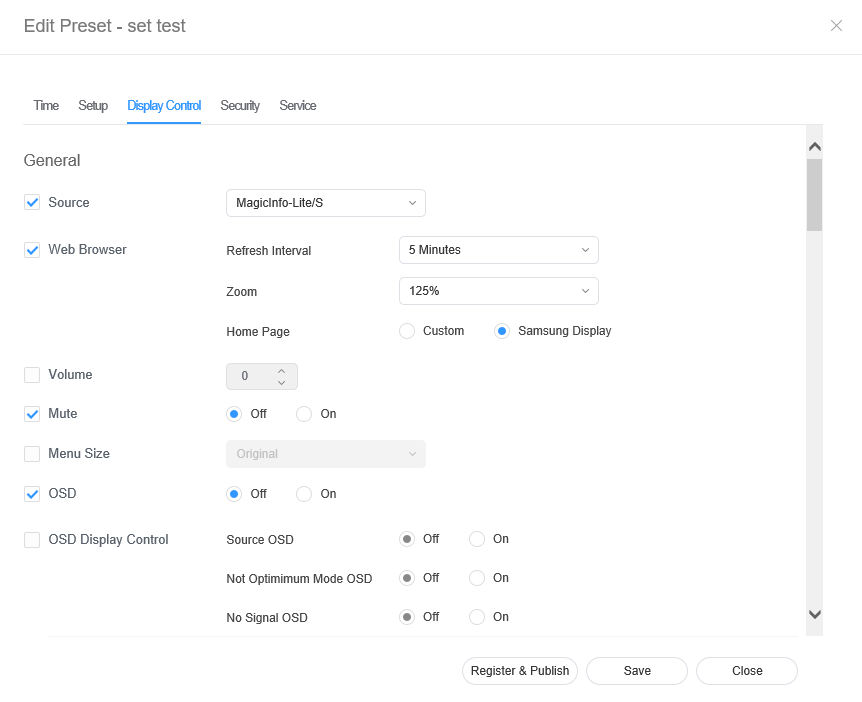
    1. Select the Display Control tab from the preset editor window.
    2. Edit information and click Save. Click Register & Publish to immediately apply the set value to a group.

      Stylesheet
      classscreen

    Editing preset security 


    1. Select the Security tab from the edit preset window. 
    2. Edit information and click Save. Click Register & Publish to immediately apply the set value to a group.

      Stylesheet
      classscreen