Versions Compared

Key

  • This line was added.
  • This line was removed.
  • Formatting was changed.

...

Sv translation
languagezh_TW

使用下列其中一個選項來編輯預設資訊。

  • 選項 1:在預設清單中選擇預設,然後按一下 編輯
  • 選項 2:按一下預設清單中的預設名稱,然後在預設編輯器視窗中編輯。

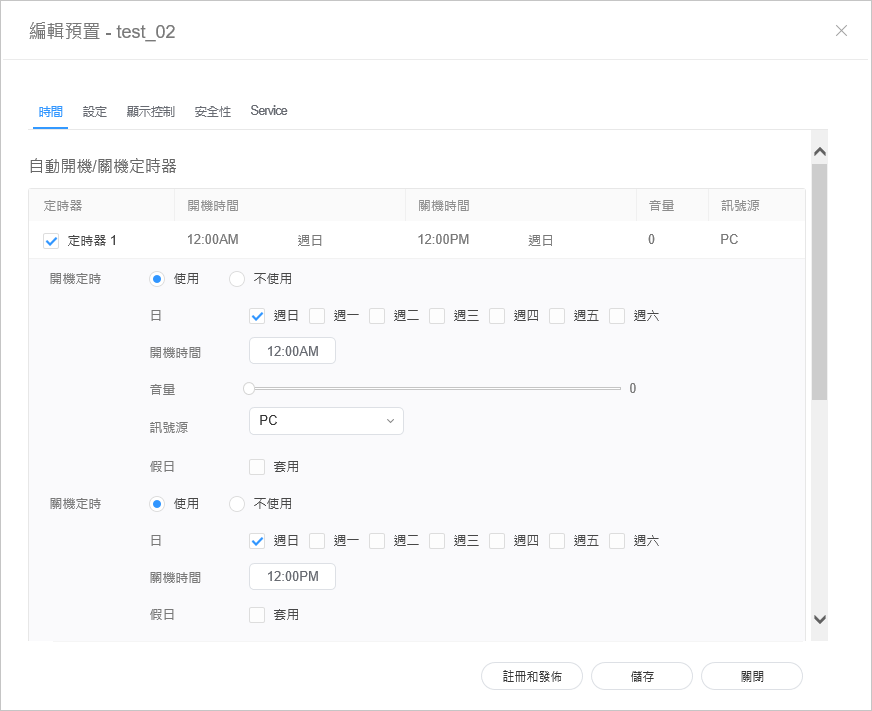
編輯預設時間


  1. 選擇預設編輯器視窗中的 時間 索引標籤。
  2. 設定定時器以開啟和關閉裝置。
  3. 按一下開啟/關閉定時器清單中的 定時器
  4. 指定定時器詳細資訊。
  5. 設定時間,然後按一下 儲存
    按一下 註冊與發佈,立即將設定值套用至群組。

    Stylesheet
    classscreen

開機定時

設定要開啟裝置的時間。若要使用定時器,選擇 使用

  • :設定在星期幾重複定時器。
  • 準時:設定要開啟裝置的時間。
  • 音量:設定開啟裝置時要套用的裝置音量。
  • 訊號源:選取開啟裝置時要套用的輸入訊號源。
  • 假日:指定是否要使用假日。.
關機定時

設定關閉裝置的時間。若要使用定時器,選擇 使用

  • :設定在星期幾重複定時器。
  • 關機時間:設定關閉裝置的時間。
  • 假日:指定是否要使用假日。
假日管理假日:指定假日以避免裝置在指定日子運作。

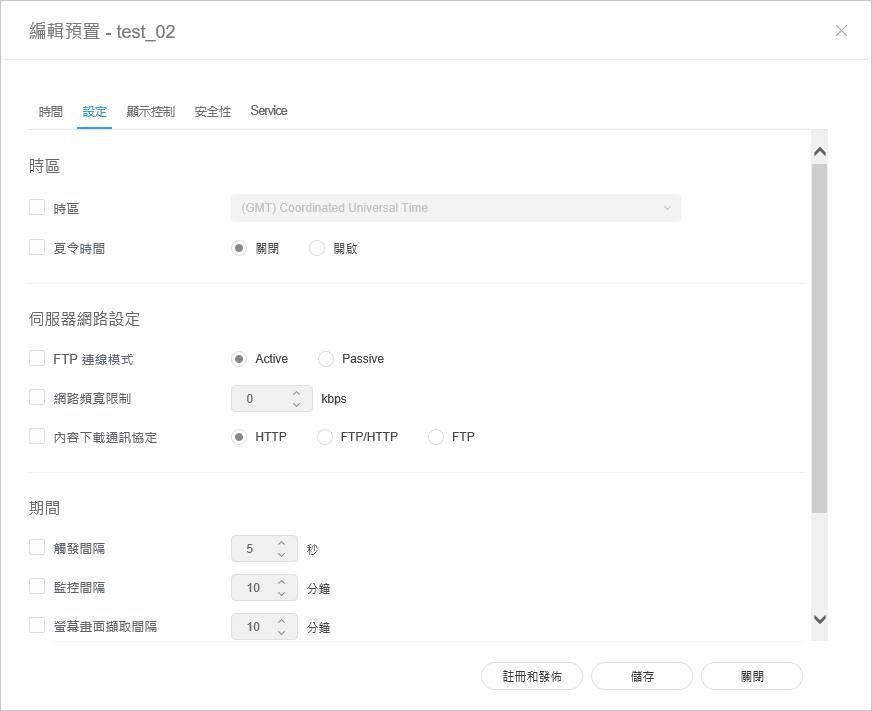
編輯預設設定


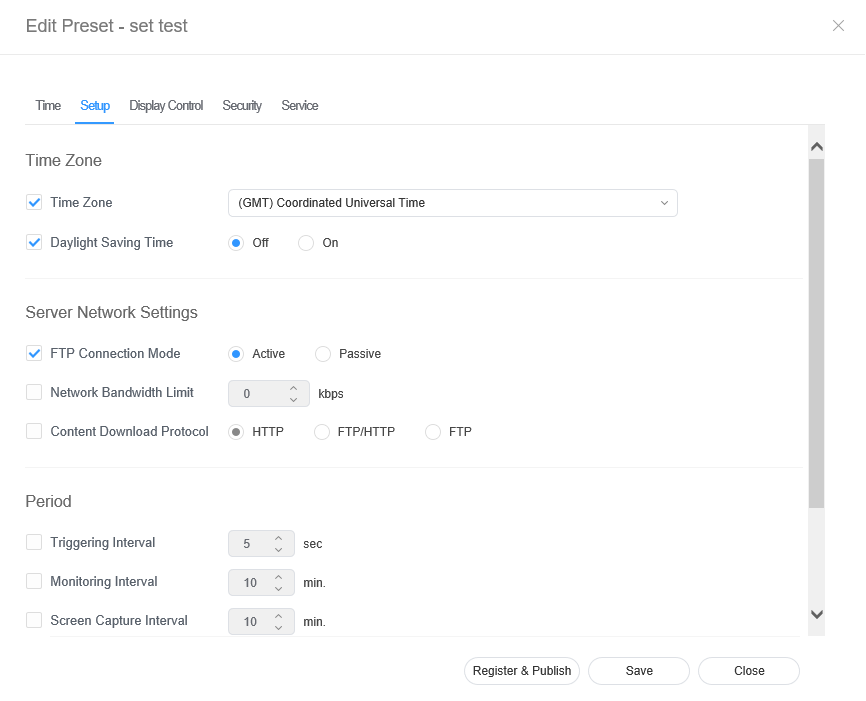
  1. 選擇預設編輯器視窗中的 設定 索引標籤。
  2. 編輯資訊,然後按一下 儲存。按一下 註冊與發佈,立即將設定值套用至群組。

    Stylesheet
    classscreen

時區
  • 時區:選擇每個城市的時區。
  • 夏令時間:開啟或關閉夏令時間模式。若要使用夏令時間模式,請進行開始與結束設定。

    Info
    title附註

    日光節約時間又稱為夏令時間,是在夏季將時鐘調快一小時的系統。

伺服器網路設定
  • FTP 連線模式:設定 (FTP) 連線模式。
  • 網路頻寬限制:限制伺服器網路的頻寬以連線。.
  • 下載通訊協定:設定下載模式。
期間
  • 觸發間隔:指定觸發週期。
  • 監控間隔:指定監控週期。
  • 螢幕畫面擷取間隔:指定螢幕畫面擷取週期。
  • 系統重啟間隔:指定系統重啟間隔。

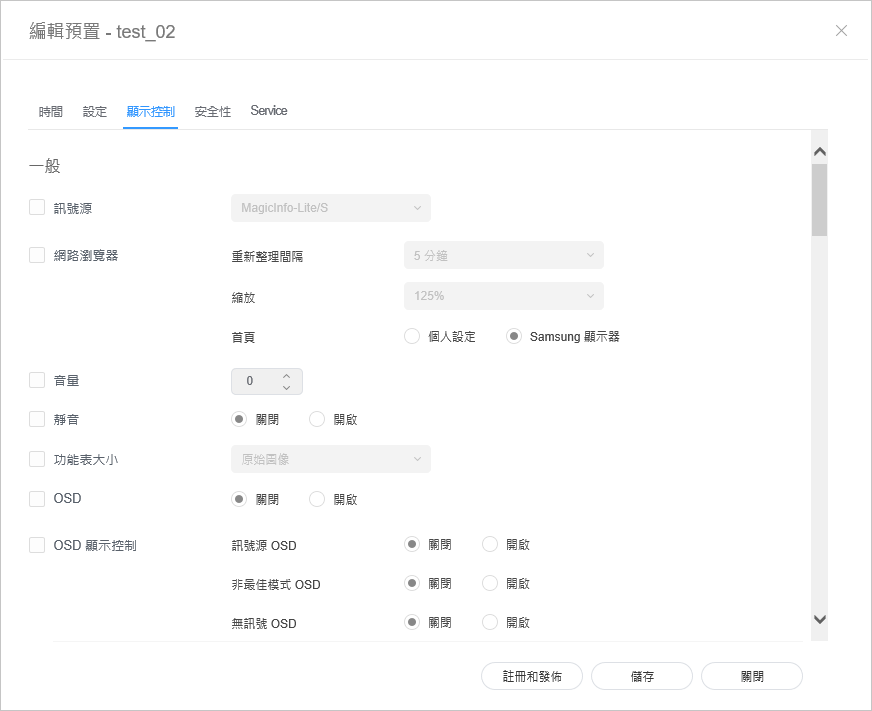
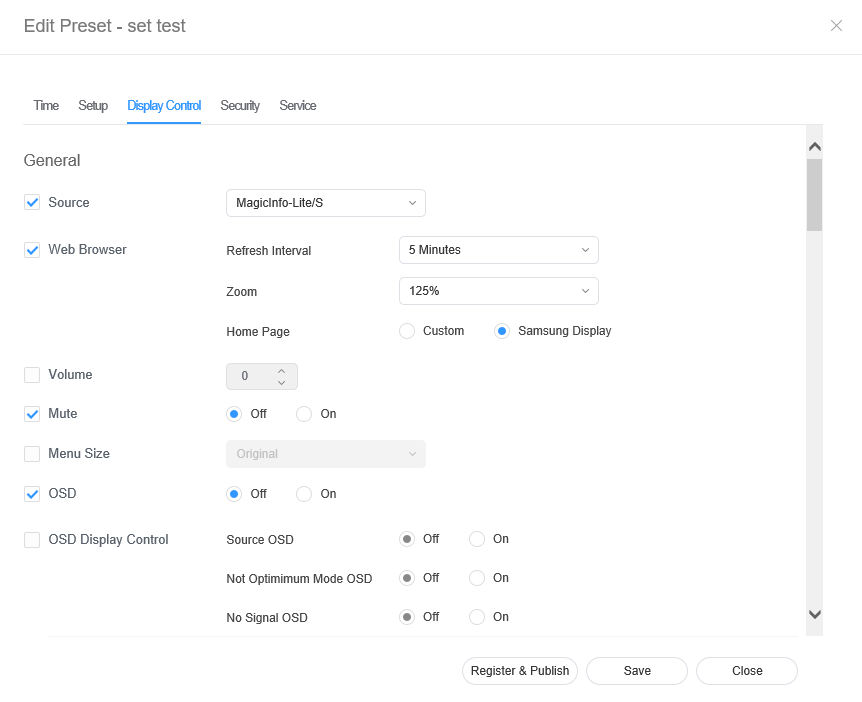
編輯預設顯示控制


  1. 選擇預設編輯器視窗中的 顯示控制 索引標籤。
  2. 編輯資訊,然後按一下 儲存。按一下 註冊與發佈,立即將設定值套用至群組。

    Stylesheet
    classscreen

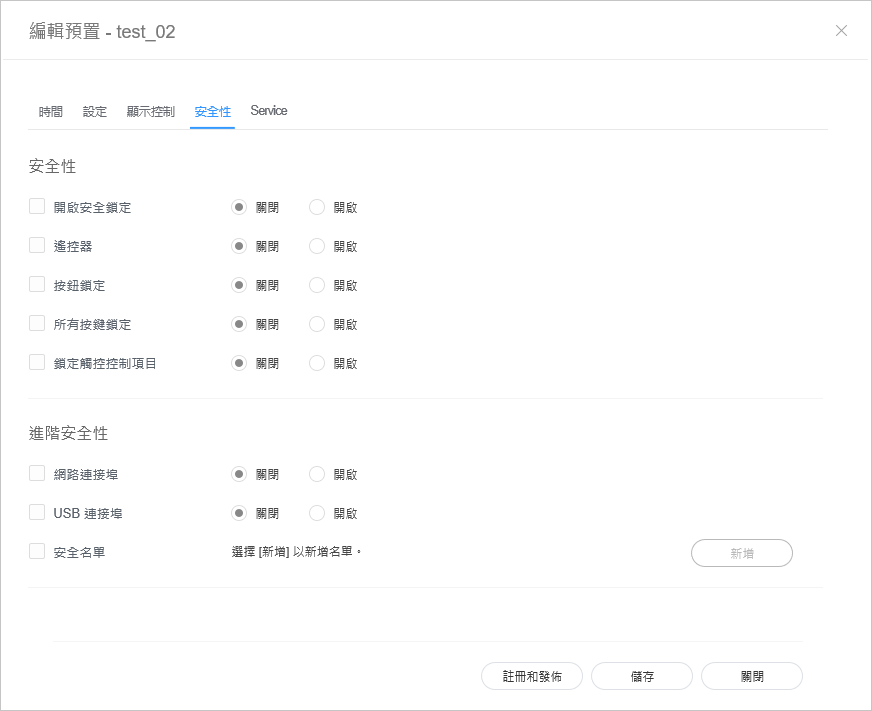
編輯預設安全性 


  1. 從編輯預設視窗中選擇的 安全性 索引標籤。 
  2. 編輯資訊,然後按一下 儲存。按一下 註冊與發佈,立即將設定值套用至群組。

    Stylesheet
    classscreen


Sv translation
languagear

Edit preset information, using one of the following options.

  • Option 1: Select a preset from the preset list and click Edit.
  • Option 2: Click a preset name from the preset list and edit in the preset editor window.

Editing preset time

  • Select the Time tab from the preset editor window.
  • Set the timer to automatically turn the device on or off.
  • Click a Timer from the on/off timer list.
  • Configure timer details.
  • Configure the time and click Save. Click Register & Publish to immediately apply the set value to a group.

    حرر معلومات التعيين المسبق باستخدام أحد الخيارات التالية.

    • الخيار 1: حدد تعيينًا مسبقًا من قائمة التعيين المسبق وانقر فوق تحرير.
    • الخيار 2: انقر فوق اسم تعيين مسبق من قائمة التعيين المسبق وعدّله في نافذة تفاصيل محرر التعيين المسبق.

    تحرير وقت التعيين المسبق


    1. حدد علامة تبويب الوقت من نافذة محرر التعيين المسبق.
    2. اضبط الميقاتي لتشغيل الجهاز تلقائيًا أو إيقاف تشغيله.
    3. انقر فوق مؤقت من قائمة تشغيل/إيقاف تشغيل المؤقت.
    4. قم بتكوين تفاصيل الميقاتي.
    5. قم بتكوين الوقت وانقر فوق حفظ.

      Stylesheet
      classscreen

    On Timer

    Set the time to turn on the device. To use the timer, select Use.

    • Day: Select day(s) of the week to repeat the timer.
    • On Time: Set the time to turn on the device.
    • Volume: Set the device volume to apply when it turns on.
    • Source: Select an input source to apply when the device turns on.
    • Holiday: Specify whether to use holidays.
    Off Timer

    Set the time to automatically turn off the device. To use the timer, select Use.

    • Day: Select day(s) of the week to repeat the timer.
    • Off Time: Set the time to turn off the device.
    • Holiday: Specify whether to use holidays.
    Holiday managementHoliday: Set holidays to prevent the device from operating on specified days.

    Editing preset settings


    1. Select the Setup tab from the preset editor window.
    2. Edit information and click Save. Click Register & Publish to immediately apply the set value to a group.

      Stylesheet
      classscreen

    Time Zone
    • Time Zone: Select a time zone for each city.
    • Daylight Saving Time: Turn daylight savings time mode on or off. To use daylight savings time mode, configure start and end settings.

      Info
      titleNote

      Daylight Saving Time, also known as Summer Time, is a system that advances clocks one hour forward in summer.

    Server Network Settings
    • FTP Connection Mode: Configure the FTP connection mode.
    • Network Bandwidth Limit: Limit the bandwidth for the server network to connect.
    • Download protocol: Configure the download mode.
    Period
    • Triggering Interval: Specify the triggering cycle.
    • Monitoring Interval: Specify the monitoring cycle.
    • Screen Capture Interval: Specify the screen capture cycle.
    • System Restart Interval: Specify the system restart interval..

    Editing preset display control


    1. Select the Display Control tab from the preset editor window.
    2. Edit information and click Save. Click Register & Publish to immediately apply the set value to a group.

      Stylesheet
      classscreen

    Editing preset security 


    1. Select the Security tab from the edit preset window. 
    2. Edit information and click Save. Click Register & Publish to immediately apply the set value to a group.

      Stylesheet
      classscreen