Versions Compared

Key

  • This line was added.
  • This line was removed.
  • Formatting was changed.
Sv translation
languageko_KR

원하는 방법으로 프리셋 정보를 수정하세요.

  • 방법 1: 프리셋 목록에서 원하는 프리셋을 선택한 후 편집을 클릭하세요. 
  • 방법2: 프리셋 목록에서 원하는 프리셋 이름을 클릭후 프리셋 편집 창에서 수정하세요.

프리셋 시간 수정하기


  1. 프리셋 편집 창에서 시간 탭을 선택하세요.
  2. 장치의 켜짐/꺼짐 시간을 설정할 수 있습니다.
  3. 켜짐/꺼짐 시간 예약 목록에서 원하는 타이머를 클릭하세요.
  4. 타이머 정보를 설정하세요.
  5. 시간을 설정한 후 저장을 클릭하세요.
    등록&배포를 클릭하여 설정 값을 그룹 단위에 즉시 반영할 수 있습니다.

    Stylesheet
    classscreen

    Image Modified

켜짐 시간 예약

장치가 켜지는 시간을 설정할 수 있습니다. 해당 기능을 사용하려면 사용을 선택하세요.

  • : 설정한 시간을 반복할 요일을 설정할 수 있습니다.
  • 켜짐 시간: 장치의 켜짐 시간을 설정할 수 있습니다.
  • 음량: 장치가 켜질 때 적용될 음량을 설정할 수 있습니다.
  • 입력소스: 장치가 켜질 때 적용될 입력 소스를 설정할 수 있습니다.
  • 공휴일: 공휴일 적용 여부를 설정할 수 있습니다.
꺼짐 시간 예약

장치가 꺼지는 시간을 설정할 수 있습니다. 해당 기능을 사용하려면 사용을 선택하세요.

  • : 설정한 시간을 반복할 요일을 설정할 수 있습니다.
  • 꺼짐 시간: 장치의 꺼짐 시간을 설정할 수 있습니다.
  • 공휴일: 공휴일 적용 여부를 설정할 수 있습니다.
공휴일 관리공휴일: 공휴일을 설정하여 해당 날짜에 장치가 작동하지 않도록 제어할 수 있습니다.

프리셋 설정 수정하기


  1. 프리셋 편집 창에서 설정 탭을 선택하세요.
  2. 원하는 정보를 수정한 후 저장을 클릭하세요. 등록&배포를 클릭하여 설정 값을 그룹 단위에 즉시 반영할 수 있습니다.

    Stylesheet
    classscreen

    Image Modified

표준 시간대
  • 표준 시간대: 도시별 표준 시간대를 선택할 수 있습니다.
  • 일광 절약 시간제: 일광 절약 시간제 사용 여부를 설정할 수 있습니다. 일광 절약 시간제를 사용할 경우, 시작/종료 정보를 설정하세요.

    Info
    title참고

    일괄 절약 시간제(Daylight Savings time)는 흔히 ‘서머타임(Summer time)’이라 부르는 제도로 여름철 낮 시간이 긴 것을 이용해 법령으로 표준시를 1시간 앞당긴 시각을 사용하는 제도입니다.

서버 네트워크 설정
  • FTP 연결 모드: FTP 연결 방식을 설정할 수 있습니다.
  • 네트워크 대역폭 제한: 연결할 서버 네트워크의 대역폭을 제한할 수 있습니다.
  • 다운로드 프로토콜: 다운로드 방식을 설정할 수 있습니다.
주기
  • 트리거링 간격: 트리거링 간격을 설정할 수 있습니다.
  • 모니터링 간격: 모니터링 간격을 설정할 수 있습니다.
  • 화면 캡처 주기: 화면 캡처 주기를 설정할 수 있습니다.
  • 시스템 재시작 주기: 시스템 재시작 주기를 설정할 수 있습니다.

프리셋 디스플레이 제어 수정하기


  1. 프리셋 편집 창에서 디스플레이 제어 탭을 선택하세요.
  2. 원하는 정보를 수정한 후 저장을 클릭하세요. 등록&배포를 클릭하여 설정 값을 그룹 단위에 즉시 반영할 수 있습니다.

    Stylesheet
    classscreen

    Image Modified

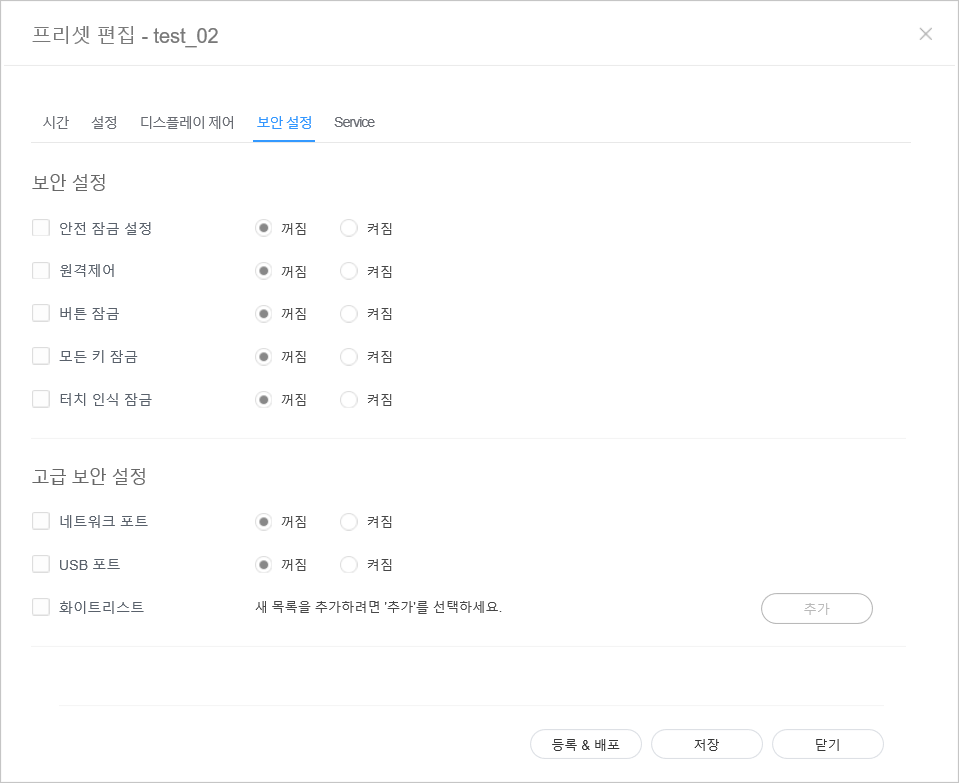
프리셋 보안 수정하기 


  1. 프리셋 편집 창에서 보안 설정 탭을 선텍하세요. 
  2. 원하는 정보를 수정한 후 저장을 클릭하세요. 등록&배포를 클릭하여 설정 값을 그룹 단위에 즉시 반영할 수 있습니다.

    Stylesheet
    classscreen

    Image Modified


Sv translation
languageen

Edit preset information, using one of the following options.

  • Option 1: Select a preset from the preset list and click Edit.
  • Option 2: Click a preset name from the preset list and edit in the preset editor window.

Editing preset time


  1. Select the Time tab from the preset editor window.
  2. Set the timer to automatically turn the device on or off.
  3. Click a Timer from the on/off timer list.
  4. Configure timer details.
  5. Configure the time and click Save. Click Register & Publish to immediately apply the set value to a group.

    Stylesheet
    classscreen

    Image Added

On Timer

Set the time to turn on the device. To use the timer, select Use.

  • Day: Select day(s) of the week to repeat the timer.
  • On Time: Set the time to turn on the device.
  • Volume: Set the device volume to apply when it turns on.
  • Source: Select an input source to apply when the device turns on.
  • Holiday: Specify whether to use holidays.
Off Timer

Set the time to automatically turn off the device. To use the timer, select Use.

  • Day: Select day(s) of the week to repeat the timer.
  • Off Time: Set the time to turn off the device.
  • Holiday: Specify whether to use holidays.
Holiday managementHoliday: Set holidays to prevent the device from operating on specified days.

Editing preset settings


  1. Select the Setup tab from the preset editor window.
  2. Edit information and click Save. Click Register & Publish to immediately apply the set value to a group.

    Stylesheet
    classscreen

    Image Added

Time Zone
  • Time Zone: Select a time zone for each city.
  • Daylight Saving Time: Turn daylight savings time mode on or off. To use daylight savings time mode, configure start and end settings.

    Info
    titleNote

    Daylight Saving Time, also known as Summer Time, is a system that advances clocks one hour forward in summer.

Server Network Settings
  • FTP Connection Mode: Configure the FTP connection mode.
  • Network Bandwidth Limit: Limit the bandwidth for the server network to connect.
  • Download protocol: Configure the download mode.
Period
  • Triggering Interval: Specify the triggering cycle.
  • Monitoring Interval: Specify the monitoring cycle.
  • Screen Capture Interval: Specify the screen capture cycle.
  • System Restart Interval: Specify the system restart interval..

Editing preset display control


  1. Select the Display Control tab from the preset editor window.
  2. Edit information and click Save. Click Register & Publish to immediately apply the set value to a group.

    Stylesheet
    classscreen

    Image Added

Editing preset security 


  1. Select the Security tab from the edit preset window. 
  2. Edit information and click Save. Click Register & Publish to immediately apply the set value to a group.

    Stylesheet
    classscreen

    Image Added