Versions Compared

Key

  • This line was added.
  • This line was removed.
  • Formatting was changed.
Comment: Content imported from a Scroll Translations translation file.

...

Sv translation
languageen
  1. Press  > Player.
    Player screen is executed.
  2. Execute desired functions.

    Stylesheet
    classscreen

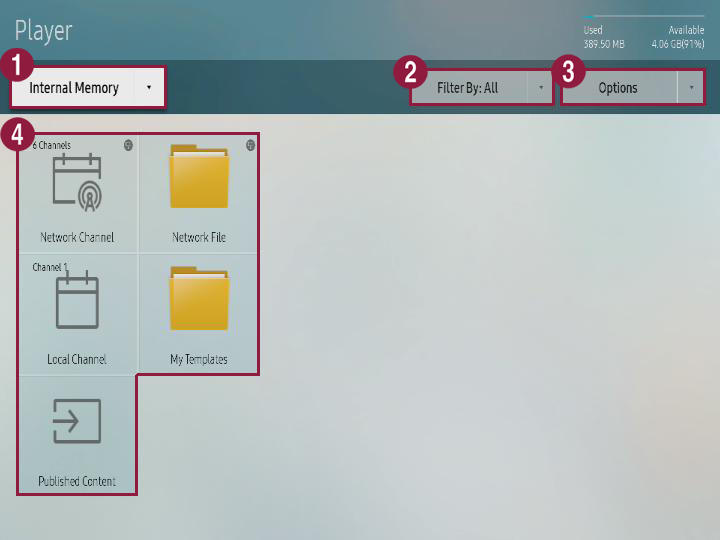
    1

    You can use S player to select the save position for the contents that will be played.

    • Internal memory: You can play the contents that are saved in S player.

    • External memory: You can play the contents that are saved in external memory such as USB storage device.

      Info
      titleNote

      External memory is only displayed when external memory is connected to S player. Name of the external memory is displayed differently depending on the external memory type that is connected.

    2

    Contents can be viewed in each category.

    Info
    titleNote

    Filter type can be different depending on the model type.

    3You can execute different options such as playing contents and slide shows. Refer to following for details. ► Using contents option menu
    4
    • Network channel: You can play contents, template, and schedule that are set from the server.

    • Local channel: You can play the contents that are saved in external memory or external memory.

    • Distribution contents: You can play the .LFD contents that are made from author and distributed to external memory.
      Refer to author user guide for details about making .LFD contents and distributing them to external memory.

      Info
      titleNote

      When contents that are made from author and distributed to external memory are copied to internal memory, it is classified as distributed contents.

    • Network file: You can play the contents that are saved in connected server.

    • My template: You can play My template that is saved in internal memory.

Anchor
1567_s_w_89011
1567_s_w_89011
Using contents option menu


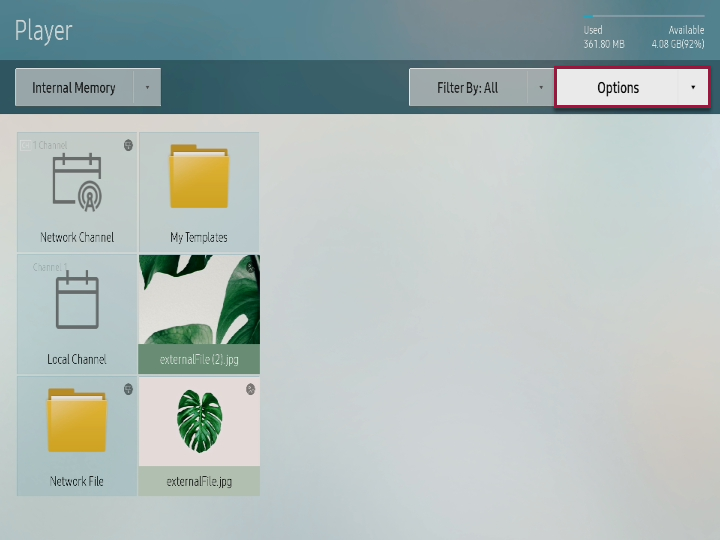
  1. Press option from player screen.

    Stylesheet
    classscreen

  2. Execute desired menu.
    • Play selected: You can select the contents that will be played in S player. Refer to following for details. ► Playing selected contents
    • Send: You can send the contents that are saved in internal memory to external memory or bring the contents that are saved in external memory to internal memory. Refer to following for details. ► Copying contents
    • Delete: You can delete the contents. Refer to following for details. ► Delete contents
    • Storage space: You can select the position for saving the schedule that is downloaded from server or other device.
    • Safely remove device: You can safely remove the external memory that is connected.
    • Contents size: You can apply setting to screen ratio for playing contents.
    • Slide show speed: You can apply different setting to slide play speed depending on the contents type (picture, PDF, office documents).
    • Slide show effect: In case of playing picture contents in slide show, you can set conversion effect for each slide.
    • Contents direction: You can apply setting on contents display direction depending on arrangement status on the player.
    • Basic contents: You can set basic contents that will be played when there are no reserved program or contents. Refer to following for details. ► Setting basic contents
    • Initialization: You can return player setting value to initial status.

Anchor
85659_s_q_123113
85659_s_q_123113
Playing selected contents

You can select the contents that will be played in S player.

  1. Press Option > Play selected from player screen.
  2. Select the contents and press Play from upper side.
    Corresponding contents are played.

Anchor
2546853_y_z_33829481
Copying contents

You can send the contents that are saved in internal memory to external memory or bring the contents that are saved in external memory to internal memory.

  1. Press Option > Send from player screen.

    Info
    titleNote

    This menu is activated only when external memory is connected to S player.

  2. Select the contents and press Send from upper side.
  3. Select the device for sending and press Start.
    Corresponding contents are copied to target device.

    Info
    titleNote

    To stop sending contents, press Cancel.

Anchor
452514_x_z_d_142141
452514_x_z_d_142141
Deleting contents

  1. Press Option > Delete from player screen.
  2. Select contents and press Delete from upper side.
  3. When window appears, press Delete.

    Info
    titleNote

    Deleted contents cannot be restored.

Anchor
131947_k_d_z_32818
131947_k_d_z_32818
Setting basic contents

  1. Press Option > Basic contents from player screen.
  2. Select contents and press Complete.
    Corresponding contents are automatically played when there are no reserved program or contents.

Sv translation
languagear
  1. اضغط على Image Added > Player.
    يتم عرض شاشة المشغل.
  2. قم بتنفيذ الوظائف المطلوبة.

    Stylesheet
    classالشاشة

    Image Added

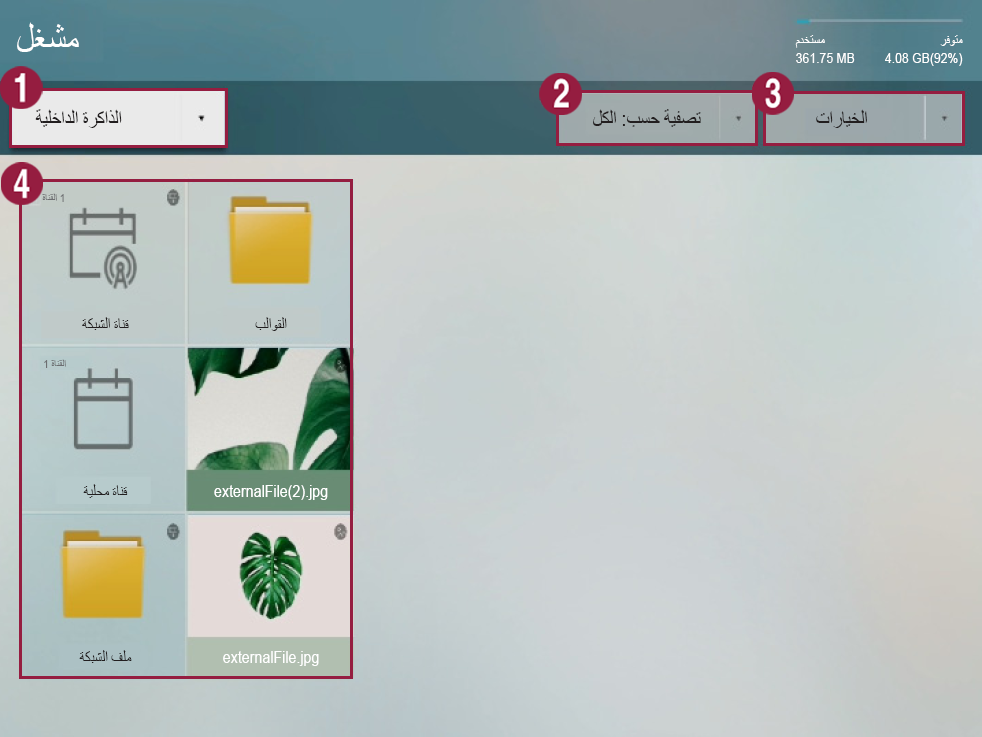
    1

    يمكنك استخدام S Player لتحديد مكان حفظ المحتويات التي سيتم تشغيلها.

    • Internal memory: يمكنك تشغيل المحتويات المحفوظة على S Player.

    • External memory: يمكنك تشغيل المحتويات المحفوظة في ذاكرة خارجية مثل جهاز تخزين USB.

      Info
      titleملحوظة

      يتم عرض جهاز External memory فقط عندما يكون متصلاً بمشغل S Player. يتم عرض اسم جهاز External memory بطريقة مختلفة وفقًا لنوع الجهاز المتصل.

    2

    يمكن عرض المحتويات في كل فئة.

    Info
    titleملحوظة

    يمكن أن يكون نوع عامل التصفية مختلفًا وفقًا لنوع الطراز.

    3يمكنك تنفيذ خيارات مختلفة مثل تشغيل المحتويات وعرض الشرائح. يرجى الرجوع إلى ما يلي لمزيد من التفاصيل: ► Using contents option menu
    4
    • Network channel: يمكنك تشغيل المحتويات والقوالب والجداول التي تم تعيينها من الخادم.

    • Local channel: يمكنك تشغيل المحتويات المحفوظة في ذاكرة خارجية أو ذاكرة داخلية.

    • Distribution contents: يمكنك تشغيل محتويات ‎LFD. التي تم صنعها في المؤلف وتوزيعها لذاكرة خارجية.
      يرجى الرجوع إلى دليل مستخدم المؤلف لمزيد من التفاصيل عن صنع محتويات ‎LFD. وتوزيعها إلى ذاكرة خارجية.

      Info
      titleملحوظة

      عند نسخ محتويات، تم صنعها في المؤلف وتوزيعها إلى ذاكرة خارجية، إلى ذاكرة داخلية، يتم تصنيفها كـ distributed contents.

    • Network file: يمكنك تشغيل المحتويات المحفوظة على الخادم المتصل.

    • My template: يمكنك تشغيل My template المحفوظ على الذاكرة الداخلية.

Anchor
‎1567_s_w_89011
‎1567_s_w_89011
استخدام قائمة خيارات المحتويات


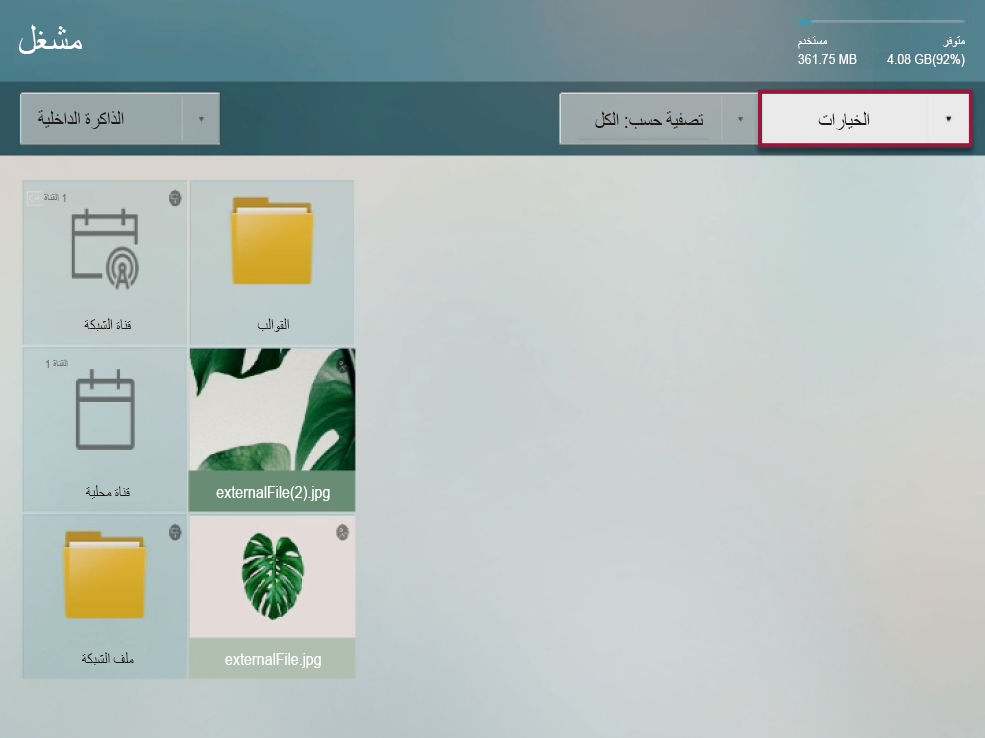
  1. اضغط على option من شاشة المشغل.

    Stylesheet
    classالشاشة

    Image Added

  2. قم بتنفيذ القائمة المطلوبة.
    • Play selected: يمكنك تحديد المحتويات التي سيتم تشغيلها في S Player. يرجى الرجوع إلى ما يلي لمزيد من التفاصيل: ► Playing selected contents
    • Send: يمكنك إرسال المحتويات المحفوظة على ذاكرة داخلية إلى ذاكرة خارجية أو نقل المحتويات المحفوظة على ذاكرة خارجية إلى ذاكرة داخلية. يرجى الرجوع إلى ما يلي لمزيد من التفاصيل: ► Copying contents
    • Delete: يمكنك حذف المحتويات. يرجى الرجوع إلى ما يلي لمزيد من التفاصيل: ► Delete contents
    • Storage space: يمكنك تحديد موقع حفظ الجدول الذي تم تنزيله من الخادم أو أي جهاز آخر.
    • Safely remove device: يمكنك إخراج الذاكرة الخارجية المتصلة بأمان.
    • Contents size: يمكنك تطبيق الإعدادات على نسبة أبعاد الشاشة.
    • Slide show speed: يمكنك تطبيق إعدادات مختلفة على سرعة تشغيل الشرائح وفقًا لنوع المحتوى (صورة أو PDF أو مستندات office).
    • Slide show effect: في حالة تشغيل محتويات صور في عرض الشرائح، يمكنك تعيين تأثيرات التحول لكل شريحة.
    • Contents direction: يمكنك تطبيق الإعدادات على اتجاه عرض المحتويات وفقًا لحالة ترتيبها في المشغل.
    • Basic contents: يمكنك تعيين محتويات افتراضية يتم تشغيلها عند عدم وجود برامج أو محتويات محفوظة. يرجى الرجوع إلى ما يلي لمزيد من التفاصيل: ► Setting basic contents
    • Initialization: يمكنك إعادة قيم إعدادات المشغل إلى الحالة الأولية.

Anchor
85659_s_q_123113
85659_s_q_123113
تشغيل محتويات محددة

يمكنك تحديد المحتويات التي سيتم تشغيلها في S Player.

  1. اضغط على Option > Play selected من شاشة المشغل.
  2. حدد المحتويات واضغط على Play من الجزء العلوي.
    يتم تشغيل المحتويات المحددة.

Anchor
2546853_y_z_33829481
نسخ المحتويات

يمكنك إرسال المحتويات المحفوظة على ذاكرة داخلية إلى ذاكرة خارجية أو نقل المحتويات المحفوظة على ذاكرة خارجية إلى ذاكرة داخلية.

  1. اضغط على Option > Send من شاشة المشغل.

    Info
    titleملحوظة

    يتم تنشيط هذه القائمة فقط عند اتصال جهاز External memory بالمشغل S Player.

  2. حدد المحتويات واضغط على Send من الجزء العلوي.
  3. حدد الجهاز للإرسال واضغط على Start.
    يتم نسخ المحتويات المحددة للجهاز الهدف.

    Info
    titleملحوظة

    لوقف إرسال المحتويات، اضغط على Cancel.

Anchor
452514_x_z_d_142141
452514_x_z_d_142141
حذف المحتويات

  1. اضغط على Option > Delete من شاشة المشغل.
  2. حدد المحتويات واضغط على Delete من الجزء العلوي.
  3. عندما تظهر النافذة، اضغط على Delete.

    Info
    titleملحوظة

    لا يمكن استعادة المحتويات التي تم حذفها.

Anchor
131947_k_d_z_32818
131947_k_d_z_32818
إعداد المحتويات الافتراضية

  1. اضغط على Option > Basic contents من شاشة المشغل.
  2. حدد المحتويات واضغط على Complete.
    يتم تشغيل المحتويات المناسبة تلقائيًا عند عدم وجود برامج أو محتويات محفوظة.