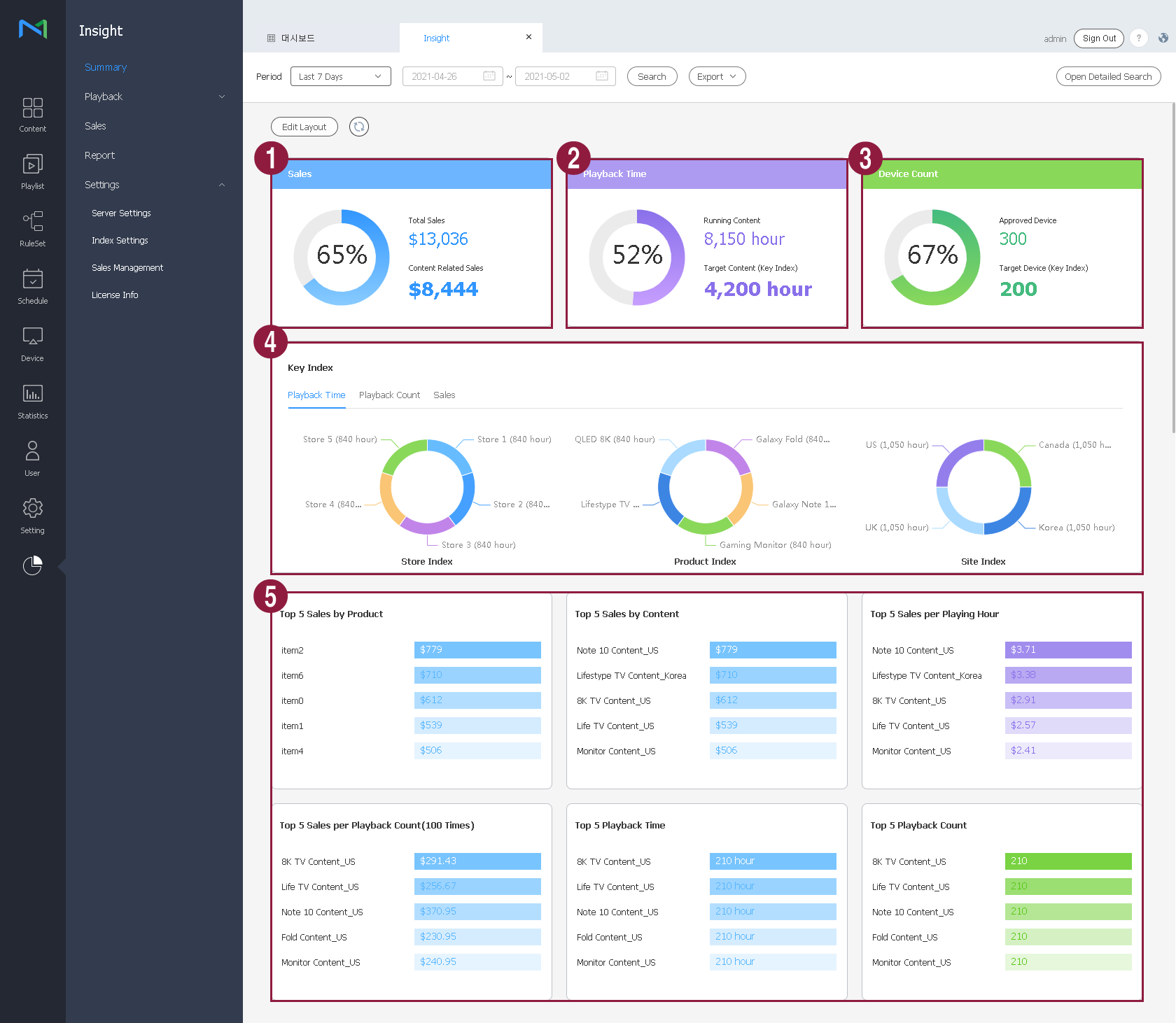
Set the analysis period in the search area at the top. The analysis period can be set to “7 days ago,” “Last Week,” or “Last Month.”
|
Click Search. The statistics that match the search conditions are presented in graphs and a table.
|
View overall information, e.g., the usage status of all devices and data items that were played using key indexes. Retrieved data is shown in visual format, e.g., graphs and a table, so that you can obtain an intuitive view of overall information by period.
Set the analysis period in the search area at the top. The analysis period can be set to “7 days ago,” “Last Week,” or “Last Month.”
|
Click Search. The statistics that match the search conditions are presented in graphs and a table.
|
The following data items are displayed.
| 1 | Number of devices | View the total number of devices that were used for playback. View the number of devices that were used for playback using key indexes. |
| 2 | Playback time | View the playback time of all content. View the duration of playback that used key indexes. |
| 3 | Key indexes | View details of tags that were used as key indexes.
|
| 4 | Top 5 content | View the rankings of content items that were played using key indexes, based on the playback time. View the playback time, playback count, and the quantity of devices used for playback. |