Set the analysis period in the search area at the top. The analysis period can be set to “7 days ago,” “Last Week,” or “Last Month.”
|
Click Search. The statistics that match the search conditions are presented in graphs and a table.
 |
View the playback status for each tag, e.g., an individual tag or key index group, and the status of playback in which key indexes are combined. Retrieved data is shown in visual format, e.g., graphs and a table, so that you can obtain an intuitive view of tag playback status by period.
Set the analysis period in the search area at the top. The analysis period can be set to “7 days ago,” “Last Week,” or “Last Month.”
|
Click Search. The statistics that match the search conditions are presented in graphs and a table.
|
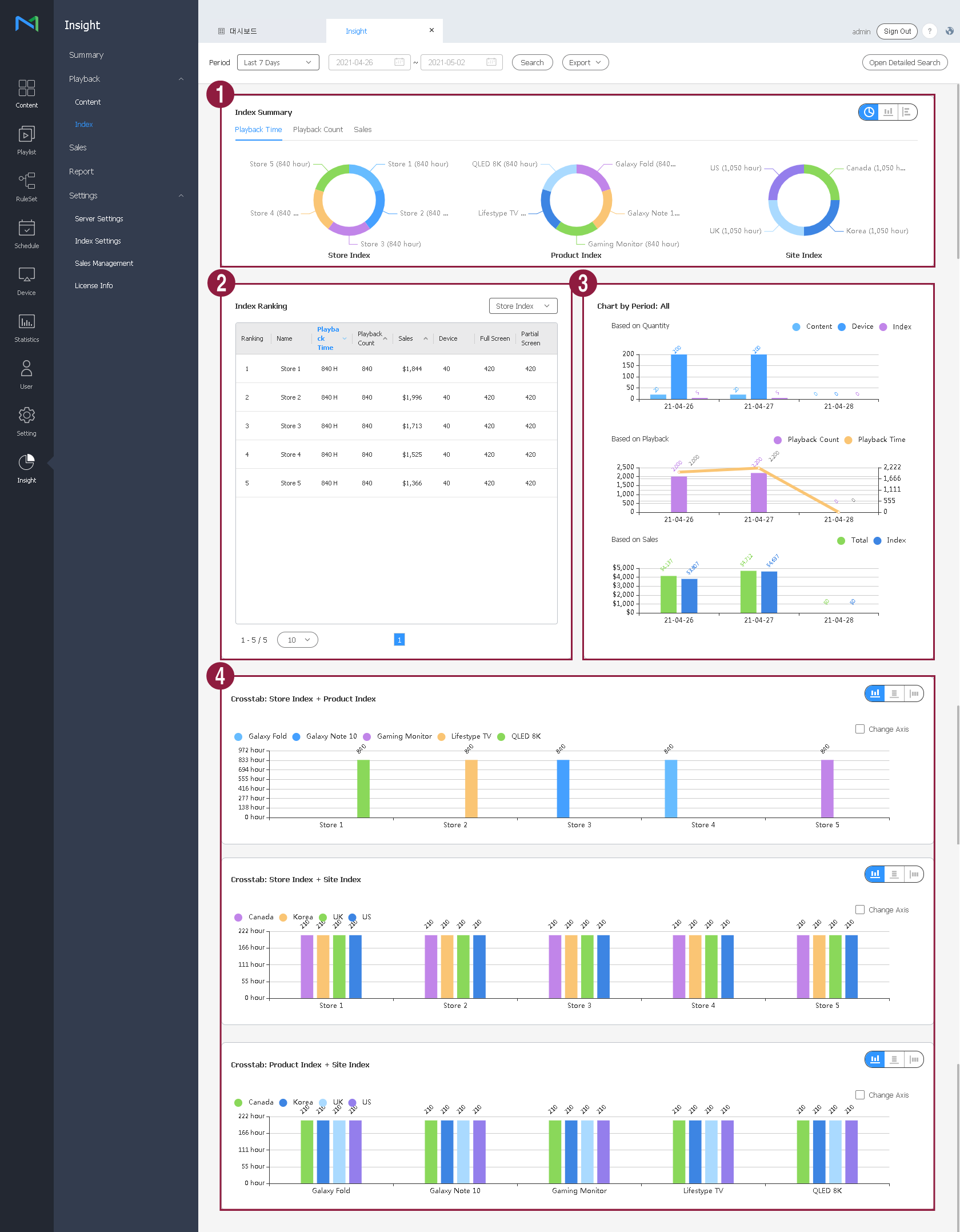
The following data items are displayed.
| 1 | Tag summary | Statistics on the usage of tags for each key index are displayed as a graph providing a comparison, and there are a wide variety of graph formats. |
| 2 | Tag ranking | Shows the tags that were played more frequently among individual key indexes or all tags, based on the playback time. If there are ten or more tags, move between pages to view tags not shown on the current page. View the tag rankings, tag names, playback time, playback count, devices used for playback, and full/split-screen playback details. You can view all key indexes or select specific key indexes to view.
|
| 3 | Chart by period |
|
| 4 | Cross-tabulation analysis | Select and combine specific key indexes to display the playback time and the relationship between individual tags as graphs. If key indexes A, B, and C are selected, the screen displays graphs in which three different pairs (A-B, B-C, and C-A) are analyzed.
You can select a preferred type from the variety of graph types. You can also display information about specific tags simply by clicking the tag names at the top of the graph. |