In the event trigger settings section under the Properties tab, click on  and select Edit…. The event editor window will appear.
|
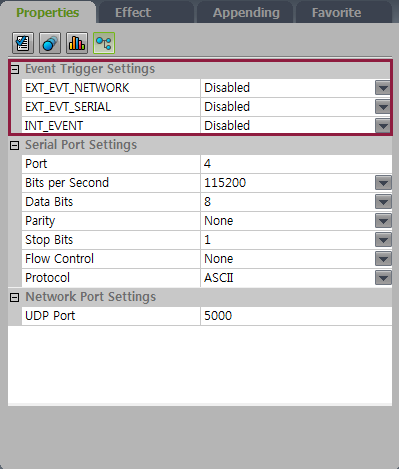
Select items to set up triggers.
If there is no registered event, first click Add to add an event item.
|
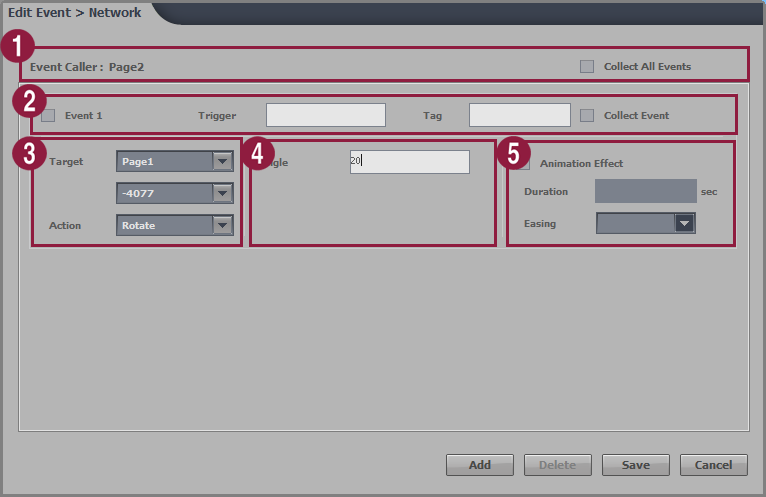
| 1 | The settings page will be displayed. To collect all event logs, select the Collect all events checkbox. | |
|---|---|---|
| 2 | Enter the trigger name and tags for the event. To collect event logs, select the Collect events checkbox. | |
| 3 |
| |
| 4 | Configure a detailed setting for the event action.
| |
| 5 | To apply the animation effect when the event is triggered, select the Animation Effect checkbox. Configure the duration and effect of the animation effect.
|
When finished, click Save.
To delete an event trigger after configuring, select the checkbox next to it and click Delete.