
Page History
| Sv translation | |||||
|---|---|---|---|---|---|
| |||||
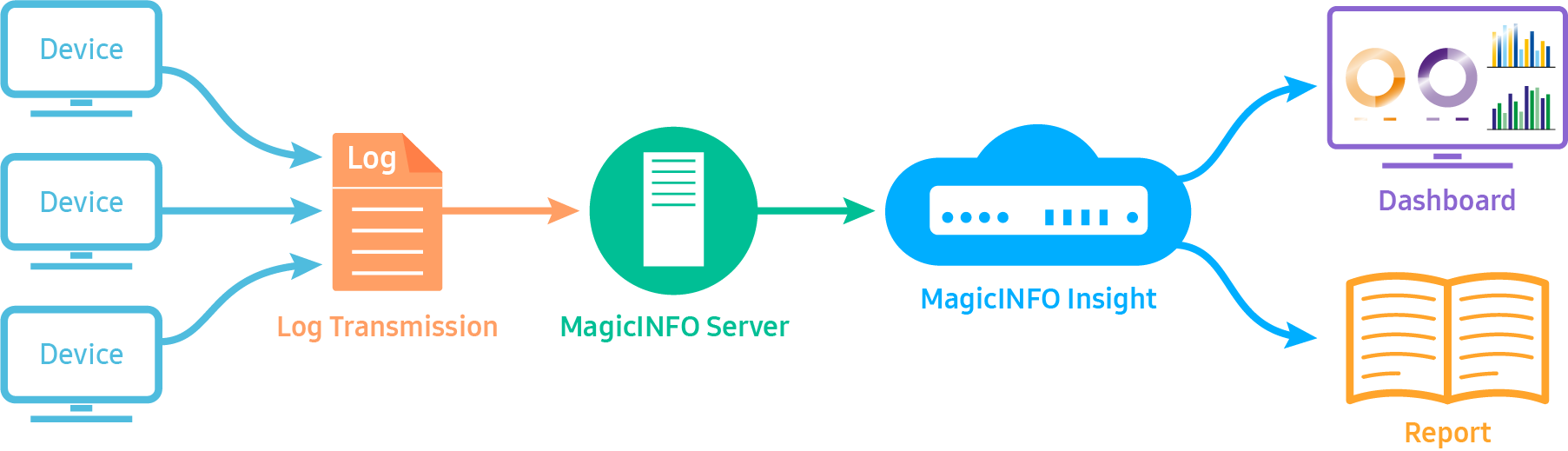
소개MagicINFO Insight는 MagicINFO Server에서 스케줄 배포 후 장치에서 콘텐츠를 재생한 기록 및 관련 내용을 분석하여 사용자에게 통계적 정보를 제공하는 솔루션입니다. MagicINFO에서 설정해 둔 지표 (Index) 정보로 재생 콘텐츠를 분류하고 수집된 정보를 분석하여 대시보드에 표현하며, 사용자는 이를 특정한 보고서로 다운로드 받을 수 있습니다. 시스템 구성 및 운용 흐름MagicINFO Insight 솔루션은 대략적으로 다음 그림과 같이 구성되어 있습니다.
사용자가 콘텐츠에 지표를 적용하고 이를 재생할 경우, 재생 기록이 플레이어에 저장됩니다. 저장 기록은 POP(Proof of play) 로그라고 하며 MagicINFO Server로 저장됩니다. 데이터는 MagicINFO Insight로 전달되며 Insight 솔루션이 재생 POP를 분석하여 Index, 콘텐츠, 재생 횟수, 재생 시간 등 정보를 분류하여 그래프로 표현합니다. 사용자는 MagicINFO Insight를 통해 다음 정보를 확인할 수 있고 보고서를 생성할 수 있습니다.
|
...
지금 바로 MagicINFO Insight를 사용해보세요.
|
| Sv translation | ||||||||||
|---|---|---|---|---|---|---|---|---|---|---|
| ||||||||||
OverviewMagicINFO Insight is a solution designed to provide you with statistics by analyzing records and other details related to content playback performed on devices based on the schedule published from MagicINFO Server . Played content is classified based on the index information configured from MagicINFO . Collected information is analyzed and displayed on the dashboard. Information displayed on the dashboard can be downloaded as a specific report. System Configuration and Operation FlowA brief overview of the configuration of the MagicINFO Insight solution is shown below.
If you assign an index to content and play the content, the playback record is saved in the player. The saved record is called a “POP” (Proof of play) log and saved to the MagicINFO Server . The saved data is sent to MagicINFO Insight . The Insight solution analyzes the playback POP and displays the analysis results under different categories (e.g., index, content, playback count, playback time) as a graph. Using MagicINFO Insight , you can view the following information and create a report.
Experience MagicINFO Insight now.
|