
Page History
...
| language | ko_KR |
|---|
MagicINFO Insight에 인증된 라이선스 정보를 확인하고 라이선스를 관리할 수 있습니다.
Insight 화면 메뉴바에서 설정 > 라이선스 정보를 클릭하세요.
| Stylesheet | ||
|---|---|---|
| ||
|
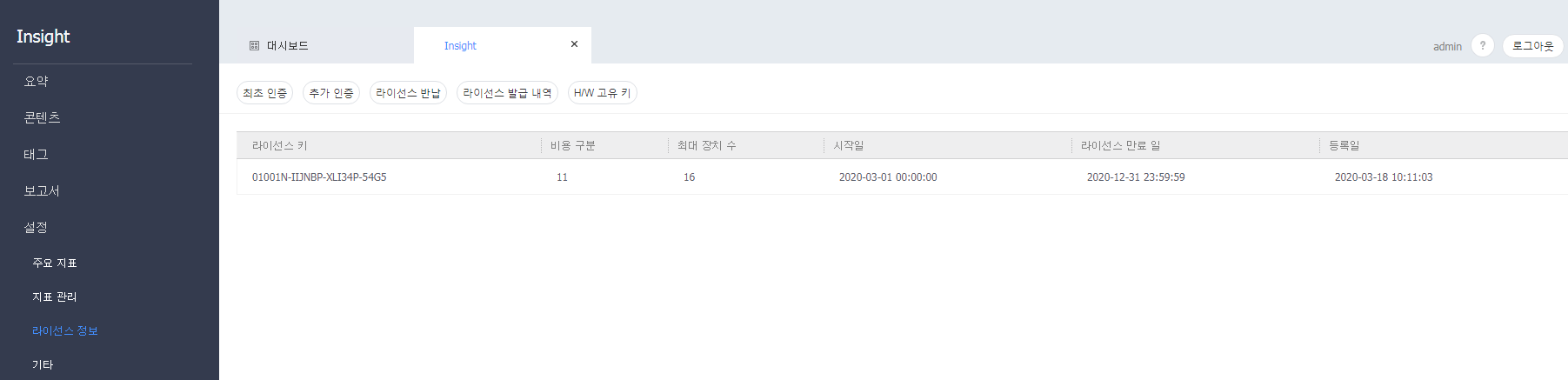
라이선스 인증 받기
MagicINFO Insight 사용을 위한 라이선스를 등록할 수 있습니다.
Insight 화면 메뉴바에서 설정 > 라이선스 정보 > 최초 인증 버튼을 클릭하세요.
라이선스 추가 인증 받기
등록한 라이선스 사용기간을 연장하거나 정보를 변경할 수 있습니다.
Insight 화면 메뉴바에서 설정 > 라이선스 정보 > 추가 인증 버튼을 클릭하세요.
라이선스 반납하기
등록한 라이선스를 더 이상 사용하지 않을 경우 라이선스를 반납할 수 있습니다.
Insight 화면 메뉴바에서 설정 > 라이선스 정보 > 라이선스 반납 버튼을 클릭하세요.
라이선스 소속 활성화 하기
사용가능한 라이선스를 소속별로 활성화/비활성화할 수 있습니다.
Insight 화면 메뉴바에서 설정 > 라이선스 정보 > 소속 활성화 버튼을 클릭하세요.
라이선스 이력 확인하기
MagicINFO Insight 에서 등록한 라이선스 발급 이력을 확인할 수 있습니다.
Insight 화면 메뉴바에서 설정 > 라이선스 정보 > 라이선스 발급 내역 버튼을 클릭하세요.
H/W 고유 키 확인하기
MagicINFO Insight 가 설치된 컴퓨터의 H/W 고유키를 확인할 수 있습니다.
Insight 화면 메뉴바에서 설정 > 라이선스 정보 > H/W 고유 키 버튼을 클릭하세요.
...
| language | en |
|---|
View the activated license information of MagicINFO Insight, and manage the license.
On the menu bar on the Insight screen, click Settings > License Info.
| Stylesheet | ||
|---|---|---|
| ||
|
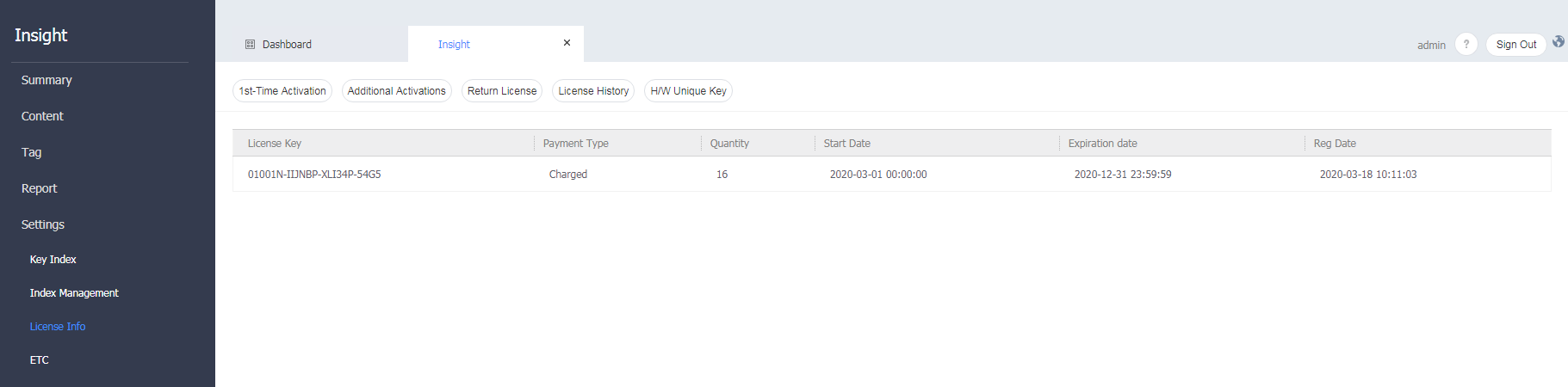
License activation
Register your license to use MagicINFO Insight.
On the menu bar on the Insight screen, click Settings > License Info > First-time Activation button.
Additional license activation
Extend the terms of the registered license or change the license information.
On the menu bar on the Insight screen, click Settings > License Info > Additional Activation button.
Returning a license
Return a license that you will not use any longer.
On the menu bar on the Insight screen, click Settings > License Info > Return License button.
Checking the license history
Check the history of licenses issued and registered from MagicINFO Insight.
On the menu bar on the Insight screen, click Settings > License Info > License Issue History button.
Checking the H/W unique key
Check the H/W unique key of the computer on which MagicINFO Insight is installed.
On the menu bar on the Insight screen, click Settings > License Info > H/W Unique Key button.