Versions Compared

Key

  • This line was added.
  • This line was removed.
  • Formatting was changed.
Sv translation
languageko

설치되어 있는 MagicINFO Server를 최신 버전으로 업그레이드할 경우, 해당 컴퓨터의 사용 환경이  MagicINFO Server 최신 버전에 적합한지 확인하는 사전 점검 과정이 자동으로 실행됩니다.

사용 환경이 설치에 적합하지 않으면 업그레이드가 진행되지 않습니다.

Warning
title프로그램 업그레이드 시 유의 사항
  • MagicINFO Server를 업그레이드하려면 .NET Framework 2.0 이상이 설치되어 있어야 합니다.
  • MagicINFO Server를 업그레이드하려면 PostgreSQL 9.0 이상이 설치되어 있어야 합니다. 9.0 미만 버전을 사용 중인 경우 기존 데이터베이스를 백업한 후 PostgreSQL 9.0 이상을 설치하고 백업한 데이터베이스를 복원해야 합니다.
  • 운영중인 서버의 DB 스키마에 변경 사항이 있을 경우 변경된 내용이 표시됩니다.  DB 스키마가 변경이 된 경우, 업그레이드는 진행될 수 있으나 서버 작동에 문제가 있을 수 있습니다.

  • 업데이트 설치 전 크롬을 미리 설치해야 합니다.  크롬을 설치하지 않으면 DB 업그레이드를 진행할 수 없습니다.


1. 전제조건

  • 설치하는 계정은 관리 권한이 있어야 하며 CMD를 실행할 수 있는 권한이 있어야 합니다. 업그레이드 대상 버전의 설치 파일을 준비합니다.
  • 크롬이 설치되어 있어야 합니다. 크롬을 설치되어있지 않으면 사전체크에서 다음 단계로 진행할 수 없습니다. 다음 링크에서 크롬 설치를 진행하세요. ▶ https://www.google.com/intl/en/chrome/?standalone=1

2. 백업

업그레이드를 시작하기 전에 업그레이드가 실패하고 이전 안정적인 버전으로 롤백할 경우 응용프로그램 서버와 데이터베이스 서버를 백업해야 합니다.

  • Application Server Backup
  • Database Server Backup

3. DB 업그레이드

DB 업그레이드는 기존 설치 환경에 따라 다릅니다.

  • 동일한 서버에 DB가 함께 설치되어 있는 경우

    • MagicINFO Server 설치 파일을 실행하여 설치를 진행합니다.  DB Upgrade는 자동 반영됩니다.
  • DB가 별도로 분리되어 설치된 경우
    • DB 업그레이드가 자동으로 진행되지 않으므로, DB 업그레이드 스크립트를 미리 실행한다.
    • 현재 설치된 버전에서 업그레이드 버전으로 DB 업그레이드 스크립트를 순서대로 실행한다.
    • DB 업그레이드 스크립트 반영은 기존 MagicINFO Server 가 정상적으로 종료된 후에 도작해야 합니다.

4. 설정파일 백업

설정이 실패할 경우를 대비하여 아래 파일들을 백업하십시오.

  • C:\ MagicInfo Premium \ conf \ config.properties
  • C:\ MagicInfo Premium \ tomcat \ conf \ Server.xml

5. 업그레이드 설치

업그레이드를 통해 최초 설치와 마찬가지로 설치 파일을 실행할 수 있습니다.

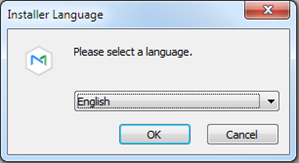
  1. 다운로드한 설치 파일을 실행하고 설치할 언어를 선택합니다.

    Stylesheet
    classscreen

  2. HTTP 사용에 관한 경고창이 나타납니다. 관련 내용을 확인 후 확인 버튼을 클릭하세요.

    Stylesheet
    classscreen

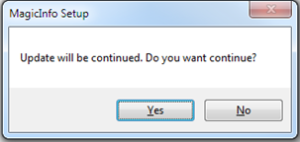
  3. Yes 버튼 클릭

    Stylesheet
    classscreen

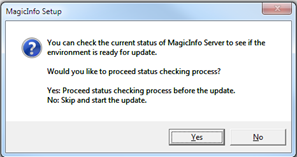
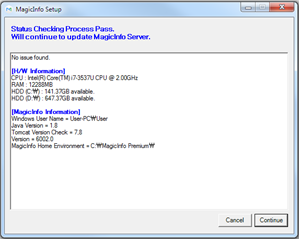
  4. 현재 시스템 상태를 확인하고 진행하려면 예를 클릭합니다.

    Stylesheet
    classscreen

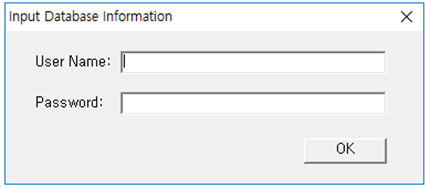
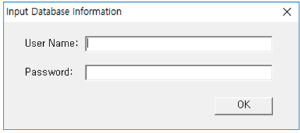
  5. DB 정보를 입력하세요.

    Stylesheet
    classscreen

    Image RemovedImage Added

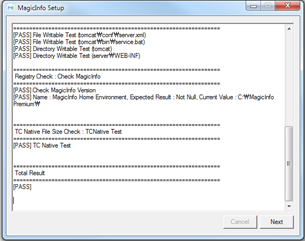
  6. 확인 완료후  OK 클릭

    Stylesheet
    classscreen

    Image Modified

    Warning
    title주의

    DB 스키마에 변경이 있으면 Fail이 표시됩니다. Fail 표시가 되더라도 업데이트는 계속 진행할 수 있지만 서버 작동에 문제가 있을 수 있습니다.

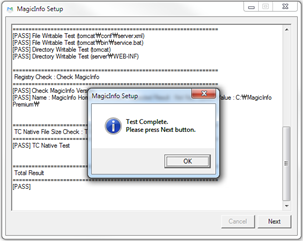
  7. Next 클릭

    Stylesheet
    classscreen

    Image Modified

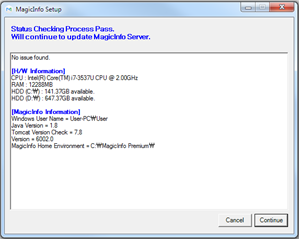
  8. Continue 클릭

    Stylesheet
    classscreen

    Image Modified

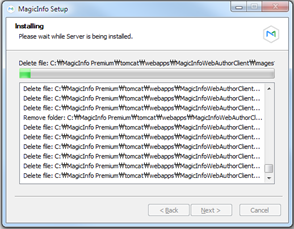
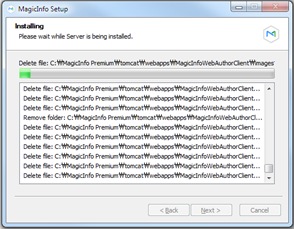
  9. 설치 진행

    Stylesheet
    classscreen

    Image Modified

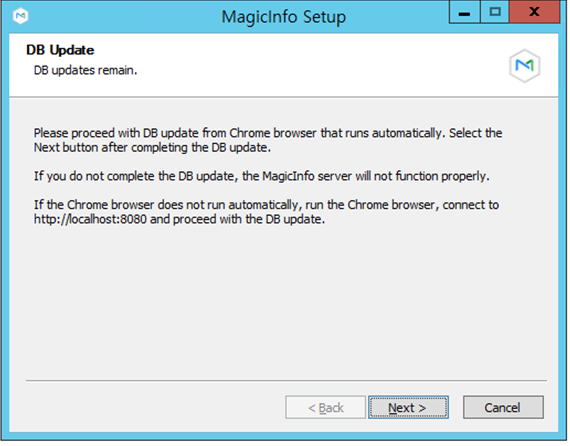
  10. Next 클릭

    Stylesheet
    classscreen

    Image Modified

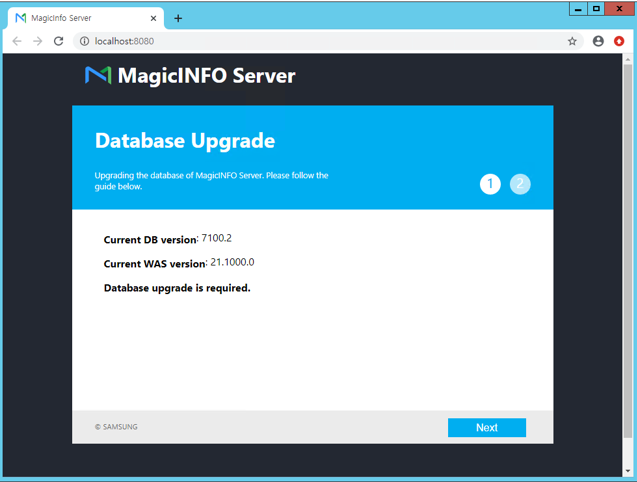
  11. 자동으로 크롬이 실행됩니다.

    Stylesheet
    classscreen

    Image Modified

    Warning
    title주의

    업데이트를 하지 않은 상태에서 Next를 선택하면 경고 팝업이 보이고 설치 완료 창으로 이동을 할 수 없습니다.

  12. DB 정보를 확인 한 다음 Next를 클릭

    Stylesheet
    classscreen

    Image Modified

  13. DB 업데이트 완료

    Stylesheet
    classscreen

    Image Modified

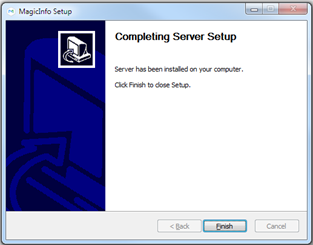
  14. 종료

    Stylesheet
    classscreen

    Image Modified

6. 설정화일 복원

2.4 단계에서 백업된 구성 파일을 복원합니다. 복원을 할 때는 다음 사항을 염두에 두시기 바랍니다.

  • 모든 파일을 복원하지 마십시오. MI(miː) Server(sə́ːrvǝr) 버전이 업그레이드되면서 새로운 속성이 추가되기 때문입니다.
  • 동일한 정보가 새로 설치된 구성 파일에도 반영됩니다. 예를 들어, DB 연결 정보, 로그 수준, 캐시 사용 설정과 같은 변경사항만 확인합니다.

7. 서비스 시작 및 확인

MagicInfo-i 프리미엄 에디션 서버 항목의 서비스가 Windows Service에 실행 중인지 확인하고, 관리자 페이지에 접속하여 확인한다.

Sv translation
languageen

In case of upgrading MagicINFO Server to the latest version, a preliminary inspection is automatically activated to check if the computing environment is suitable for the latest version of MagicINFO Server.

If the environment is deemed not suitable for installation, the upgrade cannot be proceeded.

Warning
titlePrecautions for program upgrade
  • To upgrade the MagicINFO Server, .NET Framework 2.0 or above must have been installed.
  • To upgrade the MagicINFO Server, PostgreSQL 9.0 or above must have been installed. If a version lower than 9.0 is being used, the existing database should be backed up. Then, PostgreSQL 9.0 or above should be installed and the database that has been backed up should be recovered.


1. Preconditions

The account you install must have administrative authority and the authority to run the CMD.Prepare the installation file for the upgrade target version

2. Backup

If the upgrade fails before the upgrade and roll back to the previous stable version, the application server and database server must be backed up.

  • Application Server Backup
  • Database Server Backup


3. DB Upgrade

DB upgrades vary depending on the existing installation environment.

  • When DB is installed in the same server
    • Run the MagicINFO Server installation file and proceed with the installation. DB Upgrade is automatically reflected.
  • In case DB is installed separately
    • Since the DB upgrade does not proceed automatically, run the DB upgrade script in advance.
    • Run the DB upgrade script in order from the currently installed version to the upgraded version.
    • The reflection of the DB upgrade script should be completed after the existing MagicINFO Server is successfully terminated.


4.Backup setup file

Back up the files below in case the settings fail.

  • C:\ MagicInfo Premium \ conf \ config.properties
  • C:\ MagicInfo Premium \ tomcat \ conf \ Server.xml


5. Upgrade installation

The upgrade allows you to run the installation file just like the initial installation.


1.Run the downloaded installation file and select the language to install.


2. Click on the Yes button


3. Click Yes to check and proceed with the current system status.


4. Click OK after confirmation


5. Click Next


6. Click Continue


7. Proceed installation


8. Click Next


9. Exit


6. Restore settings file

Restore the backed up configuration file in step 2.4Please keep the following in mind when you restore it.

  • Do not restore all files.This is because new properties are added as the MI (miː) server (sə ́ːrvǝr) version is upgraded.
  • The same information is reflected in the newly installed configuration file.For example, only check for changes such as DB connection information, log level, and cache usage settings.

7. Start and confirm the service

MagicInfo-i Check if the service of the premium edition server item is running on the Windows Service, and access the administrator page for confirmation.