Versions Compared

Key

  • This line was added.
  • This line was removed.
  • Formatting was changed.
Comment: Content imported from a Scroll Translations translation file.

...

Sv translation
languageen
  1. Press  > Schedule using remote controller.
    Schedule screen is executed.
  2. Execute desired functions.

    Stylesheet
    classscreen

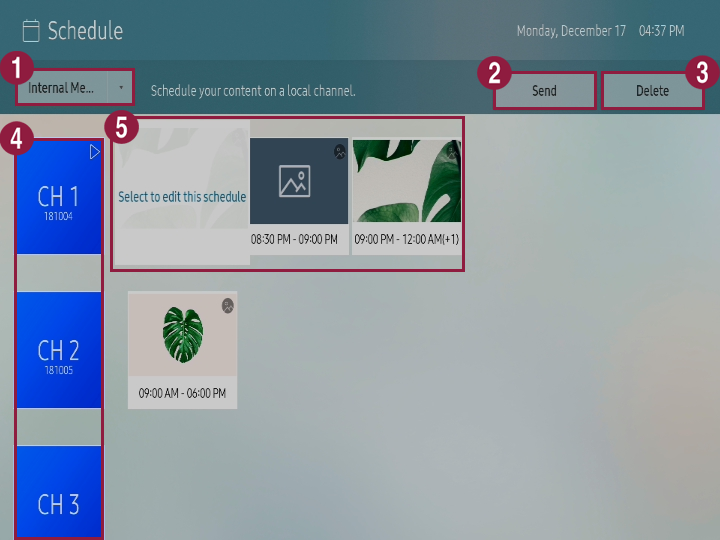
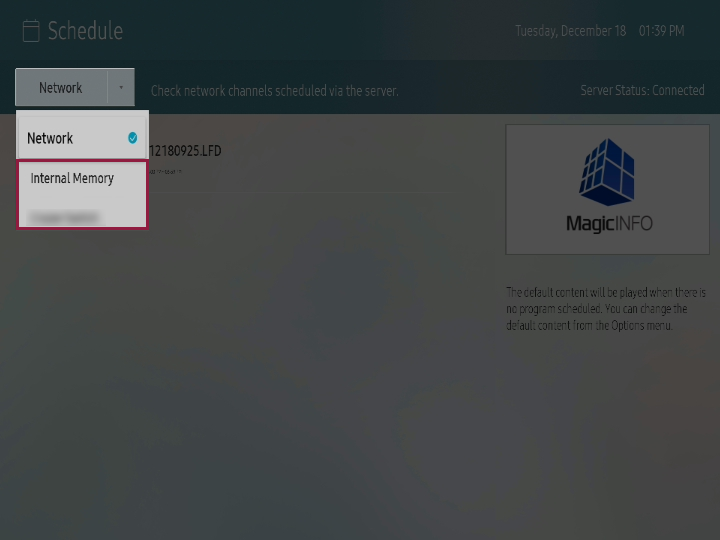
    1You can select storage location for the schedule that will be played using S player.
    • Network: You can check the schedule that is distributed from the server.
    • Internal memory/External memory: You can register contents schedule on local channel.

    External memory is only displayed when external memory is connected to S player. Name of the external memory is displayed differently depending on the external memory type that is connected.

    2

    You can send the channel that is saved in internal memory to external memory or bring the channel that is saved in external memory to internal memory. Refer to following for details. ► Copying local schedule

    Info
    titleNote

    You can only send the channel where schedule is registered.

    3

    You can delete the channel.

    Info
    titleNote

    You can only delete the channel where schedule is registered.

    4

    You can check for the channel list and register schedule on each channel.
    To register schedule to channel, select desired channel from the channel list. Refer to following for details. ► Register local schedule

    5You can check for the schedule list that is registered on channel and edit the schedule.
    To edit the schedule, select desired schedule and press it once again.

Checking network schedule


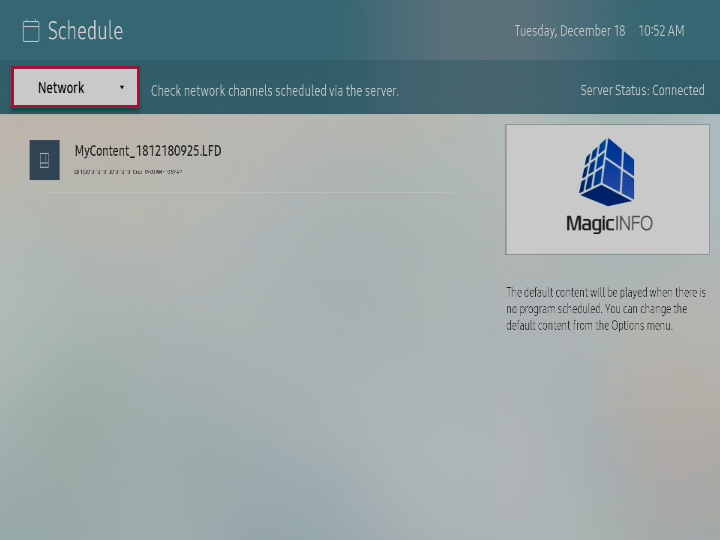
Select Network from schedule screen.

You can check for the schedule list that is distributed from the server.

Info
titleNote

If schedule is not displayed, check for the connection status with the server.

Stylesheet
classscreen

Anchor
eee_354_2234_s454
eee_354_2234_s454
Register local schedule


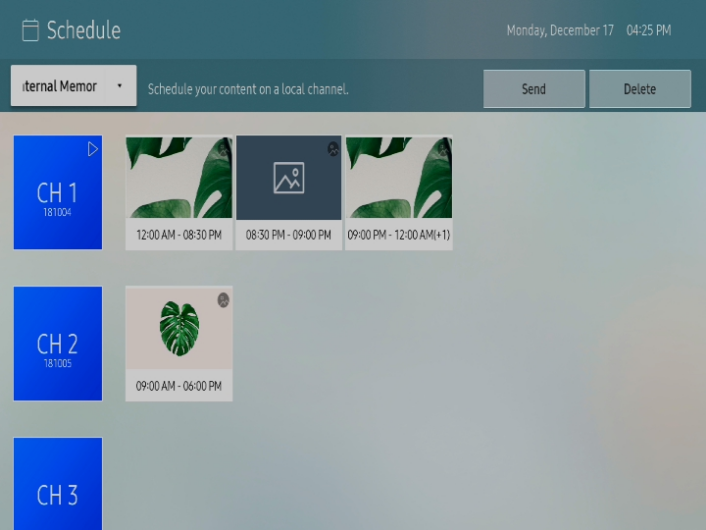
You can register contents schedule on local channel.

  1. Select internal memory or external memory that is connected from schedule screen.

    Stylesheet
    classscreen

  2. Select the channel for registering schedule and press it once again.

    Stylesheet
    classscreen

  3. Apply setting to desired items and press Save.

    Stylesheet
    classscreen

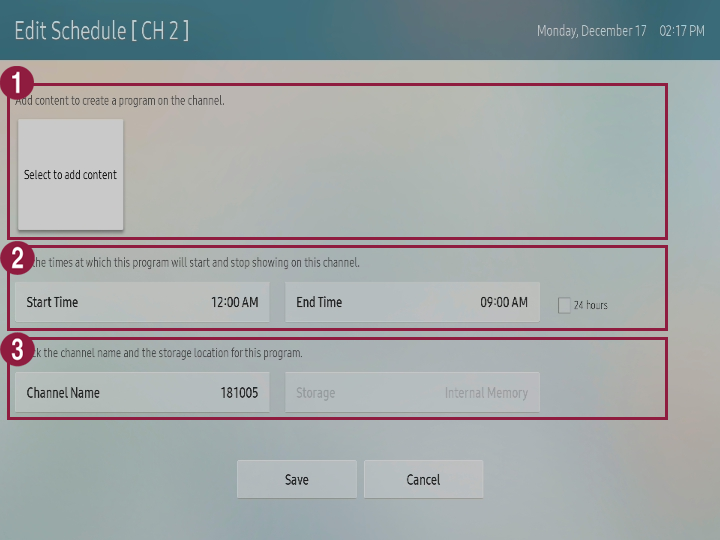
    1You can add or delete the contents to be played.
    • To add the contents, press Select to add the contents and select desired contents.
    • To delete the added contents, select the contents to be deleted and press it once again.
    2You can apply setting to start time and end time to contents schedule that will be registered on the channel.
    3Apply setting to name of contents schedule and check for storage location.

Anchor
11456_w_f_15
11456_w_f_15
Copy local schedule

You can send the channel that is saved in internal memory to external memory or bring the channel that is saved in external memory to internal memory.

  1. Select internal memory or external memory that is connected from schedule screen.
  2. Select desired channel.

    Info
    titleNote

    You can only select the channel where schedule is registered.

  3. Press Send from upper side to select the device for sending.
    Selected channel and schedule that is registered on channel are copied to corresponding device.
Sv translation
languagear
  1. اضغط على Image Added > Schedule باستخدام جهاز التحكم عن بُعد.
    يتم عرض شاشة الجدول.
  2. قم بتنفيذ الوظائف المطلوبة.

    Stylesheet
    classالشاشة

    Image Added

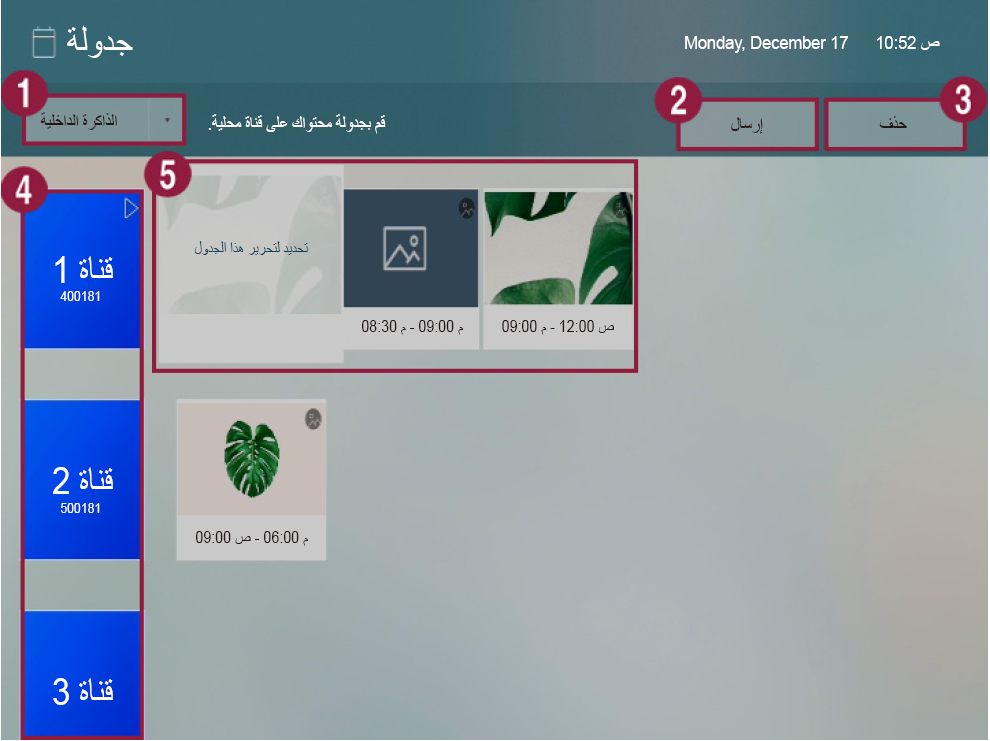
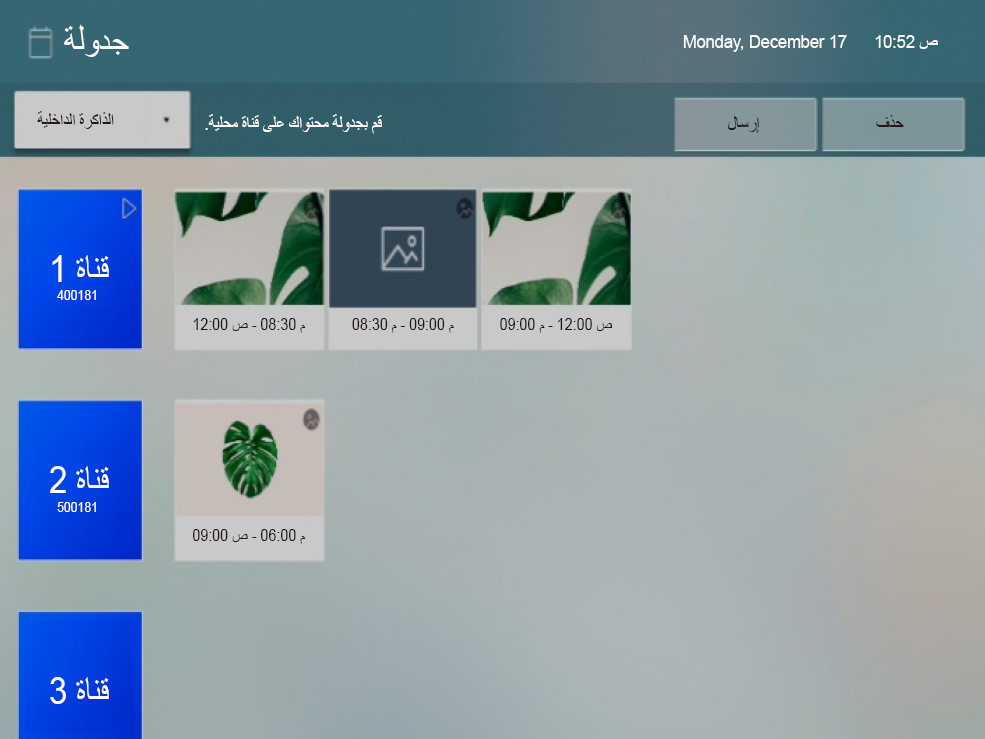
    1يمكنك تحديد موقع تخزين الجدول الذي سيتم تشغيله باستخدام S Player.
    • Network: يمكنك التحقق من الجدول الذي تم توزيعه من الخادم.
    • ذاكرة داخلية/ذاكرة خارجية: يمكنك تسجيل جدول المحتويات على قناة محلية.

    يتم عرض جهاز External memory فقط عندما يكون متصلاً بمشغل S Player. يتم عرض اسم جهاز External memory بطريقة مختلفة وفقًا لنوع الجهاز المتصل.

    2

    يمكنك إرسال القناة المحفوظة على ذاكرة داخلية إلى ذاكرة خارجية أو نقل القناة المحفوظة على ذاكرة خارجية إلى ذاكرة داخلية. يرجى الرجوع إلى ما يلي لمزيد من التفاصيل: ► Copying local schedule

    Info
    titleملحوظة

    يمكنك إرسال القناة حيث تم تسجيل الجدول فقط.

    3

    يمكنك حذف القناة.

    Info
    titleملحوظة

    يمكنك حذف القناة حيث تم تسجيل الجدول فقط.

    4

    يمكنك عرض قائمة القنوات وتسجيل الجدول لكل قناة.
    لتسجيل جدول لقناة، حدد القناة المرغوبة من قائمة القنوات. يرجى الرجوع إلى ما يلي لمزيد من التفاصيل: ► Register local schedule

    5يمكنك عرض قائمة الجداول المسجلة على القناة وتحرير الجداول.
    لتحرير الجدول، حدد الجدول المطلوب واضغط عليه مرة أخرى.

التحقق من جدول الشبكة


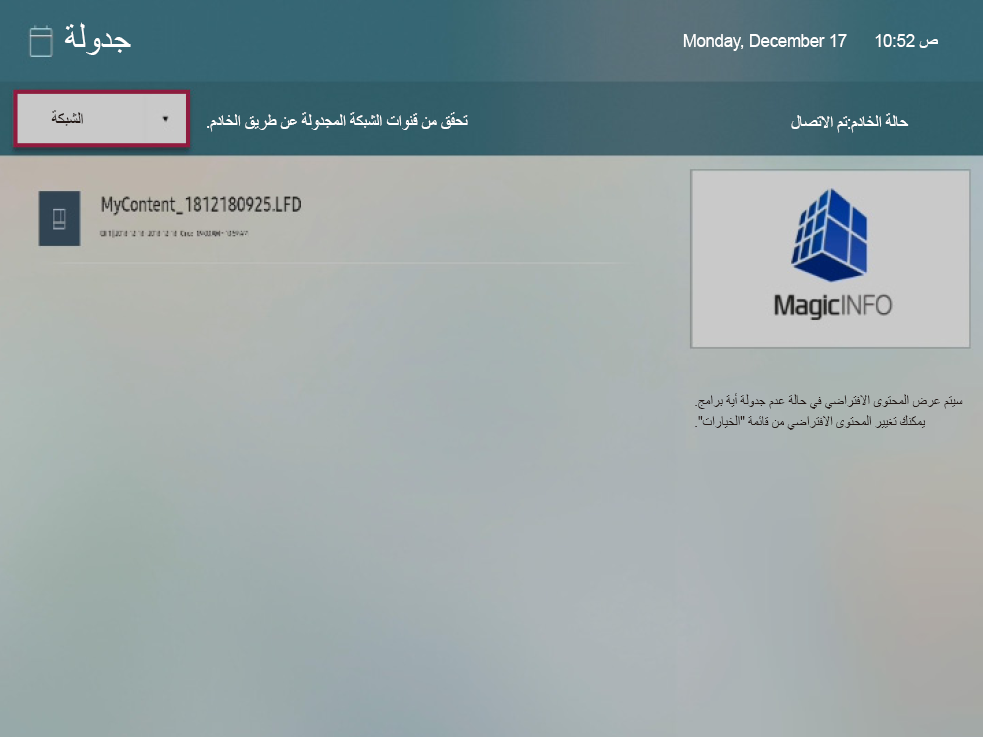
حدد Network من شاشة الجدول.

يمكنك التحقق من قائمة الجداول التي تم توزيعها من الخادم.

Info
titleملحوظة

إذا لم يتم عرض الجدول، فتحقق من حالة الاتصال بالخادم.

Stylesheet
classالشاشة

Image Added

Anchor
eee_354_2234_s454
eee_354_2234_s454
تسجيل جدول محلي


يمكنك تسجيل جدول المحتويات على قناة محلية.

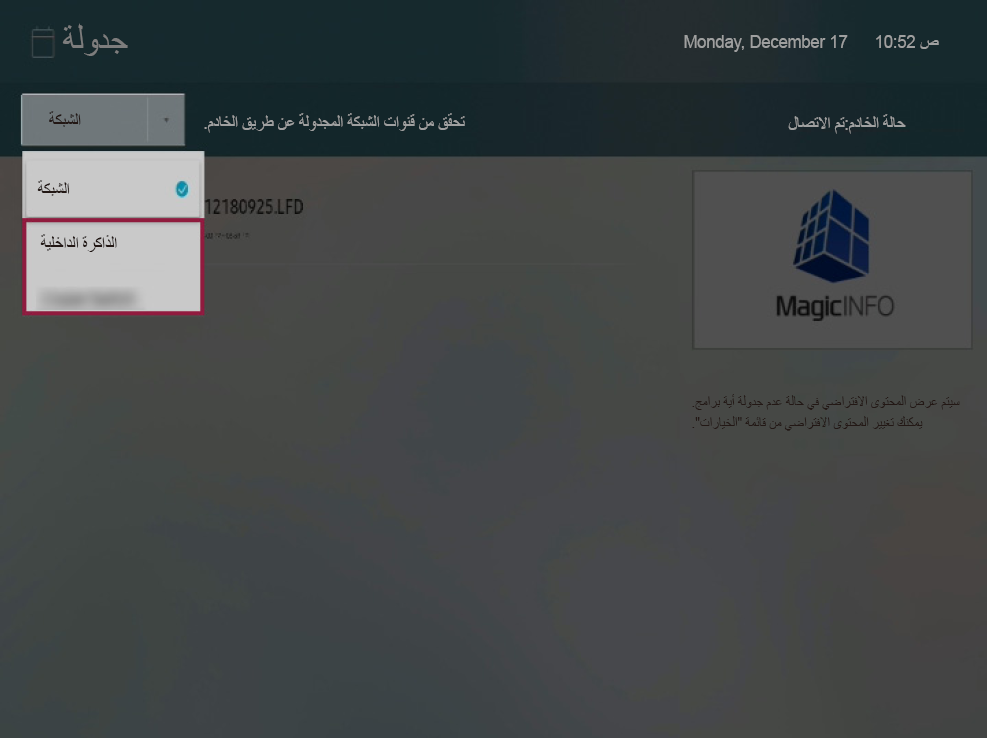
  1. حدد Internal Memory أو External Memory المتصلة بشاشة الجدول.

    Stylesheet
    classالشاشة

    Image Added

  2. حدد قناة لتسجيل الجدول واضغط عليها مرة أخرى.

    Stylesheet
    classالشاشة

    Image Added

  3. قم بتطبيق الإعداد على العناصر المطلوبة واضغط على Save.

    Stylesheet
    classالشاشة

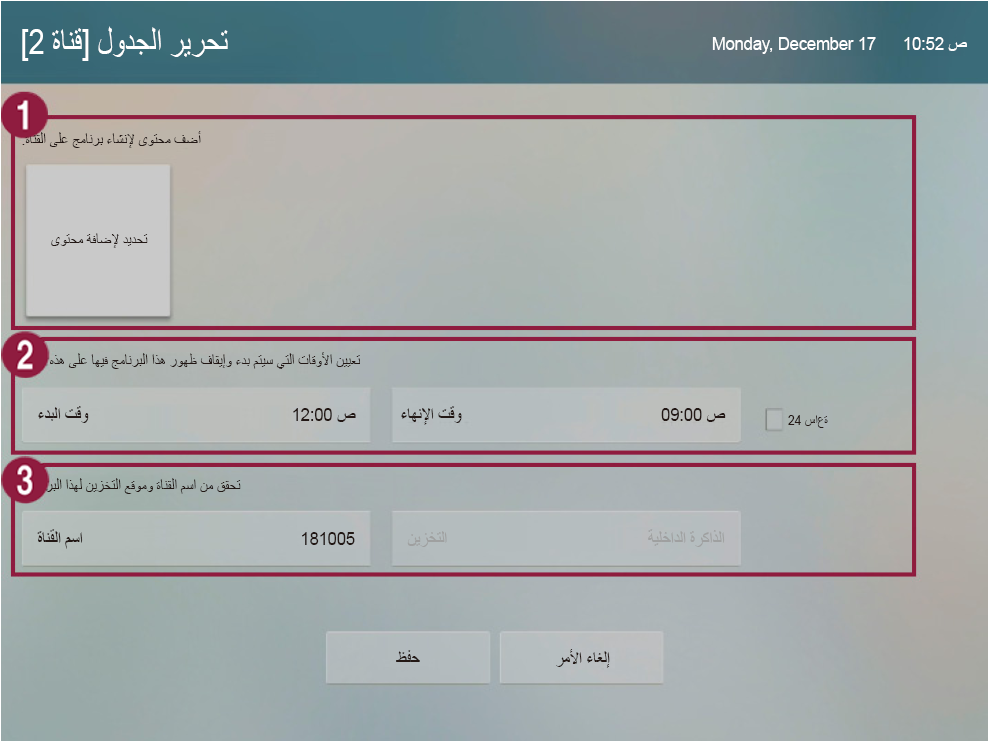
    Image Added

    1يمكنك إضافة المحتويات المطلوب تشغيلها أو حذفها.
    • لإضافة محتويات، اضغط على Select to add the contents وحدد المحتويات التي تريدها.
    • لحذف المحتويات التي تمت إضافتها، حدد المحتويات التي تريد حذفها واضغط عليها مجددًا.
    2يمكنك تطبيق الإعداد على وقت البدء ووقت الانتهاء لجدول المحتويات الذي سيتم تسجيله على القناة.
    3قم بتطبيق الإعداد على اسم جدول المحتويات والتحقق من موقع التخزين.

Anchor
11456_w_f_15
11456_w_f_15
نسخ جدول محلي

يمكنك إرسال القناة المحفوظة على ذاكرة داخلية إلى ذاكرة خارجية أو نقل القناة المحفوظة على ذاكرة خارجية إلى ذاكرة داخلية.

  1. حدد Internal Memory أو External Memory المتصلة بشاشة الجدول.
  2. حدد القناة التي تريدها.

    Info
    titleملحوظة

    يمكنك تحديد القناة حيث تم تسجيل الجدول فقط.

  3. اضغط على Send من الجزء العلوي لتحديد الجهاز للإرسال.
    يتم نسخ القناة المحددة والجدول الذي تم تسجيله على القناة إلى الجهاز المقابل.