Versions Compared

Key

  • This line was added.
  • This line was removed.
  • Formatting was changed.
Sv translation
languageko_KR

DataLink 기능을 이용해 콘텐츠 안의 요소가 실시간으로 바뀌는 동적 콘텐츠를 제작할 수 있습니다. 이 콘텐츠에는 Premium Server에 등록된 일반 미디어 파일뿐만 아니라, DataLink 서버에 수집된 외부 데이터를 맵핑할 수도 있습니다.

Info
title참고

DataLink란 외부 데이터를 일정 주기에 따라 수집하고, Player에 원하는 데이터를 전달하여 동적인 콘텐츠를 표현할 수 있도록 지원하는 웹 기반 애플리케이션입니다. DataLink에 대한 자세한 사항은 MagicINFO DataLink 사용 설명서를 참조하세요.


Web Author를 이용해 DataLink 템플릿을 생성할 수 있습니다.

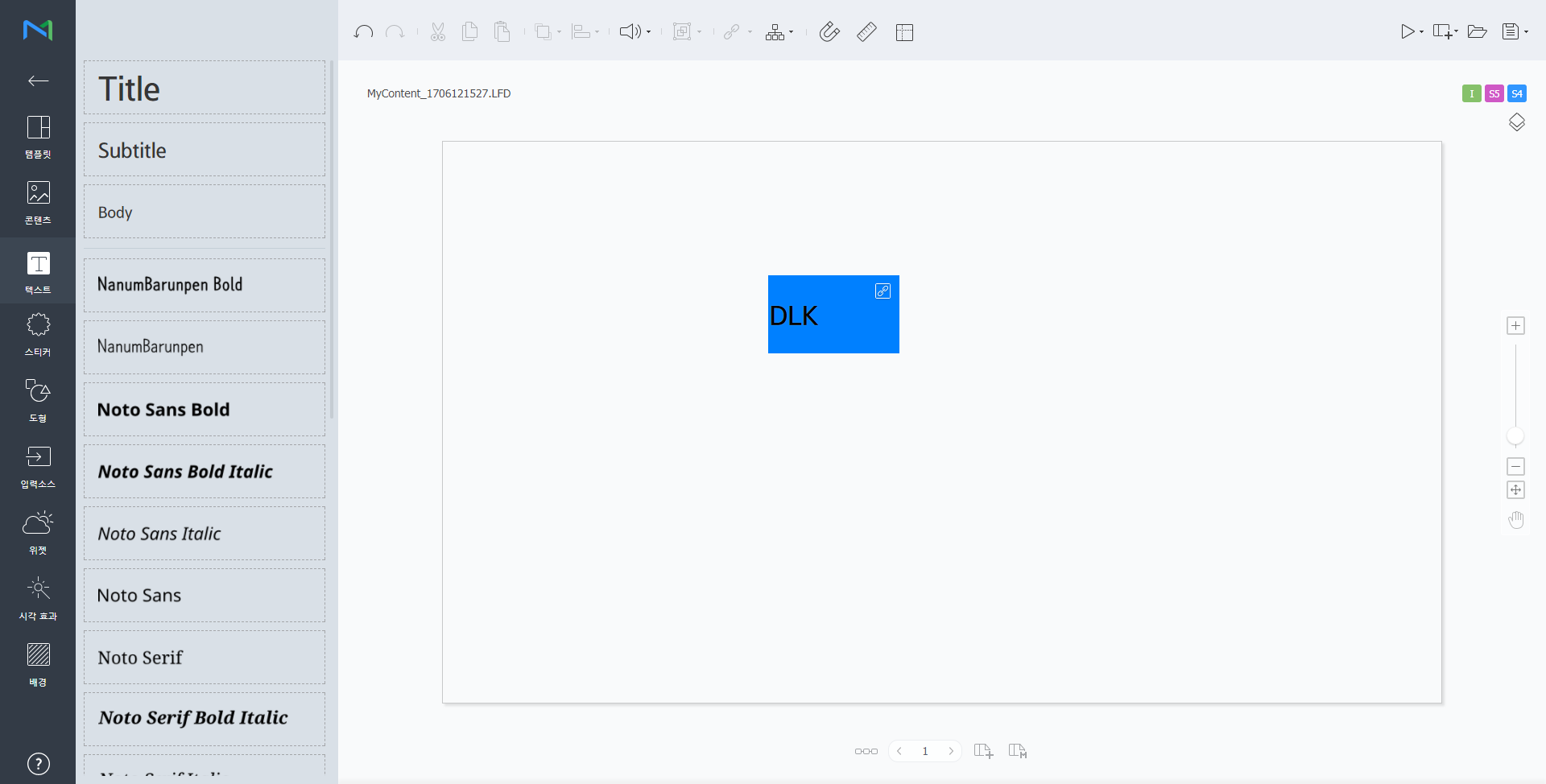
  1. 콘텐츠 페이지에 요소를 추가하세요.

    Info
    title참고

    이미지, 동영상, 텍스트 요소에만 DataLink 기능을 설정할 수 있습니다.

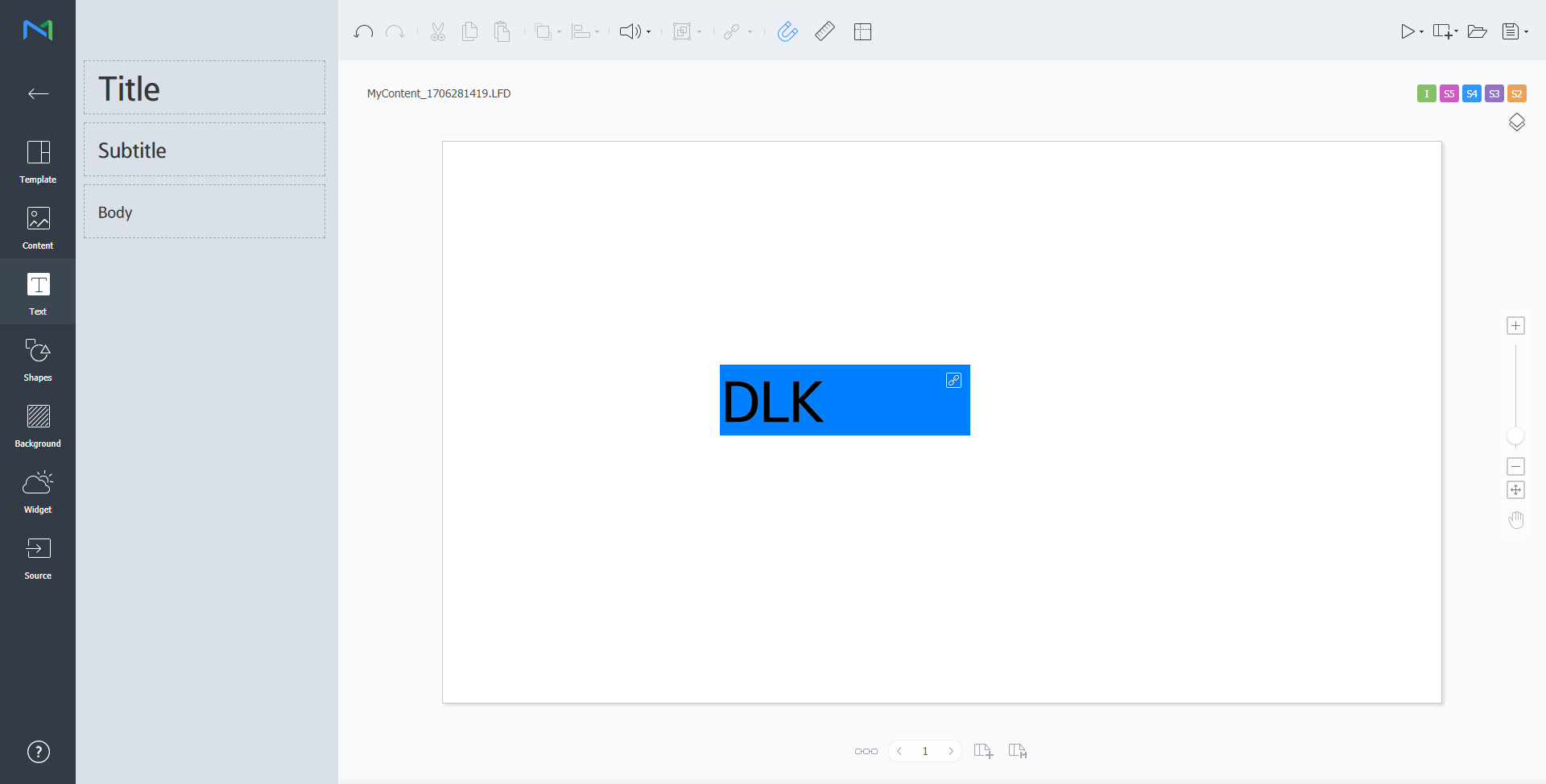
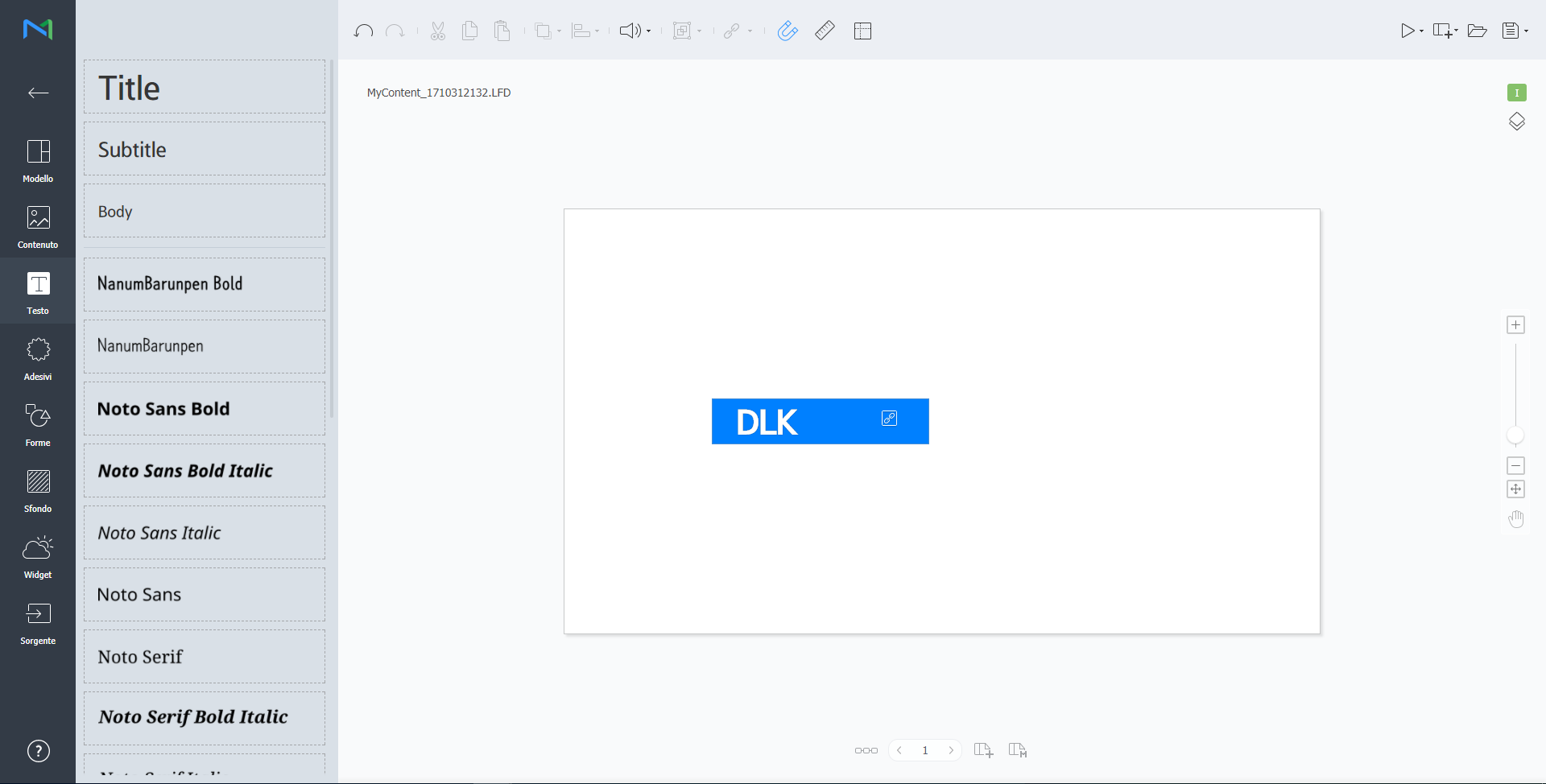
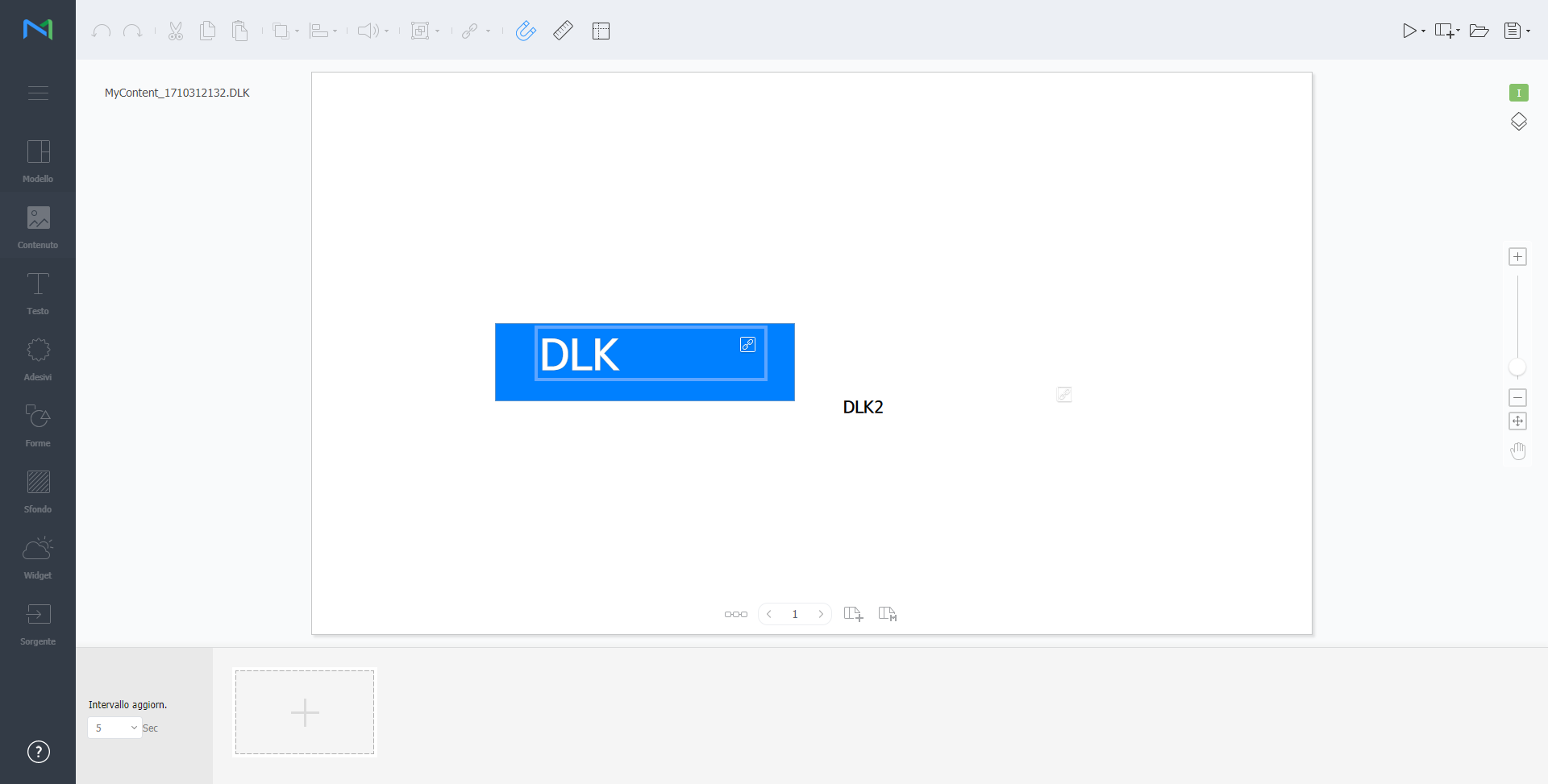
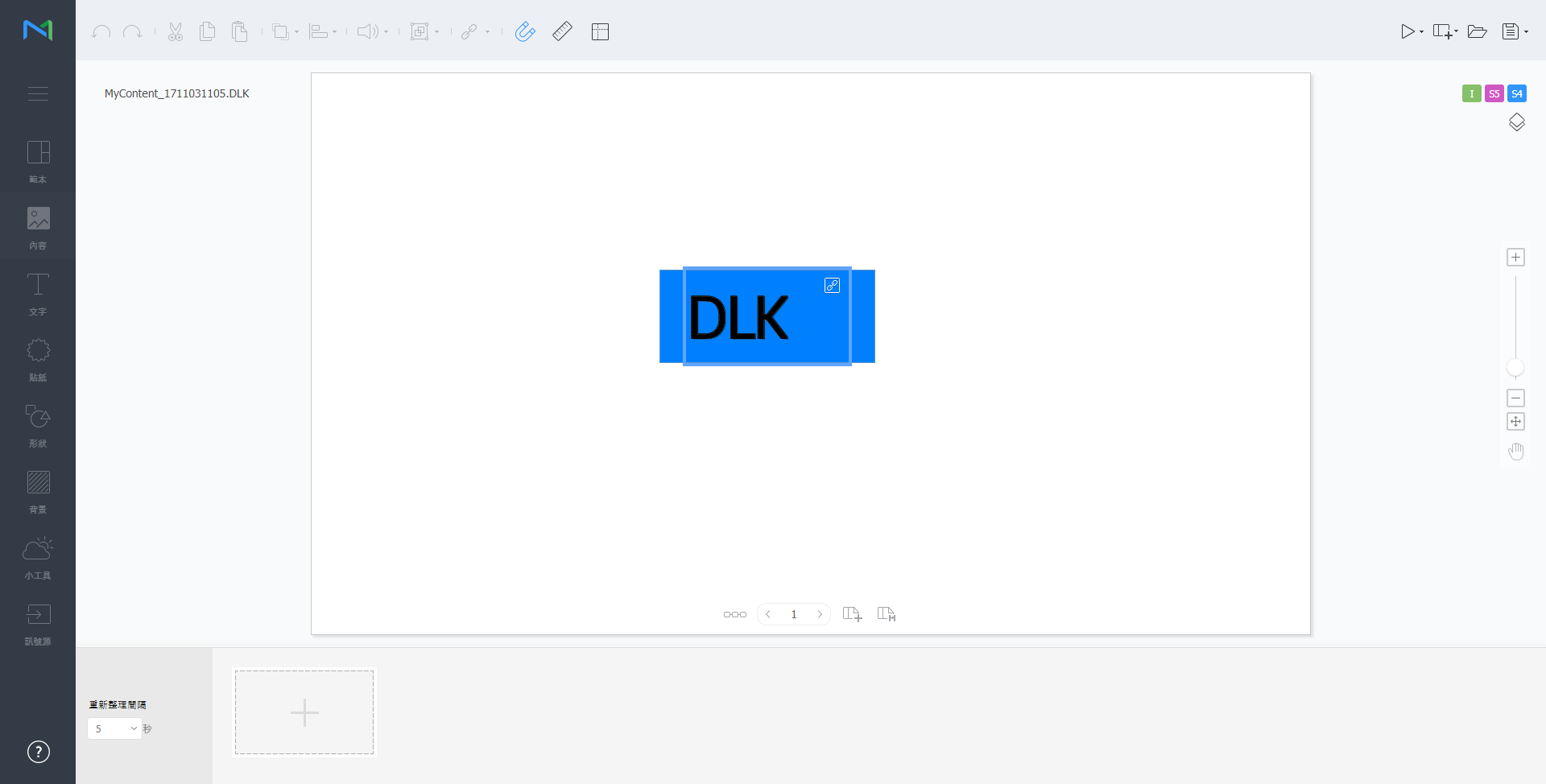
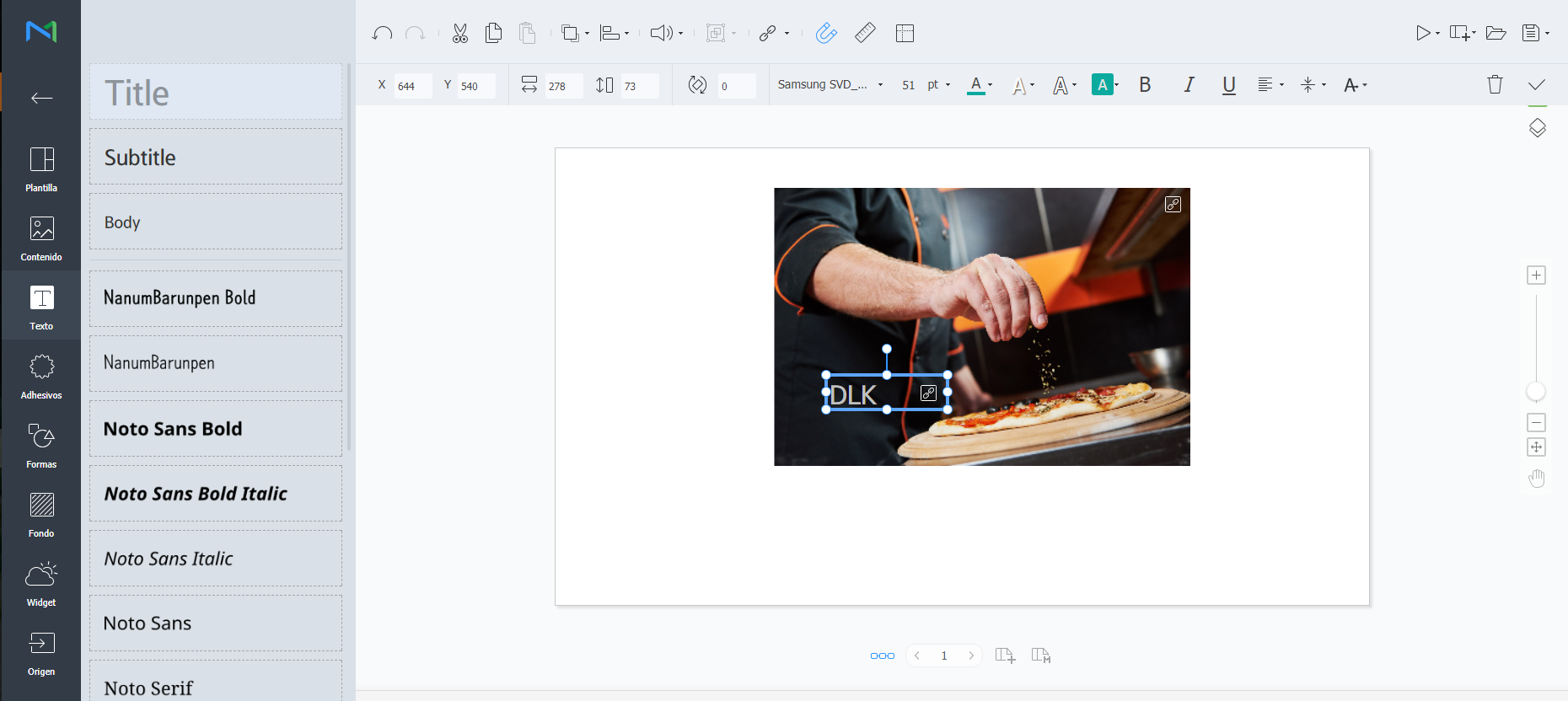
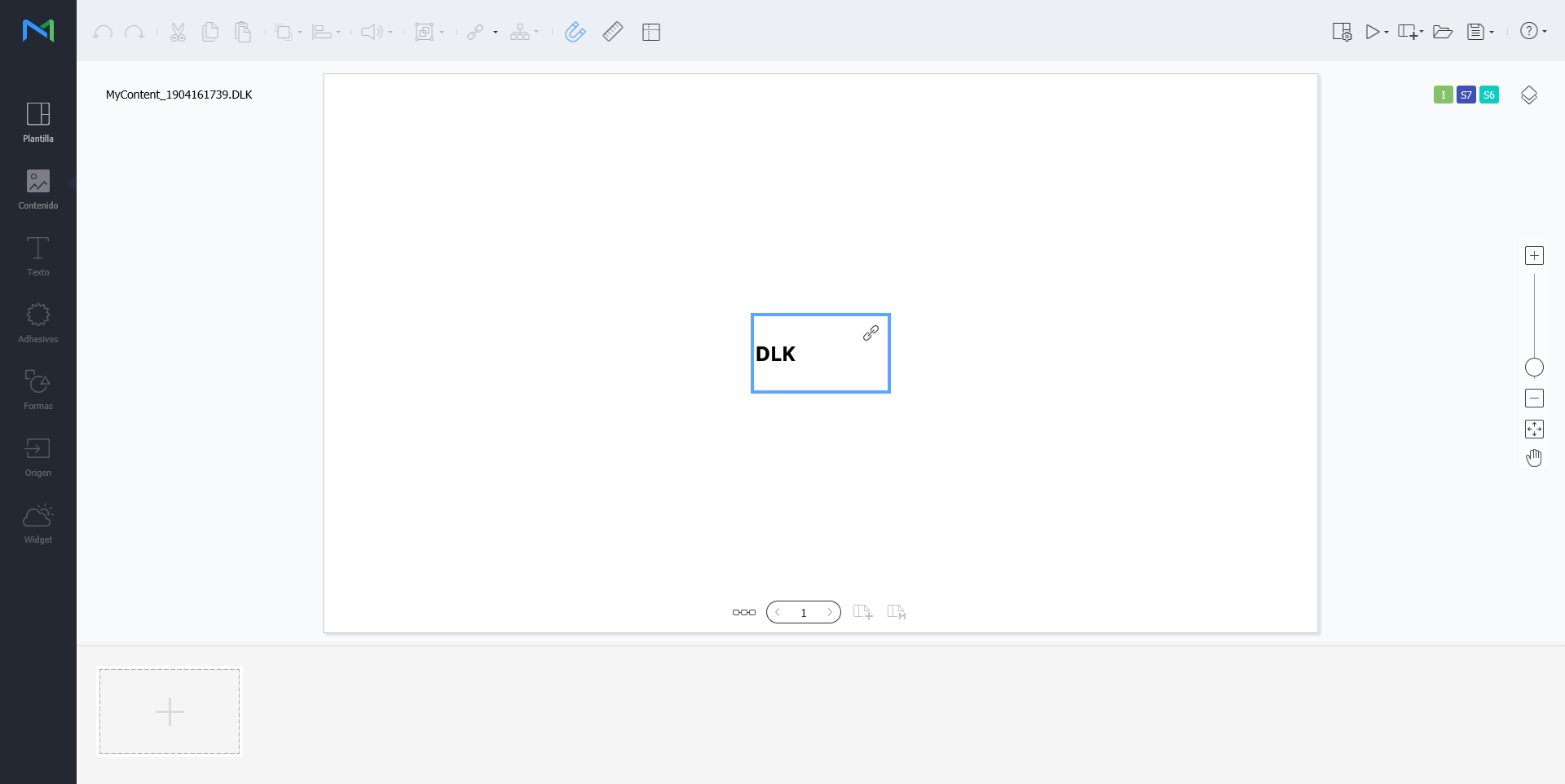
  2. DataLink 기능을 설정할 요소를 선택한 후 요소 편집 도구에서 클릭하세요. 여러 개의 요소를 동시에 선택할 수도 있습니다.
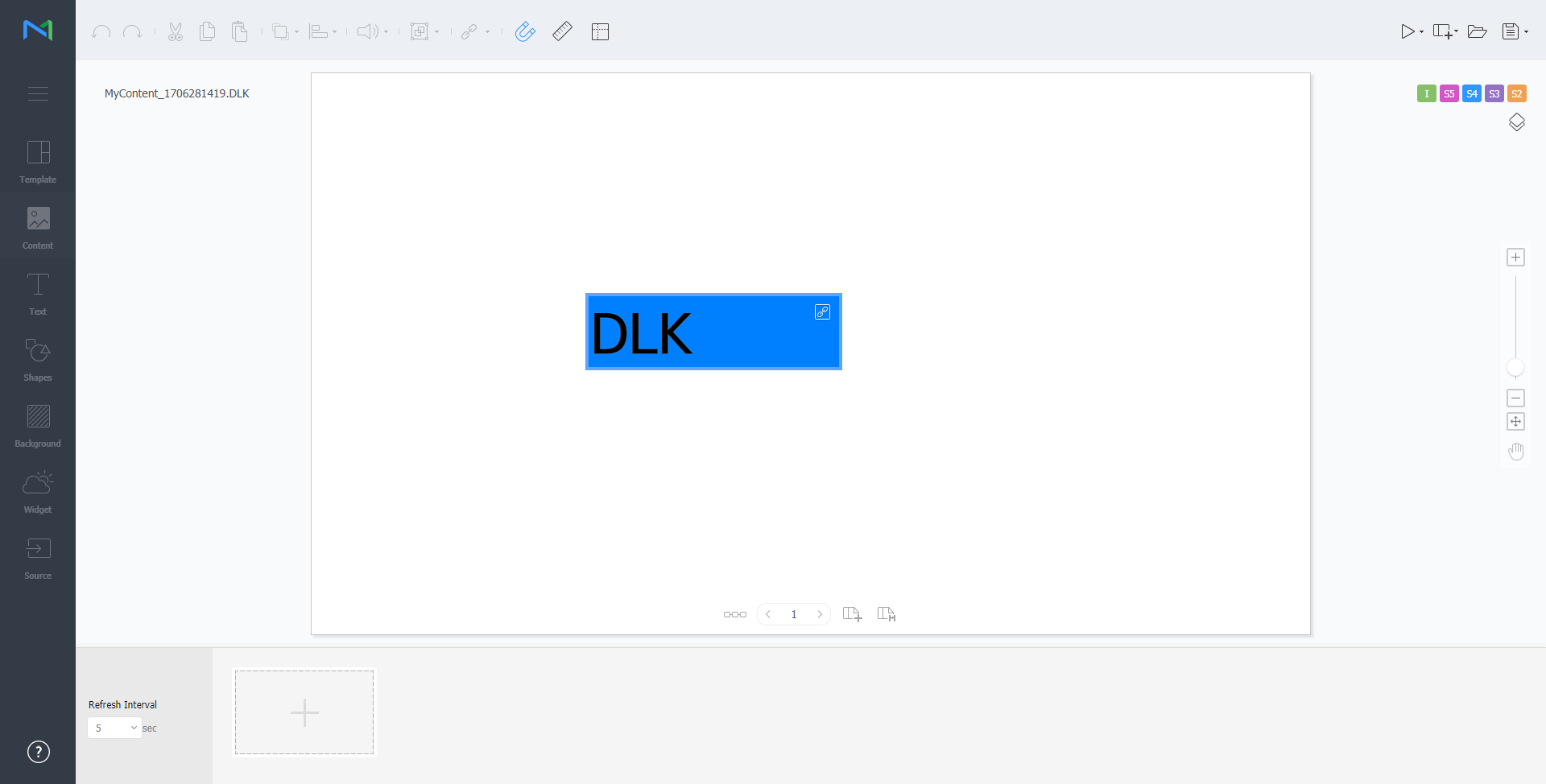
    요소에 아이콘이 나타납니다.

    Stylesheet
    classscreen
  3. 해당 요소가 선택된 상태에서 세부 사항을 설정하세요.

    /

    여러 개의 DataLink 요소를 동시에 선택한 후 요소들을 그룹화하거나, 그룹 해제할 수 있습니다.

    DataLink 정보를 설정할 수 있습니다.

    • 전환 속도: DataLink 요소가 업데이트되는 간격을 설정할 수 있습니다.
    • 데이터 동기화: 데이터 동기화 여부를 설정할 수 있습니다.
    • 이전 데이터 유지: 이전 데이터 유지 여부를 설정할 수 있습니다.
    • 데이터 그룹화: 여러 개의 DataLink 요소를 동시에 선택한 후 요소들을 그룹화할 수 있습니다. 그룹화된 DataLink 요소에는 재생 순서 아이콘이 표시됩니다.
    • 데이터 그룹 해제: 그룹화된 여러 개의 DataLink 요소를 그룹 해제할 수 있습니다.
    • 치환 테이블 수정: 데이터 치환 테이블을 이용하여 DataLink 테이블의 특정 데이터를 텍스트 또는 이미지, 동영상으로 치환할 수 있습니다. 치환 테이블 창에서 추가를 클릭하면 치환 테이블을 추가할 수 있습니다. 원하는 치환 대상을 선택한 후 저장을 클릭하세요.


  4. 설정이 완료되면 클릭하세요.
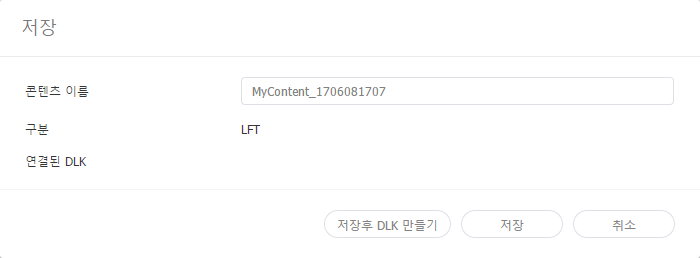
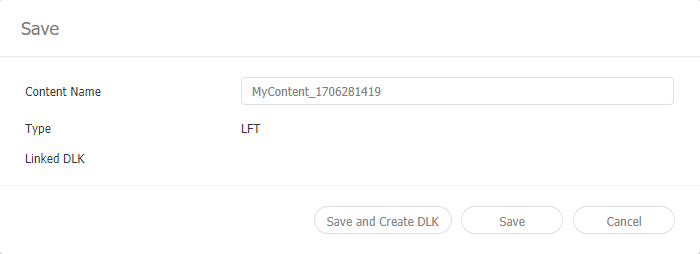
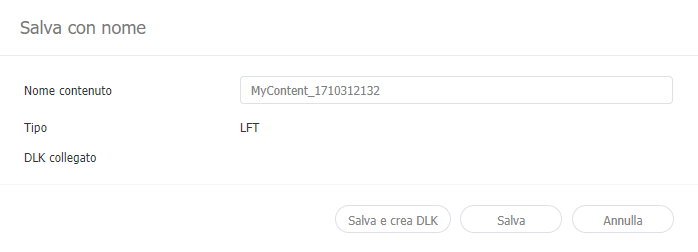
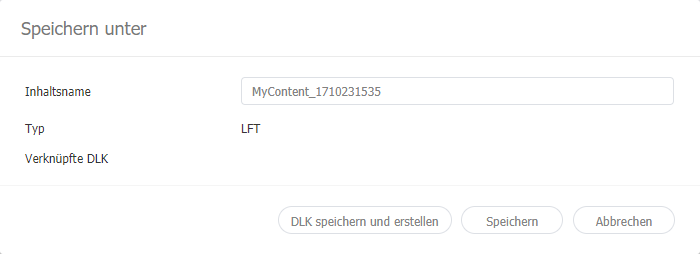
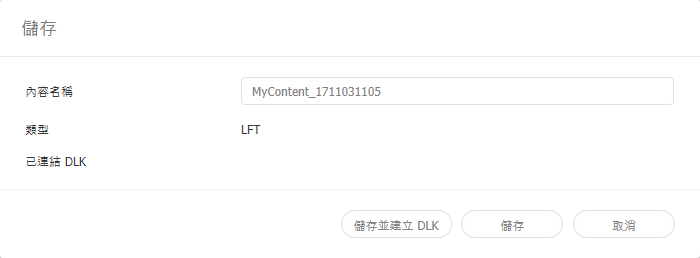
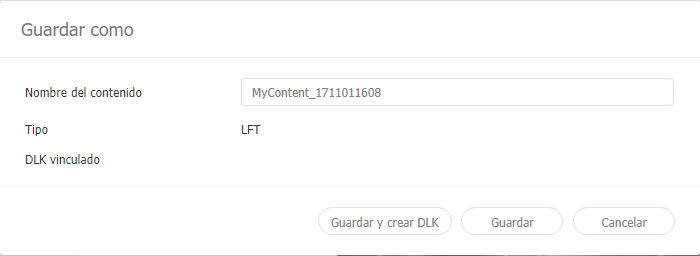
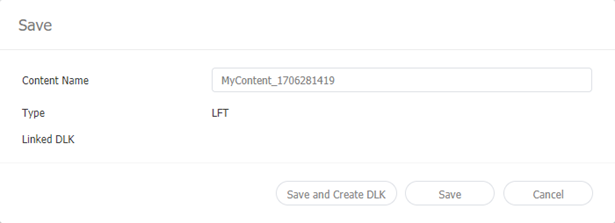
  5. 저장 정보를 설정한 후 저장후 DLK 만들기를 클릭하세요.
    해당 콘텐츠가 DataLink 템플릿으로 저장됩니다.

    Stylesheet
    classscreen

DataLink 템플릿 수정하기

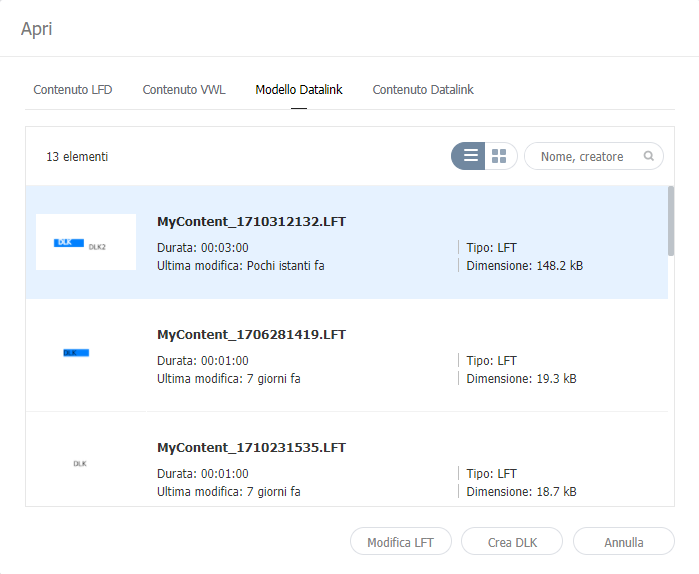
저장한 DataLink 템플릿을 불러온 후 수정할 수 있습니다.

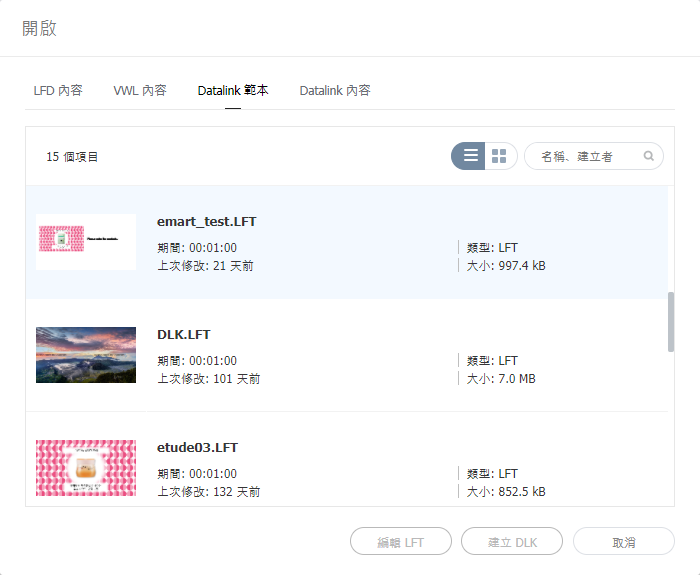
  1. Web Author 화면에서 클릭하세요.
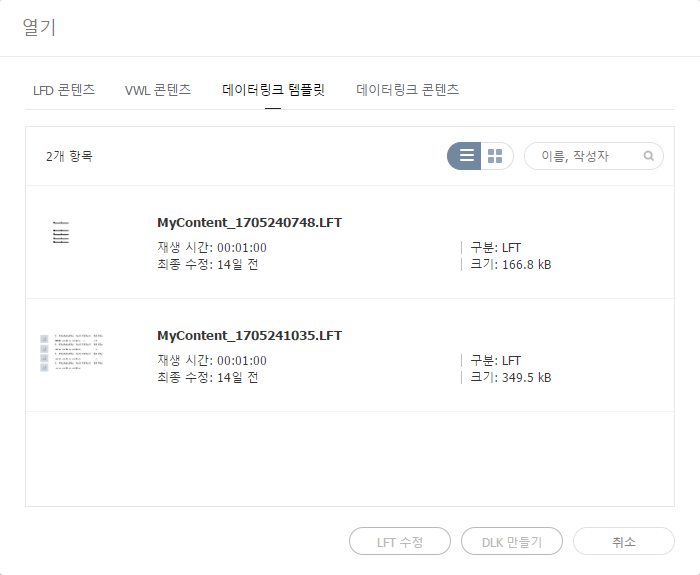
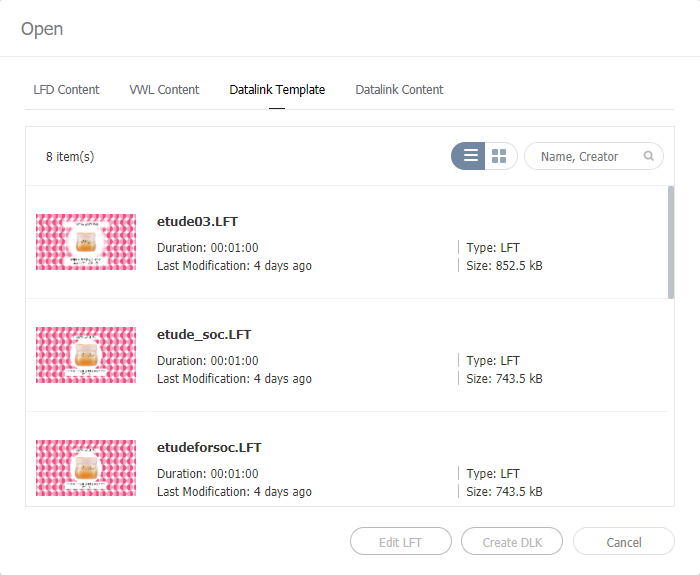
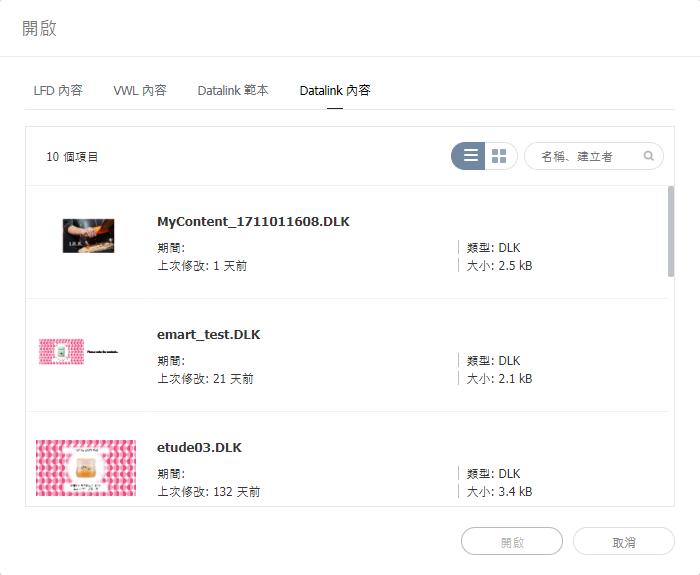
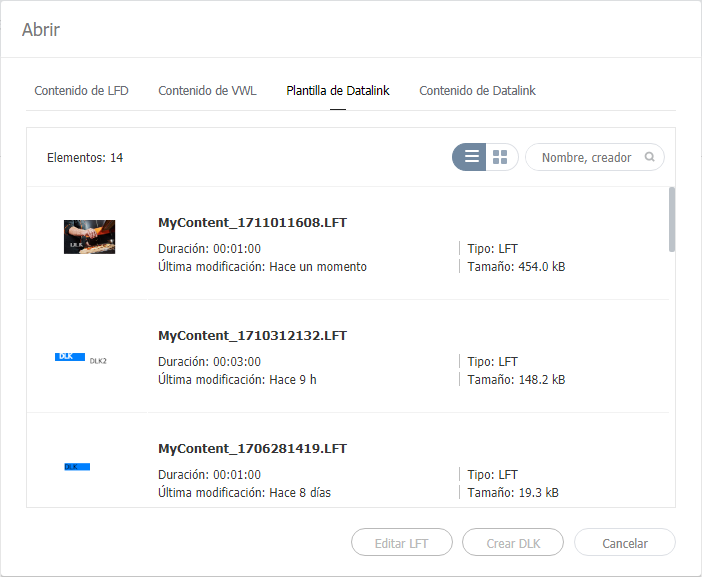
  2. 데이터링크 템플릿 탭을 클릭하세요.

    Stylesheet
    classscreen
  3. 원하는 템플릿을 선택한 후 LFT 수정을 클릭하세요.
  4. DataLink 템플릿을 생성하는 것과 동일한 방법으로 DataLink 템플릿을 수정할 수 있습니다.

DLK 콘텐츠 생성하기


DataLink 템플릿으로 Player에 배포할 DLK 콘텐츠를 생성할 수 있습니다. DLK 콘텐츠는 미디어 파일 또는 텍스트를 직접 등록하거나, 등록된 데이터링크 서버의 정보를 불러와서 생성할 수 있습니다.

DataLink 템플릿 불러오기

DLK 콘텐츠를 생성하기 위해 DataLink 템플릿을 불러올 수 있습니다.

Info
title참고

DataLink 템플릿을 생성하는 방법은 다음을 참고하세요. DataLink 템플릿 생성하기

  1. Web Author 화면에서 클릭하세요.
  2. 데이터링크 템플릿 탭을 클릭하세요.

    Stylesheet
    classscreen
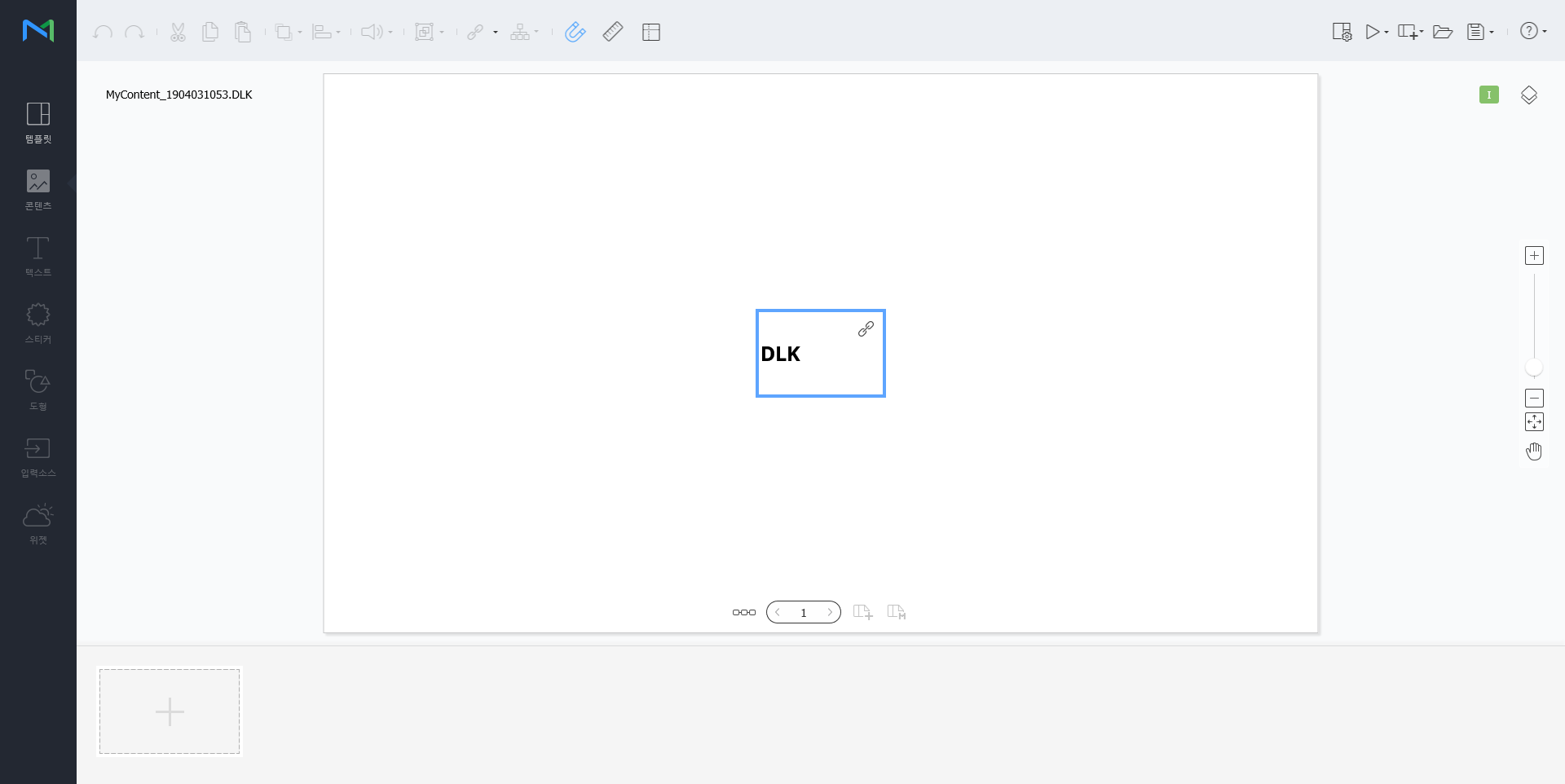
  3. 원하는 템플릿을 선택한 후 DLK 만들기를 클릭하세요.
    DLK 콘텐츠 생성 화면이 나타납니다.

직접 입력하여 DLK 콘텐츠 만들기

  1. DataLink 템플릿을 불러오세요.
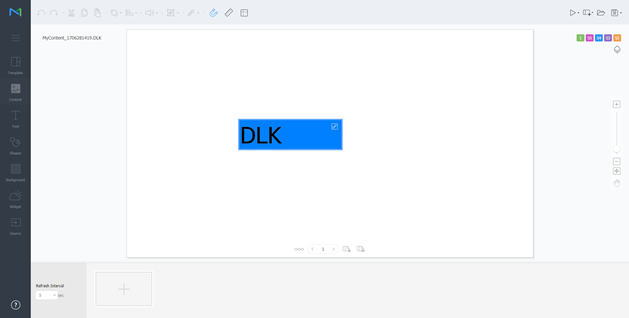
  2. DataLink 요소를 선택하세요.
    DataLink 관리 창이 나타납니다.

    Stylesheet
    classscreen
  3. 데이터를 추가하려면  클릭하세요.
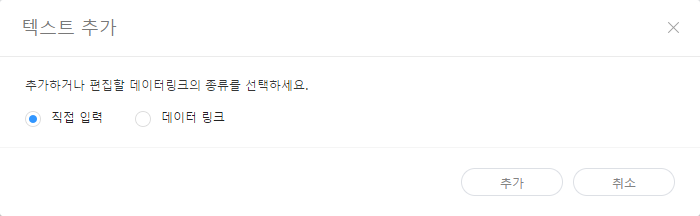
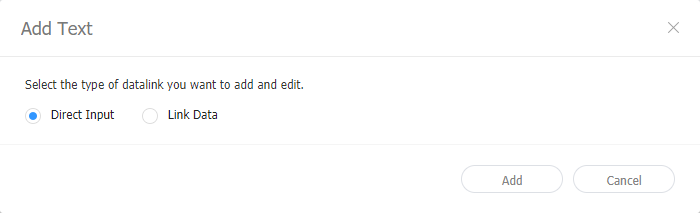
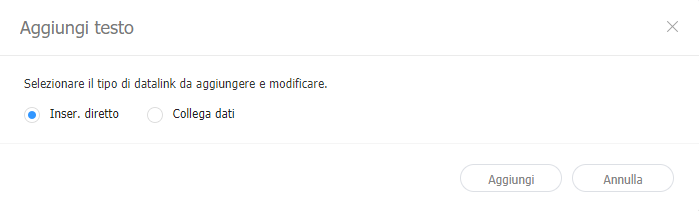
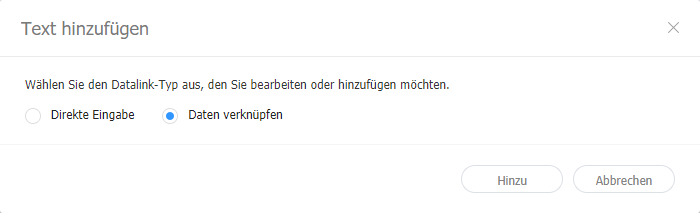
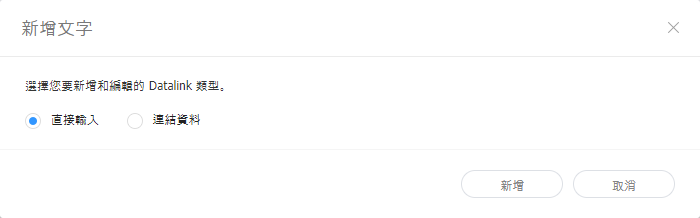
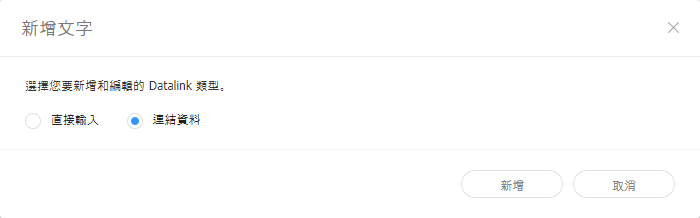
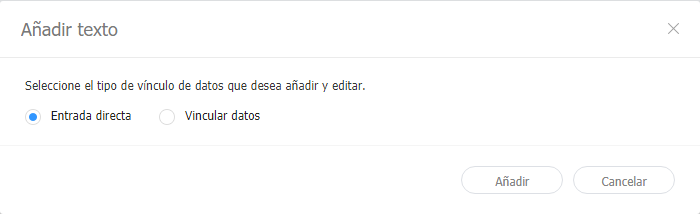
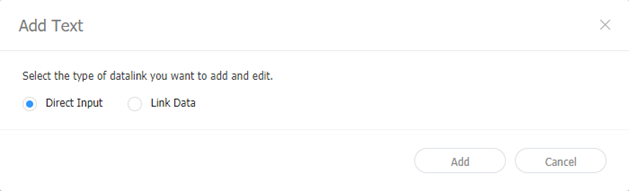
  4. 직접 입력을 선택한 후 추가를 클릭하세요.

    Stylesheet
    classscreen

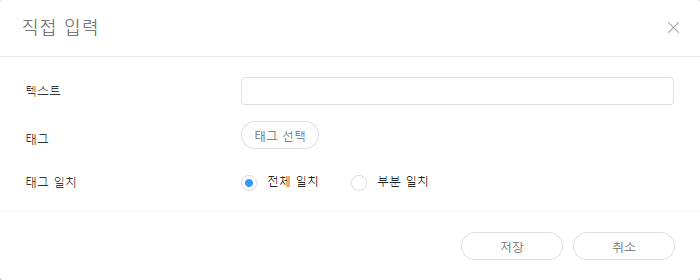
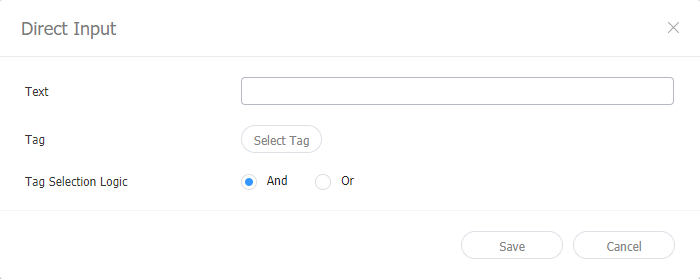
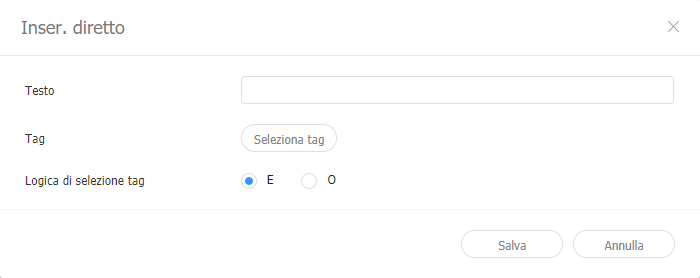
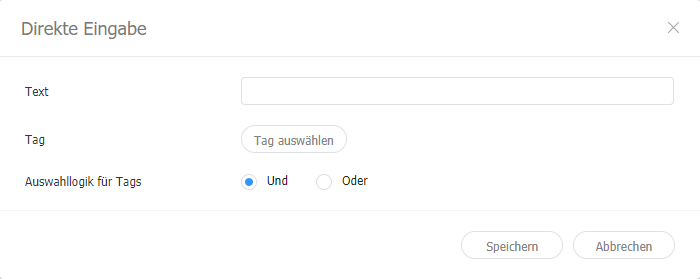
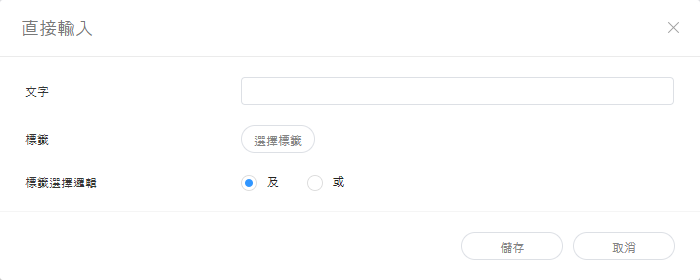
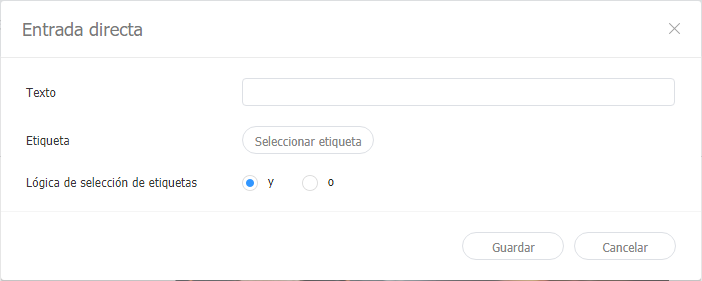
  5. 세부 정보를 입력한 후 저장을 클릭하세요.

    Stylesheet
    classscreen
    텍스트텍스트를 입력하세요.
    태그

    텍스트에 태그를 추가할 수 있습니다. 태그 목록에서 원하는 태그를 선택하고 저장을 클릭하세요. 복수의 태그를 선택할 수도 있습니다.

    Info
    title참고
    • 태그가 설정된 콘텐츠는 동일한 태그를 가진 장치에서만 재생 됩니다.
    • 텍스트에 태그를 설정하려면 먼저, Premium Server에 태그가 추가되어 있어야 합니다. 태그 추가 관련 내용은 다음을 참조하세요. ► 태그 추가하기
    • 태그 사용 관련 내용은 다음을 참조하세요. ► 태그 설정하기
    태그 일치복수의 태그를 설정한 경우, 일치 조건을 설정하세요.


  6. 설정이 완료되면 클릭하세요.
  7. 저장 정보를 설정한 후 저장을 클릭하세요.
    해당 콘텐츠가 DLK 콘텐츠로 저장됩니다.

데이터링크 서버와 연동하여 DLK 콘텐츠 만들기

데이터링크 서버의 데이터를 DLK 템플릿에 맵핑하여 DLK 콘텐츠를 구성할 수 있습니다.

Tip
title데이터링크 서버와 연동하여 DLK 콘텐츠 만들기

데이터링크 서버와 연동하여 DLK 콘텐츠를 만들기 위해서는 Premium Server와 데이터링크 서버를 연결해야 합니다. 관련 내용은 다음을 참조하세요. ► 외부 서버 관리하기

Warning
title미디어 슬라이드 요소

미디어 슬라이드 요소에는 데이터링크 서버의 데이터를 맵핑할 수 없습니다.

  1. DataLink 템플릿을 불러오세요.
  2. DataLink 요소를 선택하세요.
    DataLink 관리 창이 나타납니다.

    Stylesheet
    classscreen
  3. 데이터를 추가하려면 클릭하세요.
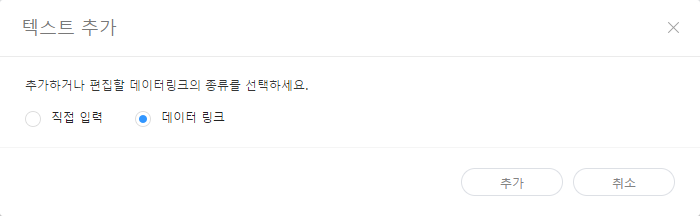
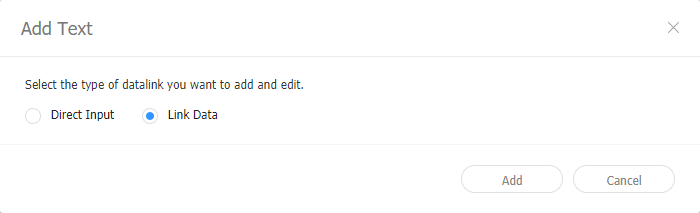
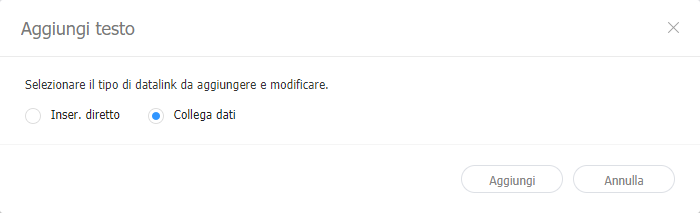
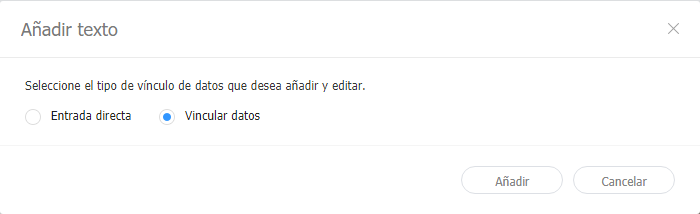
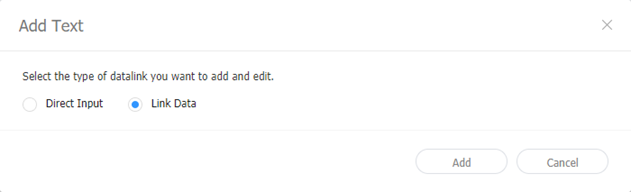
  4. 데이터 링크를 선택한 후 추가를 클릭하세요.

    Stylesheet
    classscreen
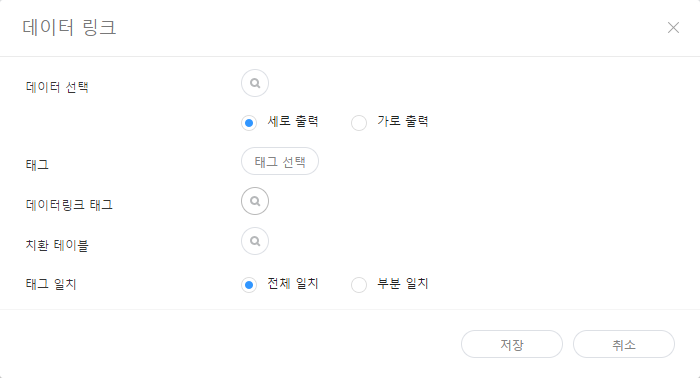
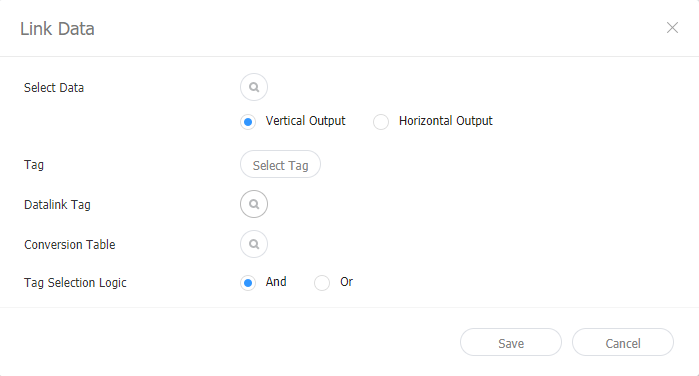
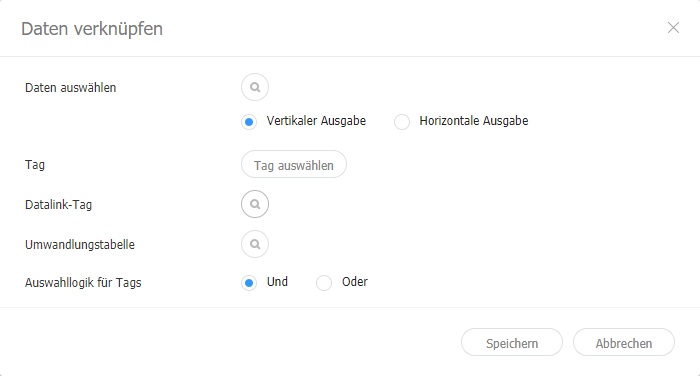
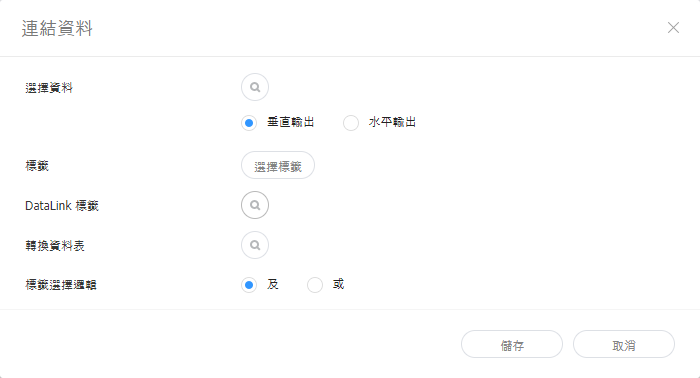
  5. 세부 정보를 입력한 후 저장을 클릭하세요.

    Stylesheet
    classscreen
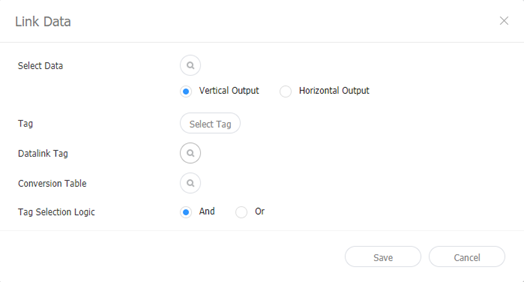
    데이터 선택

    데이터링크 서버에 등록된 DataLink 테이블을 선택하세요. DataLink 테이블에서 사용하고 싶은 데이터를 선택한 후 저장을 클릭하세요.

    태그

    데이터에 태그를 추가할 수 있습니다. 태그 목록에서 원하는 태그를 선택하고 저장을 클릭하세요. 복수의 태그를 선택할 수도 있습니다.

    Info
    title참고
    • 태그가 설정된 콘텐츠는 동일한 태그를 가진 장치에서만 재생 됩니다.
    • 데이터에 태그를 설정하려면 먼저, Premium Server에 태그가 추가되어 있어야 합니다. 태그 추가 관련 내용은 다음을 참조하세요. ► 태그 추가하기
    데이터링크 태그

    부가적으로 데이터링크 태그를 추가할 수 있습니다. 데이터링크 태그를 추가하려면 DataLink 테이블에서 컬럼을 선택한 후 확인을 클릭하세요. 태그 사용 관련 내용은 다음을 참조하세요. ► 태그 관리하기

    치환 테이블

    데이터 치환 테이블을 이용하여 DataLink 테이블의 특정 데이터를 텍스트 또는 이미지, 동영상으로 치환할 수 있습니다. 치환 테이블 선택 창에서 원하는 치환 대상을 선택한 후 확인을 클릭하세요.

    태그 일치복수의 태그를 설정한 경우, 일치 조건을 설정하세요.


  6. 설정이 완료되면 클릭하세요.
  7. 저장 정보를 설정한 후 저장을 클릭하세요.
    해당 콘텐츠가 DLK 콘텐츠로 저장됩니다.

데이터링크 관리하기

  1. DataLink 템플릿 또는 DLK 콘텐츠를 불러오세요.
  2. DataLink 요소를 선택하세요.
    DataLink 관리 창이 나타납니다.
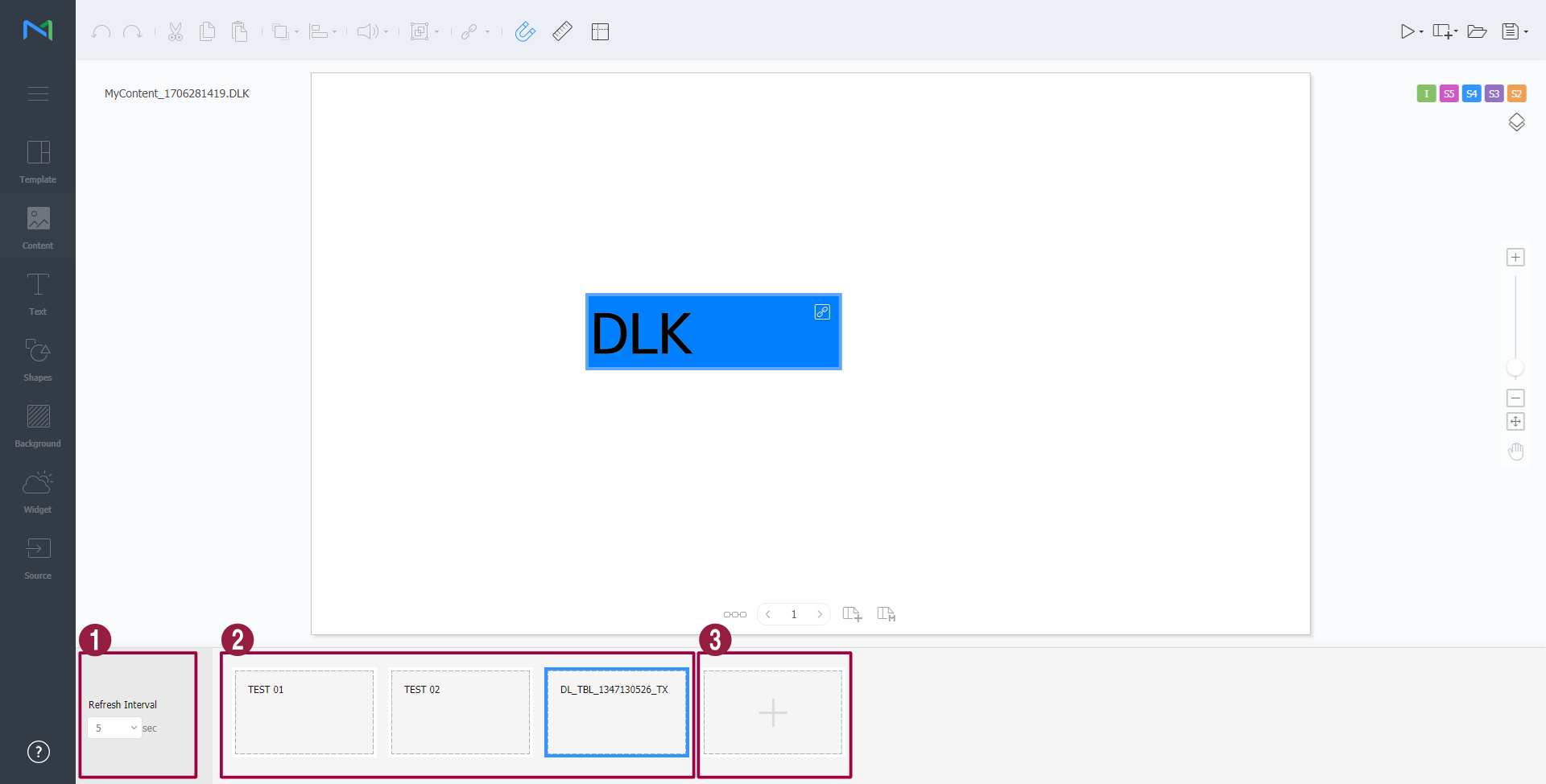
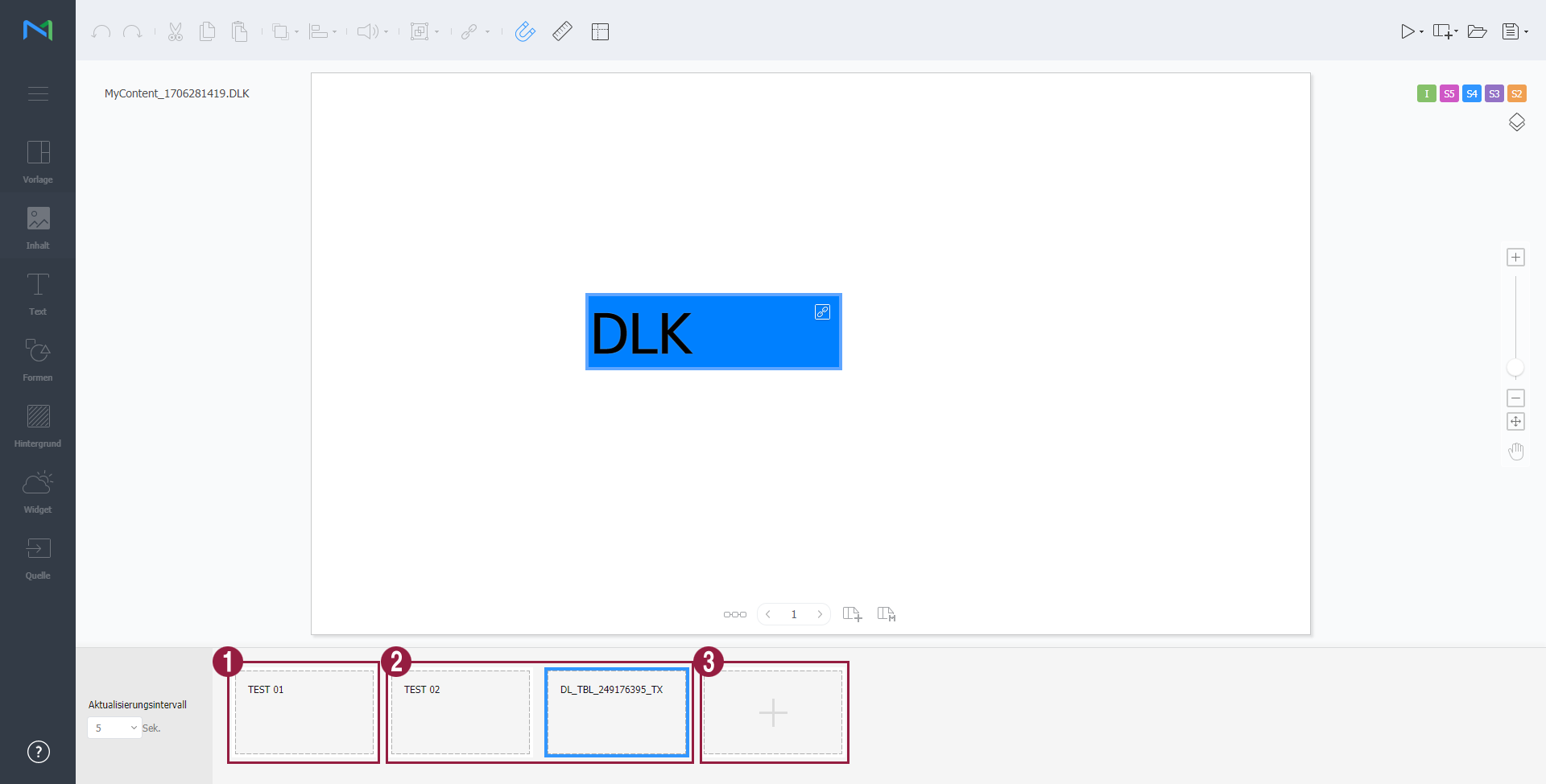
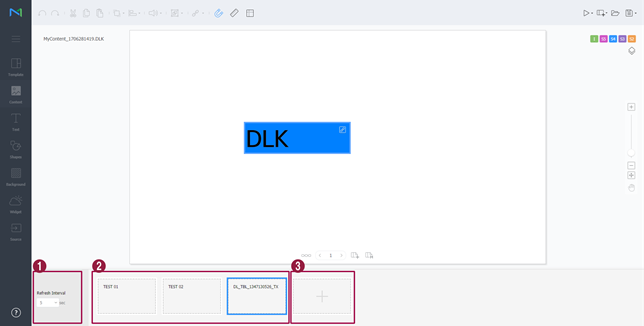
  3. 원하는 기능을 사용하여 DataLink를 관리하세요.

    Stylesheet
    classscreen

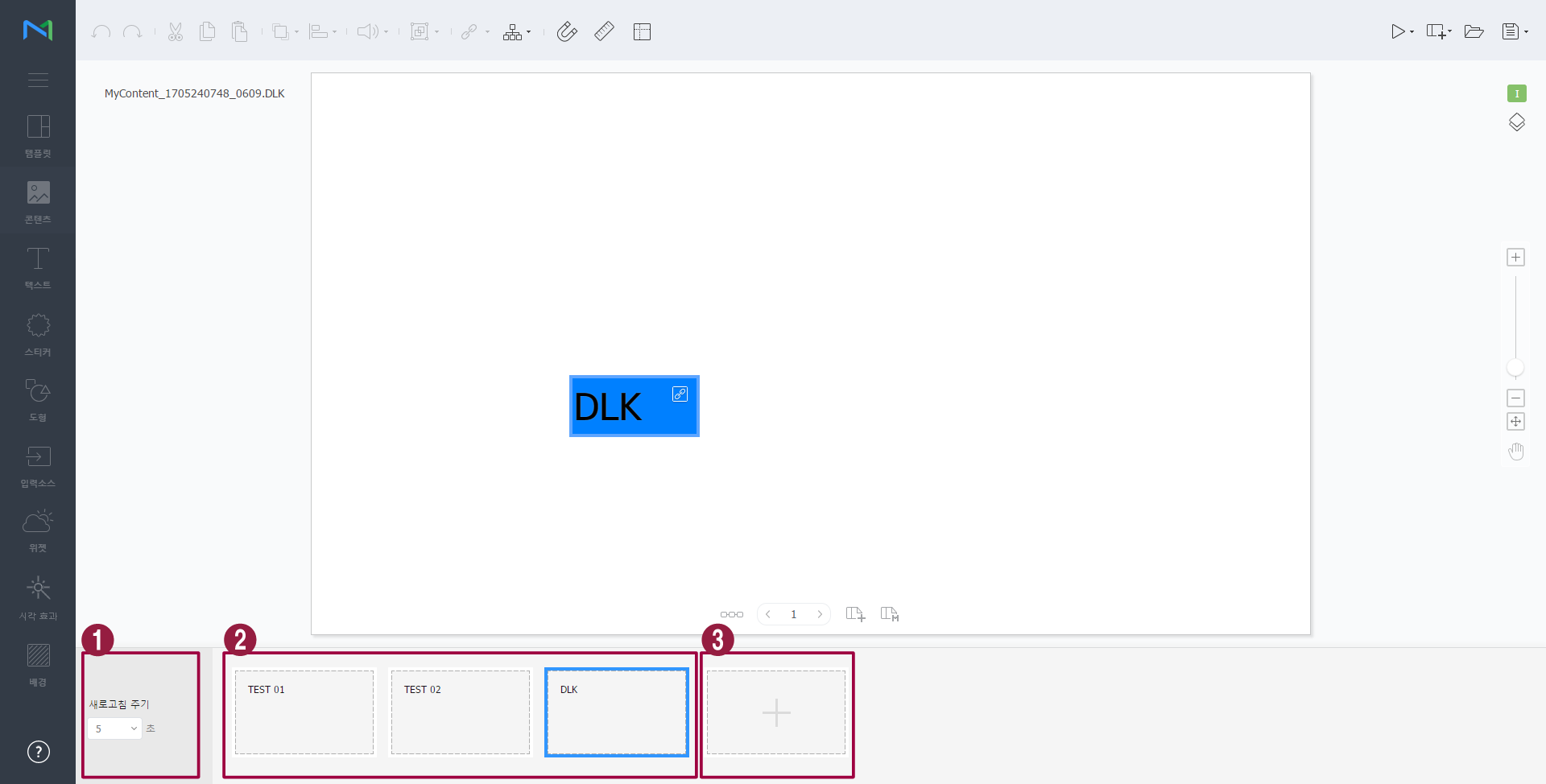
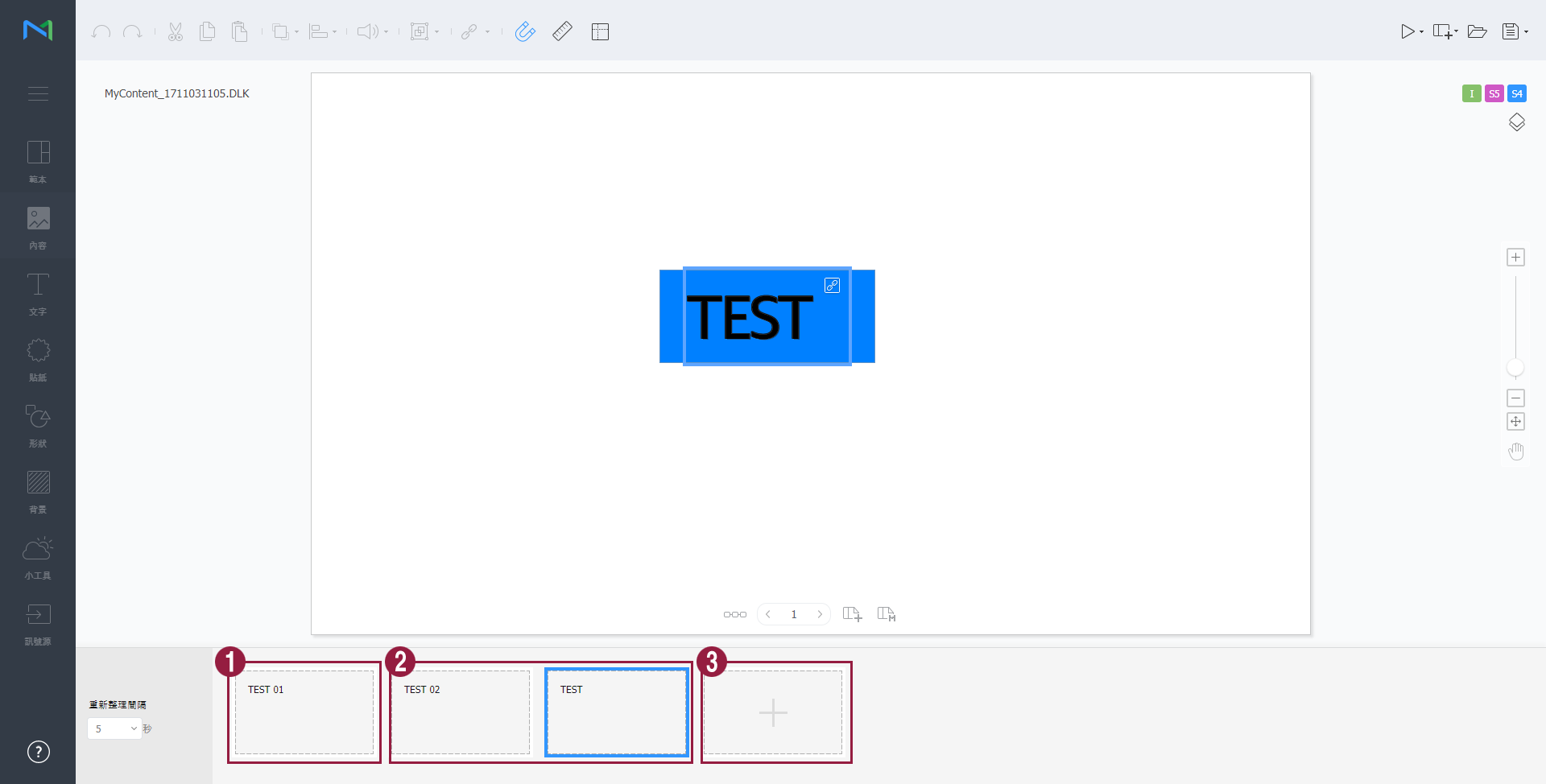
    1DataLink 요소가 업데이트되는 간격을 설정할 수 있습니다.
    2
    • 추가한 데이터를 삭제하려면 삭제할 데이터에 마우스 커서를 올린 후 클릭하세요.
    • 추가한 데이터를 수정하려면 수정할 데이터에 마우스 커서를 올린 후 클릭하세요
    3데이터를 추가할 수 있습니다.

DLK 콘텐츠 수정하기

저장한 DLK 콘텐츠를 불러온 후 수정할 수 있습니다.

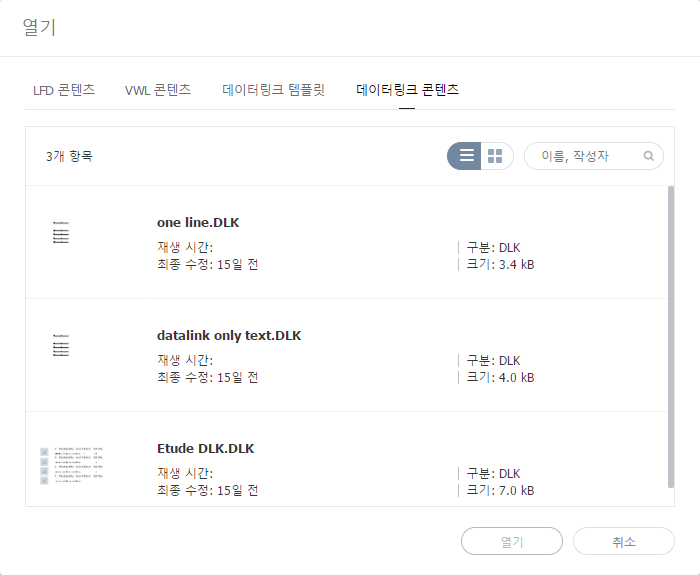
  1. Web Author 화면에서 클릭하세요.
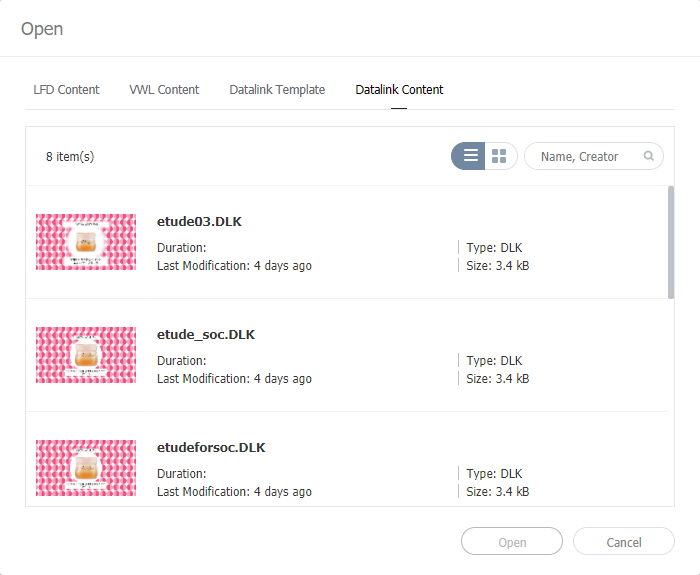
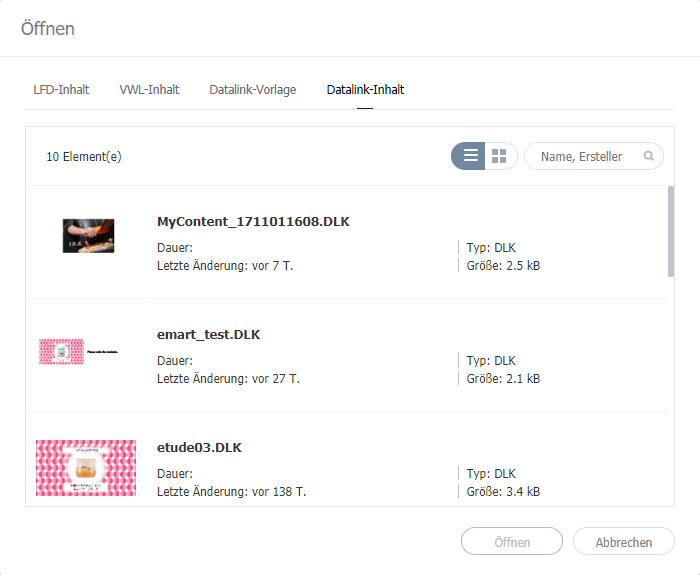
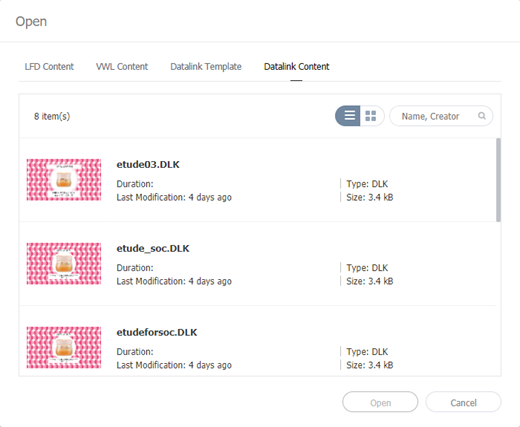
  2. 데이터링크 콘텐츠 탭을 클릭하세요.

    Stylesheet
    classscreen
  3. 원하는 콘텐츠를 선택한 후 열기를 클릭하세요.
  4. DLK 콘텐츠를 생성하는 것과 동일한 방법으로 DLK 콘텐츠를 수정할 수 있습니다.

이벤트 트리거 설정하기

  1. Web Author 화면에서 클릭하세요.
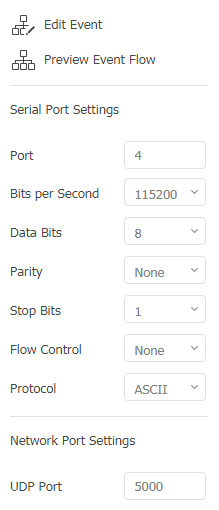
  2. 원하는 기능을 사용하여 외부 이벤트 속성을 설정하세요.

    Stylesheet
    classscreen

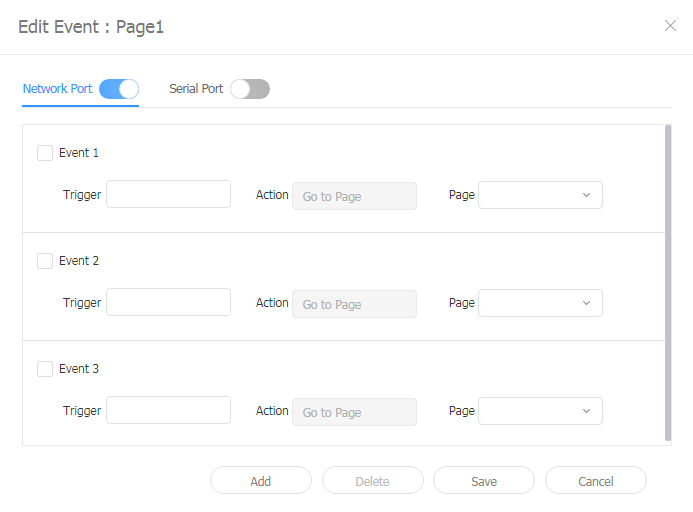
    이벤트 편집

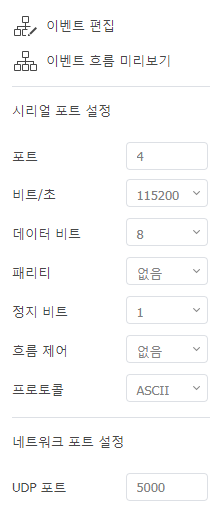
    네트워크 포트 또는 시리얼 포트의 외부 이벤트를 활성화, 비활성화 또는 편집할 수 있습니다. 자세한 내용은 다음을 참조하세요. 이벤트 트리거 구성하기

    이벤트 흐름 미리보기각 페이지에 설정된 이벤트를 확인하고 전체 이벤트 흐름을 한눈에 파악할 수 있습니다. 자세한 내용은 다음을 참조하세요. 이벤트 흐름 미리 보기
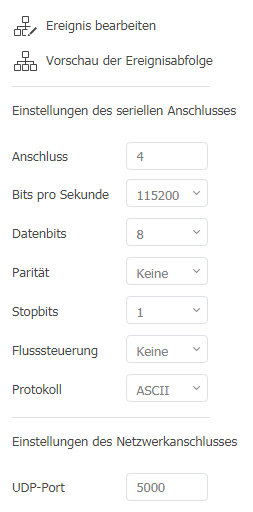
    시리얼 포트 설정포트 번호를 직접 입력하고 시리얼 포트를 설정할 수 있습니다.
    네트워크 포트 설정UDP 포트 번호를 입력하여 네트워크 포트를 설정할 수 있습니다.

Anchor
Configurin_an_event_trigger
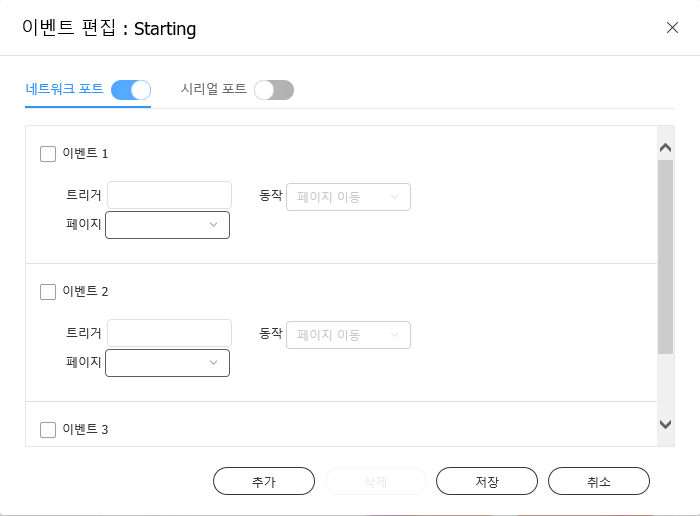
이벤트 트리거 구성하기

  1. Web Author 화면에서 클릭하세요.
  2. 이벤트 편집을 클릭하세요.
  3. 활성화할 포트를 클릭하세요.
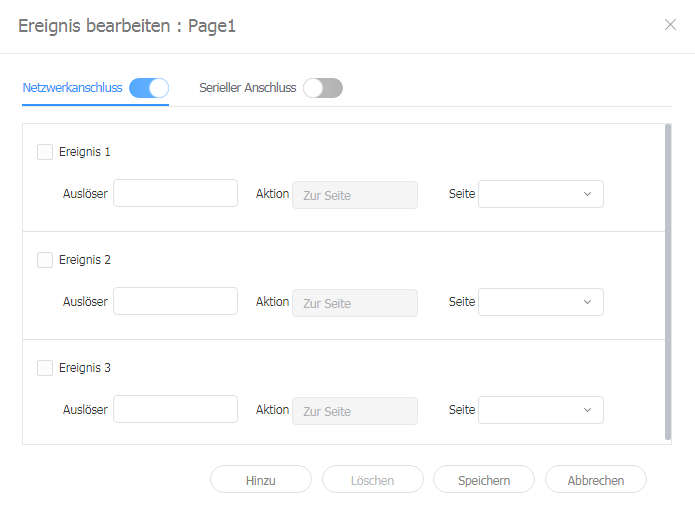
  4. 추가를 클릭해 이벤트의 트리거, 동작, 페이지를 설정하고 저장을 클릭하세요.
    이벤트 설정이 완료되고 해당 이벤트가 활성화됩니다.

    Stylesheet
    classscreen

    Info

    현재 이벤트 동작은 페이지 이동만 사용할 수 있습니다.

Anchor
Previewing_event_schedules
이벤트 흐름 미리 보기

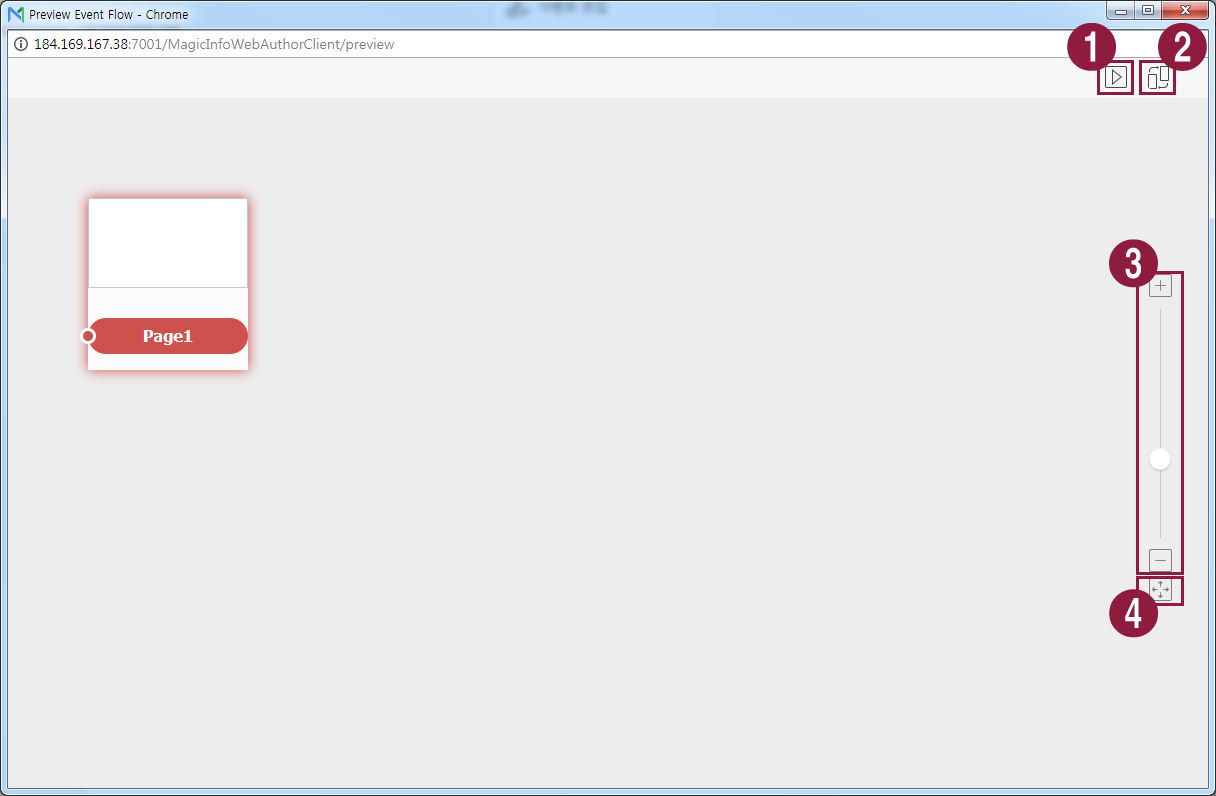
각 페이지에 설정된 이벤트를 확인하고 전체 이벤트 흐름을 한눈에 파악할 수 있습니다.

  1. Web Author 화면에서  클릭하세요.
  2. 이벤트 흐름 미리보기를 클릭하세요.

    Stylesheet
    classscreen

    1각 이벤트가 Player에서 올바르게 발생하는지 테스트할 수 있습니다.
    2자동으로 페이지 썸네일을 정렬합니다.
    3화면을 확대 또는 축소합니다.
    4화면 크기에 맞춥니다.


Sv translation
languageen

Use the DataLink feature to create dynamic content containing elements that change in real time. Map general media files added to Premium Server or external data collected on the DataLink server to this dynamic content.

Info
titleNote

DataLink is a web-based application that collects external data at a specified interval and sends data to Player so that the player can play dynamic content. Refer to the MagicINFO DataLink user guide for details on DataLink.


Use Web Author to create a DataLink template.

  1. Add elements to a content page.

    Info
    titleNote

    The DataLink feature is only compatible with image, video and text elements.

  2. Select an element to which to apply the DataLink feature, and click from the element editor toolbar. You can also select multiple elements at the same time.
    The element displays the icon.

    Stylesheet
    classscreen
  3. With the element selected, configure specific settings.

    /

    Select multiple DataLink elements, and group or ungroup them.

    Configure DataLink setting.

    • Transition Duration: Set intervals to update DataLink elements.
    • Sync Data: Select whether to sync data.
    • Keep Previous Data: Select whether to maintain previous data.
    • Group Data: Select multiple DataLink elements to group them. Grouped DataLink elements will be marked with the playback order icon.
    • Ungroup Data: Ungroup DataLink elements that are grouped together.
    • Edit Conversion Table: Using a data substitution table, replace any data in the DataLink table with text, images or videos. Click Add in the Conversion Table window to add a new conversion table. Select the data to substitute and click Save.


  4. After configuring required settings, click .
  5. Configure save details and click Save and Create DLK.
    The content is saved as a DataLink template.

    Stylesheet
    classscreen

Editing DataLink templates

Import and edit a saved DataLink template.

  1. Click on the Web Author screen.
  2. Click the Datalink Template tab.

    Stylesheet
    classscreen
  3. Select a template and click Edit LFT.
  4. Edit the DataLink template, using the same method to create a DataLink template.

Creating DLK content files


Use a DataLink template to create DLK content to distribute to Player. DLK content can be created either by adding a media file or text or by importing saved DataLink Server settings.

Importing DataLink templates

Import a DataLink template in order to create DLK content.

Info
titleNote

For details on how to create DataLink templates, refer to Creating DataLink templates

  1. Click on the Web Author screen.
  2. Click the Datalink Template tab.

    Stylesheet
    classscreen
  3. Select a template and click Create DLK.
    The DLK content creation page appears.

Creating DLK content by manually entering data

  1. Import a DataLink template.
  2. Select a DataLink element.
    The DataLink management window appears.

    Stylesheet
    classscreen
  3. To add data, click .
  4. Select Direct Input and click Add.

    Stylesheet
    classscreen

  5. Enter details and click Save.

    Stylesheet
    classscreen
    TextEnter text.
    Tag

    Add a tag to the text, if required. Select a tag from the tag list and click Save. It is possible to select more than one tag.

    Info
    titleNote
    • A content file with a tag plays only on a device that has the same tag.
    • To assign a tag to text, first make sure the tag is saved on the Premium Server. For details on adding tags, refer to ► Adding Tags
    • For details on using tags, refer to ► 태그 설정하기
    Tag MatchTypeSet matching conditions if more than one tag is assigned.


  6. After configuring required settings, click .
  7. Configure save details and click Save.
    The content is saved as DLK content.

Creating a DLK file in conjunction with DataLink Server

Create a DLK content file by mapping data, saved in DataLink Server, to a DLK template.

Tip
titleCreating a DLK file in conjunction with DataLink Server

To create a DLK content file in conjunction with DataLink Server, make sure to connect Premium Server to DataLink Server. For details, refer to ► 외부 서버 관리하기

Warning
titleMedia slide elements

It is not possible to map DataLink Server data to media slide elements.

  1. Import a DataLink template.
  2. Select a DataLink element.
    The DataLink management window appears.

    Stylesheet
    classscreen
  3. To add data, click .
  4. Select Link Data and click Add.

    Stylesheet
    classscreen
  5. Enter details and click Save.

    Stylesheet
    classscreen
    Select Data

    Select a DataLink table saved in DataLink Server. In the DataLink table, select data items to use and click Save.

    Tag

    Add tags to the data items, if required. Select a tag from the tag list and click Save. It is possible to select more than one tag.

    Info
    titleNote
    • A content file with a tag plays only on a device that has the same tag.
    • To assign tags to data items, first make sure the tags are saved on the Premium Server. For details on adding tags, refer to ► Adding Tags
    DataLink tags

    Add DataLink tags. To add a DataLink tag, select a column from the DataLink table and click OK. For details on using tags, refer to ► 태그 관리하기

    Conversion Table

    Using a data substitution table, replace any data in the DataLink table with text, images or videos. In the Select Conversion Table window, select a target for substitution and click OK.

    Tag MatchTypeSet matching conditions if more than one tag is assigned.


  6. After configuring required settings, click .
  7. Configure save details and click Save.
    The content is saved as DLK content.
  1. Import a DataLink template or DLK content.
  2. Select a DataLink element.
    The DataLink management window appears.
  3. Manage DataLink, using the following menu items:

    Stylesheet
    classscreen

    1Set intervals to update DataLink elements.
    2
    • To delete added data, hover the mouse pointer over the data item to delete and click .
    • To edit added data, hover the mouse pointer over the data item to edit and click .
    3Add data.

Editing DLK content

Import and edit saved DLK content.

  1. Click on the Web Author screen.
  2. Click the Datalink Content tab.

    Stylesheet
    classscreen
  3. Select a content file and click Open.
  4. Edit the DLK content, using the same method to create DLK content.

Configuring event triggers

  1. Click  on the Web Author screen.
  2. Use the options to configure external event properties.

    Stylesheet
    classscreen

    Edit Event

    Activate, deactivate, or edit external events from a network or serial port. For details, refer to ► Configuring Event Triggers

    Previewing event schedulesThis allows you to view set events per page and general flow for all events. For details, refer to ► Previewing event schedules
    Serial ports SettingsEnter the port number to directly configure the serial port.
    Network ports SettingsThe network port can be set by entering the UDP port number.

Anchor
Configuring_Event_Triggers
Configuring an event trigger

  1. Click  on the Web Author screen.
  2. Click Edit Event.
  3. Click the port to activate.
  4. Click Add to configure the trigger, action, and page settings for the event. Click Save.
    Event settings are now configured and the event is activated.

    Stylesheet
    classscreen

    Info

    Event actions are currently limited to moving to a page.

Anchor
Previewing_event_schedules
Previewing event schedules

This allows you to view set events per page and general flow for all events.

  1. Click  on the Web Author screen.
  2. Click Previewing event schedules

    Stylesheet
    classscreen

    1Test to confirm that each event is triggered in Player as set.
    2Arrange page thumbnails.
    3Zoom in or out of the screen.
    4Fit to screen size.
Sv translation
languageit

La funzionalità DataLink può essere utilizzata per creare contenuti dinamici contenenti elementi che cambiano in tempo reale. Mappare i file multimediali generali aggiunti a Premium Server o i dati raccolti esternamente nel server DataLink a questi contenuti dinamici.

Info
titleNota

DataLink è un'applicazione basata sul web che raccoglie i dati esterni a intervalli specificati e invia i dati a Player per essere utilizzati per la riproduzione di file di contenuti dinamici. Per ulteriori dettagli su DataLink, vedere il manuale utente MagicINFO DataLink.


Utilizzare Web Author per creare un modello DataLink.

  1. Aggiungere elementi a una pagina di contenuti.

    Info
    titleNota

    La funzionalità DataLink è compatibile solo con elementi immagine, video e testo.

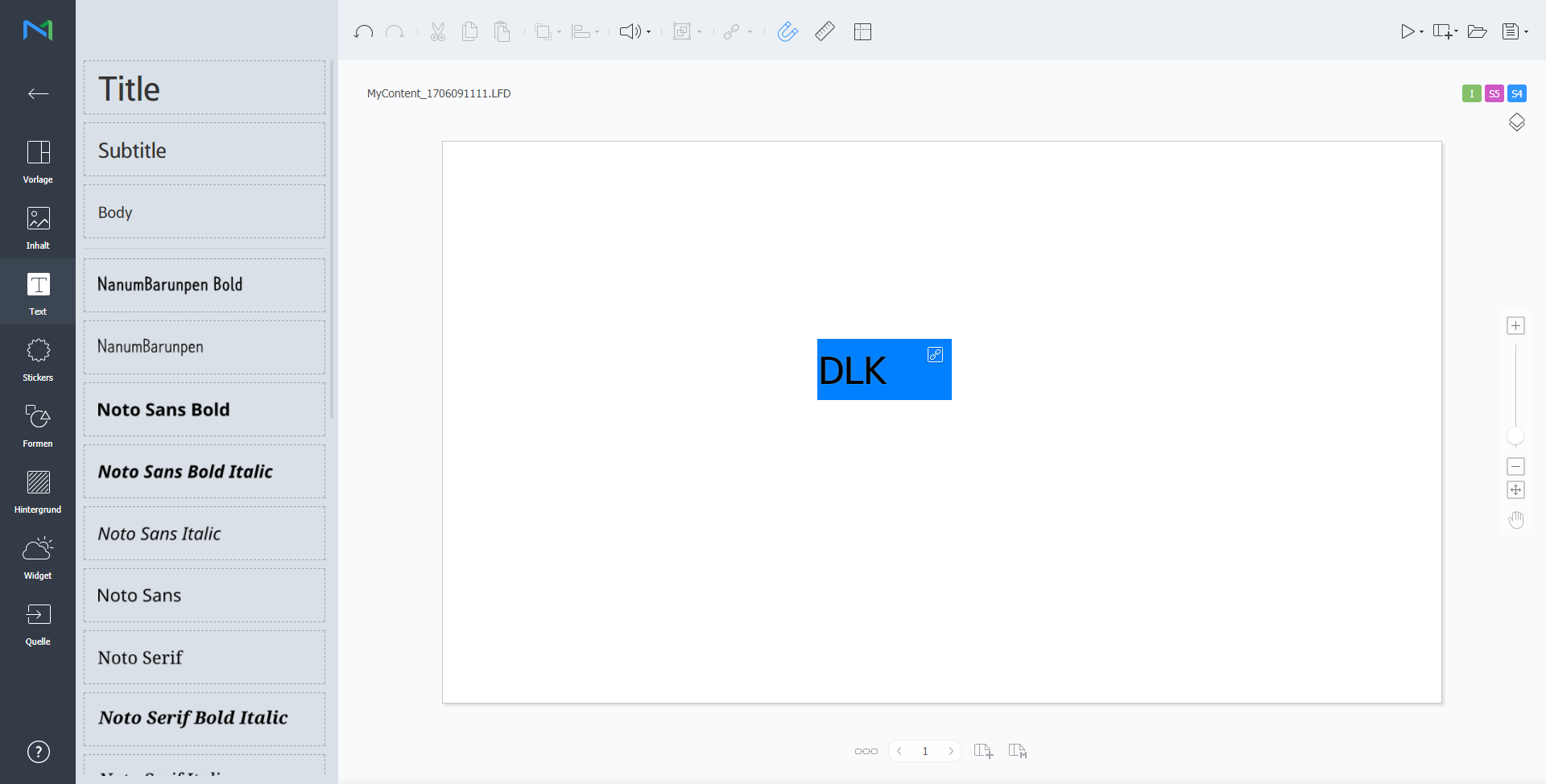
  2. Selezionare un elemento a cui applicare la funzionalità DataLink e cliccare su dalla barra degli strumenti dell’editor di elementi. È inoltre possibile selezionare più elementi contemporaneamente.
    L’elemento mostra l'icona .

    Stylesheet
    classscreen
  3. Con l'elemento selezionato, configurare le impostazioni specifiche.

    /

    Consente di selezionare più elementi DataLink e raggrupparli o separarli.

    Consente di configurare le impostazioni di DataLink.

    • Durata transizione: Consente di impostare intervalli per aggiornare gli elementi di DataLink.
    • Sincronizza dati: Consente di scegliere se sincronizzare i dati.
    • Conserva dati precedenti: Consente di scegliere se mantenere i dati precedenti.


  4. Dopo aver configurato le impostazioni richieste, cliccare su .
  5. Configurare i dettagli da salvare e cliccare su Salva e crea DLK.
    Il contenuto viene salvato come modello DataLink.

    Stylesheet
    classscreen

Importare e modificare un modello DataLink salvato.

  1. Cliccare su nella schermata Web Author.
  2. Cliccare sulla scheda Modello Datalink.

    Stylesheet
    classscreen
  3. Selezionare un modello e cliccare su Modifica LFT.
  4. Modificare il modello DataLink, utilizzando il metodo analogo a quello per creare un modello DataLink.

Creazione di un file di contenuto DLK


Creare un contenuto DLK da distribuire a Player utilizzando un modello DataLink. È possibile creare contenuto DLK aggiungendo un file multimediale o importando le impostazioni salvate di DataLink Server.

Importare un modello DataLink per create un contenuto DLK.

Info
titleNota

Per dettagli su come creare dei modelli DataLink, vedere Creazione di modelli DataLink

  1. Cliccare su nella schermata Web Author.
  2. Cliccare sulla scheda Modello Datalink.

    Stylesheet
    classscreen
  3. Selezionare un modello e cliccare su Crea DLK.
    Viene visualizzata la pagina di creazione del contenuto DLK.

Creazione di contenuto DLK immettendo i dati manualmente

  1. Importare un modello DataLink.
  2. Selezionare un elemento di DataLink.
    Viene visualizzata la pagina di gestione di DataLink.

    Stylesheet
    classscreen
  3. Per aggiungere dati, cliccare su .
  4. Selezionare Inser. diretto e cliccare su Agg.

    Stylesheet
    classscreen

  5. Immettere i dettagli e cliccare su Salva.

    Stylesheet
    classscreen
    TestoConsente di immettere il testo.
    Tag

    Se necessario, aggiungere un tag al testo. Selezionare un tag dall'elenco dei tag e cliccare su Salva. È possibile selezionarne più di uno.

    Info
    titleNota
    • Un file di contenuto con un tag è riprodotto solo su dispositivi che hanno lo stesso tag.
    • Per assegnare un tag al testo, è necessario assicurarsi prima che il tag sia salvato su Premium Server. Per ulteriori dettagli sull'aggiunta di tag, vedere ► Aggiunta di tag
    • Per ulteriori dettagli sull'utilizzo di tag, vedere quanto segue. ► 태그 설정하기
    Tipo corr. tagConsente di impostare condizioni corrispondenti se è assegnato più di un tag.


  6. Dopo aver configurato le impostazioni richieste, cliccare su .
  7. Configurare i dettagli da salvare e cliccare su Salva.
    Il contenuto viene salvato come contenuto DLK.

Creazione di un file DLK in congiunzione con DataLink Server

Crea un file di contenuto DLK mappando i dati, salvati su DataLink Server, a un modello DLK.

Tip
titleCreazione di un file DLK in congiunzione con DataLink Server

Per creare un file di contenuto DLK in congiunzione con DataLink Server, connettere Premium Server a DataLink Server. Per i dettagli, vedere ► 외부 서버 관리하기

Warning
titleElementi presentazione multimediale

Non è possibile mappare i dati DataLink Server a elementi presentazione multimediale.

  1. Importare un modello DataLink.
  2. Selezionare un elemento di DataLink.
    Viene visualizzata la pagina di gestione di DataLink.

    Stylesheet
    classscreen
  3. Per aggiungere dati, cliccare su .
  4. Selezionare Collega dati e cliccare su Aggiungi.

    Stylesheet
    classscreen
  5. Immettere i dettagli e cliccare su Salva.

    Stylesheet
    classscreen
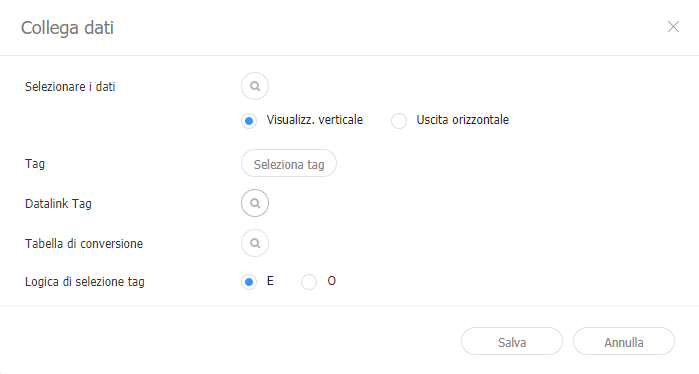
    Selezionare i dati

    Selezionare una tabella DataLink salvata in DataLink Server. Nella tabella DataLink, selezionare i dati da utilizzare e cliccare su Salva.

    Tag

    Se necessario, aggiungere tag ai dati. Selezionare un tag dall'elenco dei tag e cliccare su Salva. È possibile selezionarne più di uno.

    Info
    titleNota
    • Un file di contenuto con un tag è riprodotto solo su dispositivi che hanno lo stesso tag.
    • Per assegnare tag ai dati, è necessario assicurarsi prima che i tag siano salvati su Premium Server. Per ulteriori dettagli sull'aggiunta di tag, vedere ► Aggiunta di tag
    Tag DataLink

    Consente di aggiungere tag DataLink. Per aggiungerne uno, selezionare una colonna dalla tabella DataLink e fare clic su OK. Per ulteriori dettagli sull'utilizzo di tag, vedere quanto segue. ► 태그 관리하기

    Tabella di conversione

    Sostituire i dati nella tabella DataLink con testo, immagini o video utilizzando una tabella di sostituzione dati. Nella finestra Seleziona tabella di conversione, selezionare una destinazione per la sostituzione e cliccare su OK.

    Tipo corr. tagConsente di impostare condizioni corrispondenti se è assegnato più di un tag.


  6. Dopo aver configurato le impostazioni richieste, cliccare su .
  7. Configurare i dettagli da salvare e cliccare su Salva.
    Il contenuto viene salvato come contenuto DLK.
  1. Importare un modello DataLink o del contenuto DLK.
  2. Selezionare un elemento di DataLink.
    Viene visualizzata la pagina di gestione di DataLink.
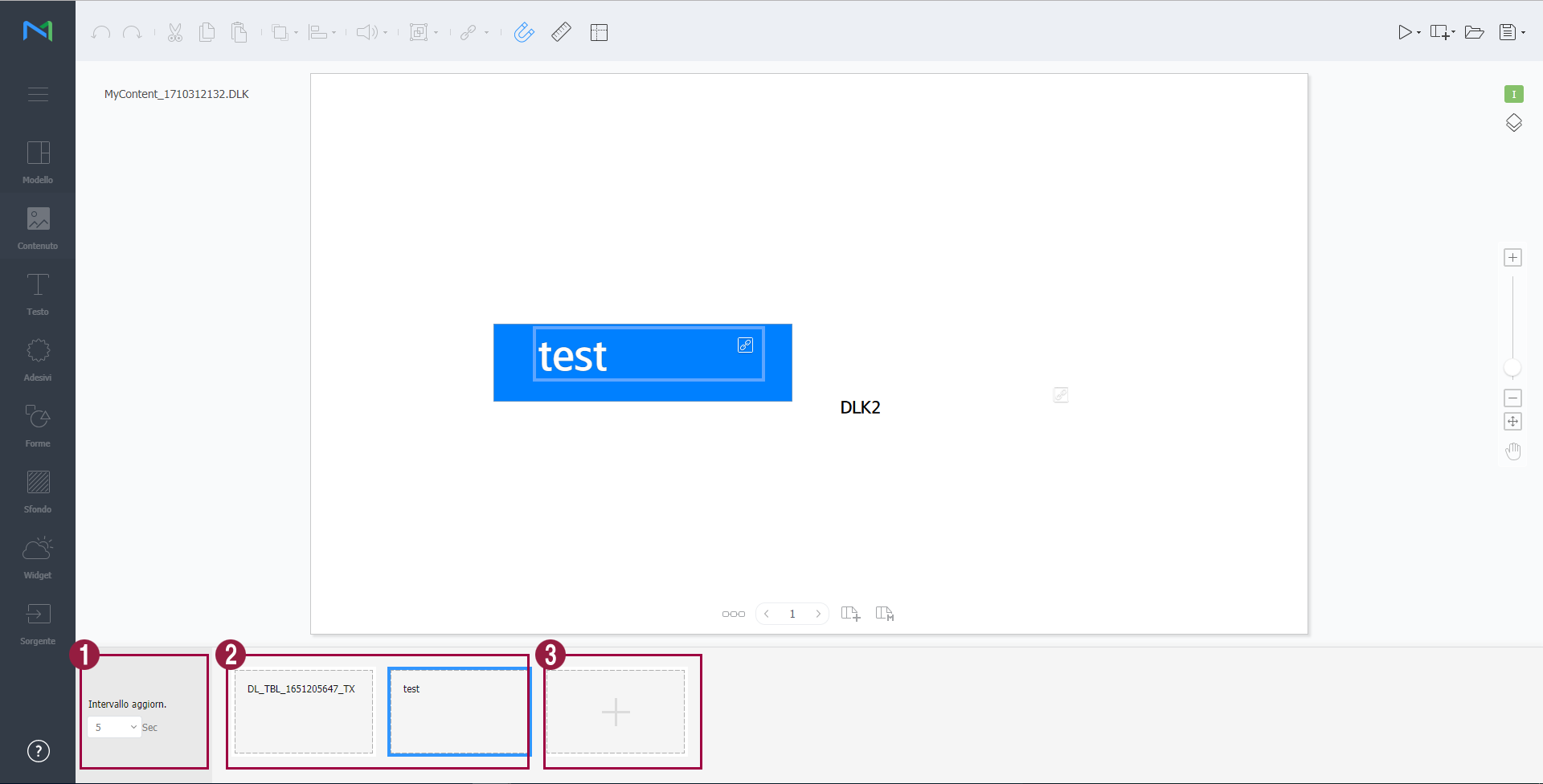
  3. Gestire DataLink, utilizzando le seguenti voci di menu:

    Stylesheet
    classscreen

    1Consente di impostare intervalli per aggiornare gli elementi di DataLink.
    2
    • Per eliminare dei dati aggiunti, passare il puntatore del mouse su di essi e cliccare su .
    • Per modificare dei dati aggiunti, passare il puntatore del mouse su di essi e cliccare su .
    3Consente di aggiungere dati.

Modifica di contenuti DLK

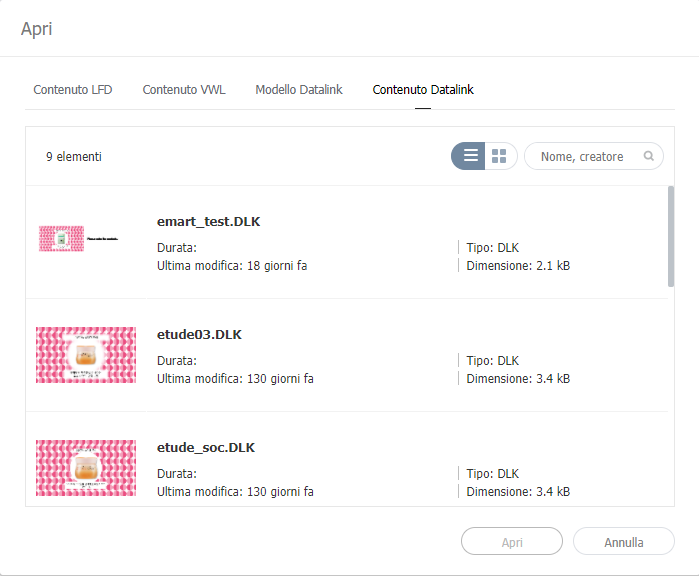
Importare e modificare contenuto salvato di DLK.

  1. Cliccare su nella schermata Web Author.
  2. Cliccare sulla scheda Contenuto Datalink.

    Stylesheet
    classscreen
  3. Selezionare un file di contenuto e cliccare su Apri.
  4. Modificare il contenuto DLK, utilizzando il metodo analogo a quello per creare del contenuto DLK.


Sv translation
languagede

Erstellen Sie mit der Funktion DataLink dynamische Inhalte, die sich in Echtzeit verändernde Elemente enthalten. Ordnen Sie dem Premium Server hinzugefügte allgemeine Mediendateien oder auf dem DataLink-Server eingeholte externe Daten diesen dynamischen Inhalten zu.

Info
titleHinweis

DataLink ist eine webbasierte Anwendung, mit der externe Daten in festen Intervallen erfasst und an den Player zur Wiedergabe dynamischer Inhaltsdateien gesendet werden. Weitere Informationen zu DataLink finden Sie im Benutzerhandbuch zu MagicINFO DataLink.


Erstellen Sie mit dem Web Author eine DataLink-Vorlage.

  1. Fügen Sie einer Inhaltsseite Elemente hinzu.

    Info
    titleHinweis

    Die Funktion DataLink ist nur mit Bild-, Video- und Textelementen kompatibel.

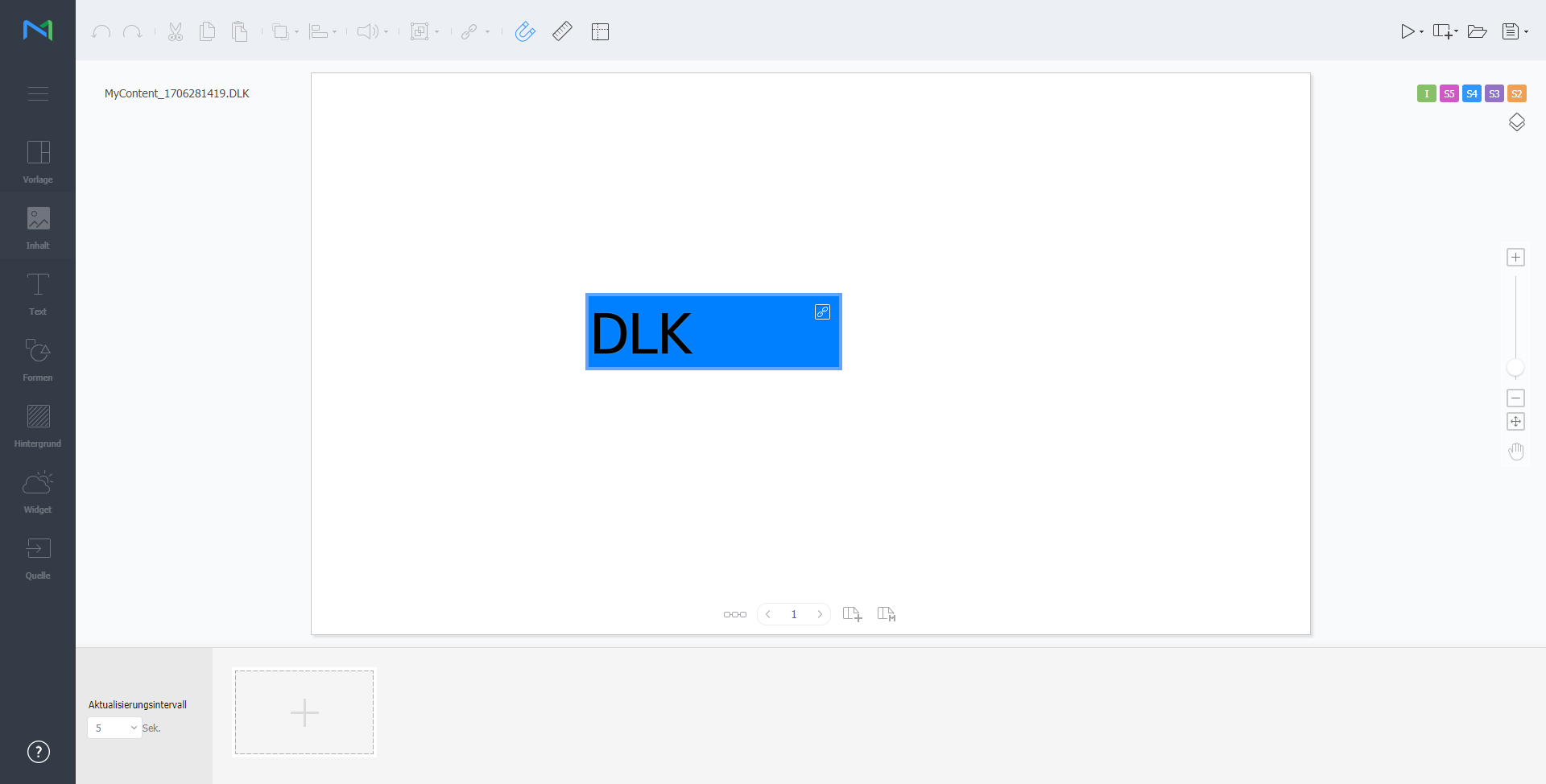
  2. Wählen Sie ein Element zur Anwendung der Funktion DataLink aus und klicken Sie auf der Bearbeitungssymbolleiste auf . Es können gleichzeitig mehrere Elemente ausgewählt werden.
    Für das Element erscheint das Symbol .

    Stylesheet
    classscreen
  3. Konfigurieren Sie unter einem ausgewählten Element spezifische Einstellungen.

    /

    Wählen Sie mehrere DataLink-Elemente aus und nehmen Sie diese in Gruppen auf oder aus diesen heraus.

    Konfigurieren Sie die Einstellung von DataLink.

    • Übergangsdauer: Legen Sie Intervalle zur Aktualisierung von DataLink-Elementen fest.
    • Daten synchronisieren: Wählen Sie aus, ob die Daten synchronisiert werden sollen.
    • Vorherige Daten beibehalten: Wählen Sie aus, ob vorherige Daten erhalten bleiben sollen.
    • Group Data (Daten gruppieren): Wählen Sie mehrere DataLink-Elemente aus, um sie zu gruppieren. Gruppierte DataLink-Elemente werden mit dem Symbol für die Wiedergabereihenfolge markiert.
    • Ungroup Data (Daten aus Gruppen herausnehmen): Gruppierte DataLink-Elemente aus Gruppen herausnehmen.
    • Edit Conversion Table (Umwandlungstabelle bearbeiten) Ersetzen Sie mit einer Datensubstitutionstabelle alle Daten in der DataLink-Tabelle durch Text, Bilder oder Videos. Klicken Sie im Umwandlungstabellenfenster auf Hinzufügen, um eine neue Umwandlungstabelle hinzuzufügen. Wählen Sie die zu ersetzenden Daten aus und klicken Sie auf Speichern.


  4. Klicken Sie nach dem Konfigurieren der erforderlichen Einstellungen auf .
  5. Konfigurieren Sie das Speichern der Details und klicken Sie auf DLK speichern und erstellen.
    Die Inhalte werden als DataLink-Vorlage gespeichert.

    Stylesheet
    classscreen

Importieren und bearbeiten Sie eine gespeicherte DataLink-Vorlage.

  1. Klicken Sie auf auf dem Bildschirm Web Author.
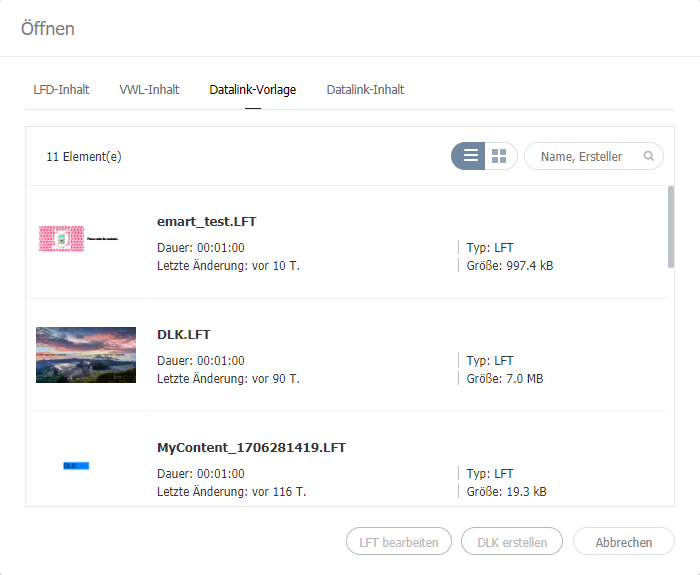
  2. Klicken Sie auf die Registerkarte Datalink-Vorlage.

    Stylesheet
    classscreen
  3. Wählen Sie eine Vorlage aus, und klicken Sie auf LFT bearbeiten.
  4. Bearbeiten Sie die DataLink-Vorlage auf die gleiche Weise wie beim Erstellen einer DataLink-Vorlage.

Erstellen einer DLK-Inhaltsdatei


Erstellen Sie mit einer DataLink-Vorlage einen DLK-Inhalt zum Verteilen an den Player. DLK-Inhalte können entweder durch Hinzufügen von Medien- oder Textdateien oder durch Importieren gespeicherter DataLink-Server-Einstellungen erstellt werden.

Importieren Sie eine DataLink-Vorlage, um DLK-Inhalte zu erstellen.

Info
titleHinweis

Informationen zum Erstellen von DataLink-Vorlagen finden Sie unter DataLink 설정하기

  1. Klicken Sie auf auf dem Bildschirm Web Author.
  2. Klicken Sie auf die Registerkarte Datalink-Vorlage.

    Stylesheet
    classscreen
  3. Wählen Sie eine Vorlage aus, und klicken Sie auf DLK erstellen.
    Die Seite zum Erstellen von DLK-Inhalten wird angezeigt.

Erstellen von DLK-Inhalten durch manuelle Eingabe von Daten

  1. Importieren Sie eine DataLink-Vorlage.
  2. Wählen Sie ein DataLink-Element aus.
    Das DataLink-Verwaltungsfenster wird angezeigt.

    Stylesheet
    classscreen
  3. Klicken Sie zum Hinzufügen von Daten auf .
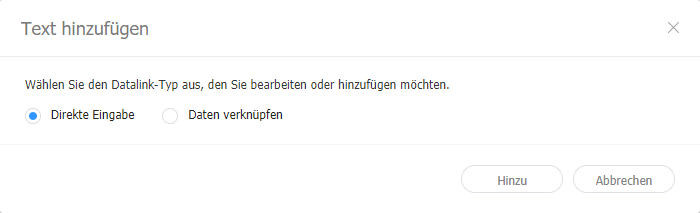
  4. Wählen Sie Direkte Eingabe aus und klicken Sie auf Hinzu.

    Stylesheet
    classscreen

  5. Geben Sie Details ein und klicken Sie auf Speichern.

    Stylesheet
    classscreen
    TestoGeben Sie den Text ein.
    Tag

    Fügen Sie ggf. ein Tag zum Text hinzu. Wählen Sie ein Tag aus der Tagliste aus und klicken Sie auf Speichern. Es kann mehr als ein Tag ausgewählt werden.

    Info
    titleHinweis
    • Eine Inhaltsdatei mit einem Tag kann nur auf einem Gerät mit dem gleichen Tag wiedergegeben werden.
    • Um Text ein Tag zuweisen zu können, müssen Sie zunächst sicherstellen, dass das Tag auf dem Premium Server gespeichert ist. Weitere Informationen zum Hinzufügen von Tags finden Sie unter ► Verwalten von Tags
    • Weitere Informationen zur Verwendung von Tags finden Sie hier: ► Konfigurieren von Tag-Einstellungen
    Tag-MatchTypeLegen Sie Übereinstimmungsbedingungen ein, falls mehr als ein Tag zugewiesen wird.


  6. Klicken Sie nach dem Konfigurieren der erforderlichen Einstellungen auf .
  7. Konfigurieren Sie das Speichern der Details und klicken Sie auf Speichern.
    Die Inhalte werden als DLK-Inhalt gespeichert.

Erstellen Sie eine DLK-Inhaltsdatei durch Abbilden von Daten, die im DataLink Server gespeichert sind, auf eine DLK-Vorlage.

Tip
titleErstellen einer DLK-Datei in Verbindung mit Datalink-Server

Zu Erstellen einer DLK-Inhaltsdatei in Verbindung mit DataLink Server muss Premium Server mit DataLink Server verbunden sein. Einzelheiten entnehmen Sie bitte ► Verwalten externer Server

Warning
titleMedien-Show-Elemente

DataLink Server-Daten können nicht auf Medien-Show-Elemente abgebildet werden.

  1. Importieren Sie eine DataLink-Vorlage.
  2. Wählen Sie ein DataLink-Element aus.
    Das DataLink-Verwaltungsfenster wird angezeigt.

    Stylesheet
    classscreen
  3. Klicken Sie zum Hinzufügen von Daten auf .
  4. Wählen Sie Daten verknüpfen aus und klicken Sie auf Hinzu.

    Stylesheet
    classscreen
  5. Geben Sie Details ein und klicken Sie auf Speichern.

    Stylesheet
    classscreen
    Daten auswählen

    Wählen Sie eine DataLink-Tabelle, die in DataLink Server gespeichert ist, aus. Wählen Sie in der DataLink-Liste die zu verwendenden Datenelemente aus und klicken Sie auf Speichern.

    Tag

    Fügen Sie ggf. Tags zu Datenelementen hinzu. Wählen Sie ein Tag aus der Tagliste aus und klicken Sie auf Speichern. Es kann mehr als ein Tag ausgewählt werden.

    Info
    titleHinweis
    • Eine Inhaltsdatei mit einem Tag kann nur auf einem Gerät mit dem gleichen Tag wiedergegeben werden.
    • Um Datenelementen Tags zuweisen zu können, müssen Sie zunächst sicherstellen, dass die Tags auf dem Premium Server gespeichert sind. Weitere Informationen zum Hinzufügen von Tags finden Sie unter ► Verwalten von Tags
    DataLink-Tags

    Fügen Sie DataLink-Tags hinzu. Wählen Sie zum Hinzufügen eines DataLink-Tags eine Spalte in der DataLink-Liste aus und klicken Sie auf OK. Weitere Informationen zur Verwendung von Tags finden Sie hier: ► Verwalten von Tags

    Umwandlungstabelle

    Ersetzen Sie mit einer Datensubstitutionstabelle alle Daten in der DataLink-Tabelle durch Text, Bilder oder Videos. Wählen Sie im Fenster Umwandlungstabelle auswählen ein Ersetzungsziel aus und klicken Sie auf OK.

    Tag-MatchTypeLegen Sie Übereinstimmungsbedingungen ein, falls mehr als ein Tag zugewiesen wird.


  6. Klicken Sie nach dem Konfigurieren der erforderlichen Einstellungen auf .
  7. Konfigurieren Sie das Speichern der Details und klicken Sie auf Speichern.
    Die Inhalte werden als DLK-Inhalt gespeichert.
  1. Importieren Sie eine DataLink-Vorlage oder einen DLK-Inhalt.
  2. Wählen Sie ein DataLink-Element aus.
    Das DataLink-Verwaltungsfenster wird angezeigt.
  3. Verwalten Sie DataLink unter dem Einsatz folgender Menüelemente:

    Stylesheet
    classscreen

    1Legen Sie Intervalle zur Aktualisierung von DataLink-Elementen fest.
    2
    • Um hinzugefügte Daten zu löschen, bewegen Sie den Mauszeiger auf das zu löschende Datenelement und klicken Sie auf .
    • Um hinzugefügte Daten zu bearbeiten, bewegen Sie den Mauszeiger auf das zu bearbeitende Datenelement und klicken Sie auf .
    3Fügen Sie Daten hinzu.

Bearbeiten von DLK-Inhalten

Importieren und bearbeiten Sie gespeicherte DLK-Inhalte.

  1. Klicken Sie auf auf dem Bildschirm Web Author.
  2. Klicken Sie auf die Registerkarte Datalink-Inhalt.

    Stylesheet
    classscreen
  3. Wählen Sie eine Inhaltsdatei aus und klicken Sie auf Öffnen.
  4. Bearbeiten Sie die DLK-Inhalte auf die gleiche Weise wie beim Erstellen von DLK-Inhalten.


Konfigurieren von Ereignisauslösern

  1. Klicken Sie auf  auf dem Bildschirm Web Author.
  2. Verwenden Sie die Optionen zum Konfigurieren der Eigenschaften von externen Ereignissen.

    Stylesheet
    classscreen

    Ereignis bearbeiten

    Aktivieren, deaktivieren oder bearbeiten Sie externe Ereignisse von einem Netzwerk oder einem seriellen Port aus. Einzelheiten entnehmen Sie bitte ► Konfigurieren eines Ereignisauslösers

    Previewing event schedules (Vorschau von Ereigniszeitplänen ansehen)Hiermit können Sie eingestellte Ereignisse pro Seite und den allgemeinen Ablauf für alle Ereignisse anzeigen. Einzelheiten entnehmen Sie bitte ► Vorschau von Ereigniszeitplänen ansehen
    Serial ports Settings (Einstellungen von seriellen Ports)Geben Sie die Port-Nummer ein, um den seriellen Port direkt zu konfigurieren.
    Network ports Settings (Einstellungen von Netzwerk-Ports)Der Netzwerk-Port kann durch Eingabe der UDP-Portnummer eingestellt werden.

Anchor
Configurin_an_event_trigger
Konfigurieren eines Ereignisauslösers

  1. Klicken Sie auf  auf dem Bildschirm Web Author.
  2. Auf Edit Event (Ereignis bearbeiten) klicken.
  3. Auf den zu aktivierenden Port klicken.
  4. Auf Hinzufügen klicken, um die Auslöser-, Handlungs- und Seiteneinstellungen für das Ereignis zu konfigurieren. Klicken Sie auf Speichern.
    Ereigniseinstellungen sind jetzt konfiguriert und das Ereignis ist aktiviert.

    Stylesheet
    classscreen

    Info

    Ereignishandlungen sind aktuell auf das Bewegen auf eine Seite beschränkt.

Anchor
Previewing_event_schedules
Vorschau von Ereigniszeitplänen ansehen

Hiermit können Sie eingestellte Ereignisse pro Seite und den allgemeinen Ablauf für alle Ereignisse anzeigen.

  1. Klicken Sie auf  auf dem Bildschirm Web Author.
  2. Auf Previewing event schedules (Vorschau von Ereigniszeitplänen ansehen) klicken

    Stylesheet
    classscreen

    1Testen zum Bestätigen, dass jedes Ereignis wie eingestellt im Player ausgelöst wird.
    2Seiten-Miniaturen anordnen.
    3In den Bildschirm hinein-/herauszoomen.
    4An Bildschirmgröße anpassen.


Sv translation
languagezh_TW

使用 DataLink 功能來建立包含即時變更元件的動態內容。將新增至 Premium Server 的一般媒體檔案或 DataLink 伺服器上收集的外部資料對應至此動態內容。

Info
title附註

DataLink 為網頁式的應用程式,依指定間隔收集外部資料並傳送資料至 Player 以便用來播放動態內容檔案。請參閱 MagicINFO DataLink 使用者導覽,了解關於 DataLink 的詳細資料。


使用 Web Author 來建立 DataLink 範本。

  1. 新增元件至內容頁面。

    Info
    title附註

    DataLink 功能僅相容於圖片、視訊和文字元件。

  2. 選擇要套用 DataLink 功能的元件,並從元件編輯器工具列按一下 。您也可以同時選擇多個元件。
    元件會顯示 圖示。

    Stylesheet
    classscreen
  3. 選擇元件後,進行特定的設定。

    /

    選擇多個 DataLink 元件,並組成群組或取消群組。

    設定 DataLink 設定。

    • 轉換持續時間:設定更新 DataLink 元件的時間間隔。
    • 同步資料:選擇是否同步資料。
    • 保留先前的資料:選擇是否保留先前的資料。


  4. 設定必要的設定後,按一下
  5. 設定儲存詳細資料並按一下儲存並建立 DLK
    內容會儲存為 DataLink 範本。

    Stylesheet
    classscreen

編輯 DataLink 範本

匯入並編輯已儲存的 DataLink 範本。

  1. 按一下 Web Author 畫面上的
  2. 按一下 Datalink 範本索引標籤。

    Stylesheet
    classscreen
  3. 選擇範本並按一下編輯 LFT
  4. 編輯 DataLink 範本,使用相同的方式建立 DataLink 範本。

建立 DLK 內容檔案


使用 DataLink 範本,建立 DLK 內容以分配至 Player。可透過新增媒體檔案或文字,或匯入已儲存的 DataLink Server 設定來建立DLK 內容。

匯入 DataLink 範本

匯入 DataLink 範本以建立 DLK 內容。

Info
title附註

關於如何建立 DataLink 範本的詳細資訊,請參閱 DataLink 설정하기

  1. 按一下 Web Author 畫面上的
  2. 按一下 Datalink 範本索引標籤。

    Stylesheet
    classscreen
  3. 選擇範本並按一下建立 DLK
    會出現 DLK 內容建立頁面。

手動輸入資料以建立 DLK 內容

  1. 匯入 DataLink 範本。
  2. 選擇 DataLink 元件。
    會出現 DataLink 管理視窗。

    Stylesheet
    classscreen
  3. 若要新增資料,請按一下
  4. 選擇直接輸入並按一下新增

    Stylesheet
    classscreen

  5. 輸入詳細資料並按一下儲存

    Stylesheet
    classscreen
    文字輸入文字。
    標籤

    如有需要,請新增標籤至文字。從標籤清單中選擇標籤,並按一下儲存。可選擇多個標籤。

    Info
    title附註
    • 有標籤的內容檔案僅會在有相同標籤的裝置上播放。
    • 若要指派標籤至文字,請先確認標籤已儲存在 Premium Server 上。關於新增標籤的詳細資訊,請參閱 ► 태그 관리하기#adding_tags
    • 請參閱下列內容,以瞭解使用標籤的詳細資訊。► 태그 설정하기
    標籤比對類型若指派了多個標籤,請設定相符條件。


  6. 設定必要的設定後,按一下
  7. 設定儲存詳細資料並按一下儲存
    內容會儲存為 DLK 內容。

建立與 DataLink Server 連接的 DLK 檔案

將儲存在 DataLink Server 中的資料對應至 DLK 範本,以建立 DLK 內容檔案。

Tip
title建立與 DataLink Server 連接的 DLK 檔案

若要建立與 DataLink Server 連接的 DLK 內容檔案,請確認將 Premium Server 連接至 DataLink Server。如需詳細資料,請參閱 ► 외부 서버 관리하기

Warning
title媒體滑動元件

無法將 DataLink Server 資料對應至媒體滑動元件。

  1. 匯入 DataLink 範本。
  2. 選擇 DataLink 元件。
    會出現 DataLink 管理視窗。

    Stylesheet
    classscreen
  3. 若要新增資料,請按一下
  4. 選擇連結資料並按一下新增

    Stylesheet
    classscreen
  5. 輸入詳細資料並按一下儲存

    Stylesheet
    classscreen
    選擇資料

    選擇儲存在 DataLink 中的 DataLink Server 表格。在 DataLink 資料表中,選擇要使用的資料項目並按一下儲存

    標籤

    如有需要,請新增標籤至資料項目。從標籤清單中選擇標籤,並按一下儲存。可選擇多個標籤。

    Info
    title附註
    • 有標籤的內容檔案僅會在有相同標籤的裝置上播放。
    • 若要指派標籤至資料項目,請先確認標籤已儲存在 Premium Server 上。關於新增標籤的詳細資訊,請參閱 ► 태그 관리하기#adding_tags
    DataLink 標籤

    新增 DataLink 標籤。若要新增 DataLink 標籤,請從 DataLink 資料表中選擇欄位並按一下確定。請參閱下列內容,以瞭解使用標籤的詳細資訊。► 태그 관리하기

    轉換資料表

    使用資料替代表格,以文字、圖片或影片取代 DataLink 表格中的任何資料。在選擇轉換資料表視窗中,選擇替代目標並按一下確定

    標籤比對類型若指派了多個標籤,請設定相符條件。


  6. 設定必要的設定後,按一下
  7. 設定儲存詳細資料並按一下儲存
    內容會儲存為 DLK 內容。
  1. 匯入 DataLink 範本或 DLK 內容。
  2. 選擇 DataLink 元件。
    會出現 DataLink 管理視窗。
  3. 使用下列選單項目管理 DataLink:

    Stylesheet
    classscreen

    1設定更新 DataLink 元件的時間間隔。
    2
    • 若要刪除已新增的資料,請將滑鼠游標移動到要刪除的資料項目並按一下
    • 若要編輯已新增的資料,請將滑鼠游標移動到要編輯的資料項目並按一下
    3新增資料。

編輯 DLK 內容

匯入並編輯已儲存的 DLK 內容。

  1. 按一下 Web Author 畫面上的
  2. 按一下 Datalink 內容索引標籤。

    Stylesheet
    classscreen
  3. 選擇內容檔案並按一下開啟
  4. 編輯 DLK 內容,使用相同方式建立 DLK 內容。


Sv translation
languagees

Utilice la función DataLink para crear contenido dinámico que incluya elementos que van cambiando en tiempo real. Asigne archivos multimedia generales añadidos a Premium Server o datos externos recogidos en el servidor DataLink a este contenido dinámico.

Info
titleNota

DataLink es una aplicación basada en web que recoge datos externos a intervalos determinados y los envía a Player para reproducir archivos de contenido dinámicos. Consulte la guía de usuario de MagicINFO DataLink para obtener más información acerca de DataLink.


Utilice Web Author para crear una plantilla DataLink.

  1. Añada elementos a una página de contenido.

    Info
    titleNota

    La función DataLink solo es compatible con elementos de imagen, vídeo o texto.

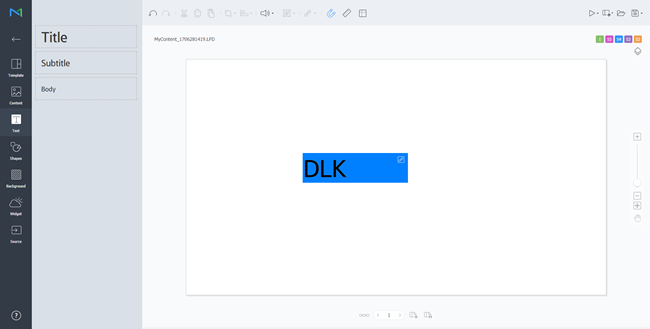
  2. Seleccione un elemento al que aplicar la función DataLink y haga clic en en la barra de herramientas del editor de elementos. También puede seleccionar varios elementos a la vez.
    El elemento muestra el icono .

    Stylesheet
    classscreen
  3. Con el elemento seleccionado, configure los ajustes específicos.

    /

    Seleccione varios elementos DataLink y agrúpelos o anule su agrupación.

    Configure el ajuste DataLink.

    • Duración de transición: establezca los intervalos para actualizar los elementos DataLink.
    • Sincronizar datos: seleccione si desea sincronizar o no los datos.
    • Mantener datos anteriores: seleccione si desea conservar o no los datos anteriores.


  4. Tras configurar los ajustes necesarios, haga clic en .
  5. Configure los detalles de almacenamiento y haga clic en Guardar y crear DLK.
    El contenido se guardará como una plantilla DataLink.

    Stylesheet
    classscreen

Importe y edite una plantilla DataLink guardada.

  1. Haga clic en en la pantalla Web Author.
  2. Haga clic en la pestaña Plantilla de Datalink.

    Stylesheet
    classscreen
  3. Seleccione una plantilla y haga clic en Editar LFT.
  4. Edite la plantilla DataLink siguiendo el mismo método que para crear una plantilla DataLink.

Creación de un archivo de contenido DLK


Utilice una plantilla DataLink para crear contenido DLK que se distribuirá a Player. Puede crear contenido DLK añadiendo un archivo multimedia o un texto o bien importando ajustes de DataLink Server guardados.

Importe una plantilla DataLink para crear contenido DLK.

Info
titleNota

Para obtener detalles sobre cómo crear plantillas de DataLink, consulte ► DataLink 설정하기.

  1. Haga clic en en la pantalla Web Author.
  2. Haga clic en la pestaña Plantilla de Datalink.

    Stylesheet
    classscreen
  3. Seleccione una plantilla y haga clic en Crear DLK.
    Aparecerá la página de creación de contenidos DLK.

Creación de contenido DLK introduciendo datos manualmente

  1. Importe una plantilla DataLink.
  2. Seleccione un elemento DataLink.
    Aparecerá la ventana de administración de DataLink.

    Stylesheet
    classscreen
  3. Para añadir datos, haga clic en .
  4. Seleccione Entrada directa y haga clic en Añadir.

    Stylesheet
    classscreen

  5. Introduzca los detalles y haga clic en Guardar.

    Stylesheet
    classscreen
    TextoIntroduzca texto.
    Etiqueta

    Añada una etiqueta al texto, en caso necesario. Seleccione una etiqueta en la lista de etiquetas y haga clic en Guardar. Es posible seleccionar más de una etiqueta.

    Info
    titleNota
    • Los elementos de contenido con etiqueta solo se reproducen en dispositivos que tengan la misma etiqueta.
    • Para asignar una etiqueta al texto, asegúrese antes de que la etiqueta está guardada en Premium Server. Para obtener detalles sobre la adición de etiquetas, consulte ► Administración de etiquetas.
    • Para obtener más información sobre el uso de etiquetas consulte lo siguiente: ► Configuración de etiquetas
    lógica de selección de etiquetas
    Establezca las condiciones de coincidencia si asigna más de una etiqueta.


  6. Tras configurar los ajustes necesarios, haga clic en .
  7. Configure los detalles de almacenamiento y haga clic en Guardar.
    El contenido se guardará como contenido DLK.

Crear un archivo DLK en combinación con DataLink Server

Puede crear un archivo de contenido DLK asignando datos guardados en DataLink Server a una plantilla DLK.

Tip
titleCrear un archivo DLK en combinación con DataLink Server

Para crear un archivo de contenido DLK en combinación con DataLink Server, asegúrese de conectar Premium Server a DataLink Server. Para obtener detalles al respecto, consulte ► 외부 서버 관리하기

Warning
titleElementos de presentación multimedia

No es posible asignar datos DataLink Server a elementos de presentación multimedia.

  1. Importe una plantilla DataLink.
  2. Seleccione un elemento DataLink.
    Aparecerá la ventana de administración de DataLink.

    Stylesheet
    classscreen
  3. Para añadir datos, haga clic en .
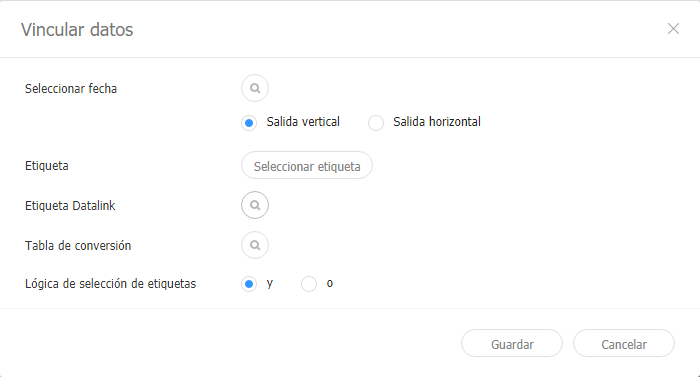
  4. Seleccione Vincular datos y haga clic en Añadir.

    Stylesheet
    classscreen
  5. Introduzca los detalles y haga clic en Guardar.

    Stylesheet
    classscreen
    Seleccionar fecha

    Seleccione una tabla DataLink guardada en DataLink Server. En la tabla DataLink, seleccione los elementos de datos que desee utilizar y haga clic en Guardar.

    Etiqueta

    Añada etiquetas a los elementos de datos, en caso necesario. Seleccione una etiqueta en la lista de etiquetas y haga clic en Guardar. Es posible seleccionar más de una etiqueta.

    Info
    titleNota
    • Los elementos de contenido con etiqueta solo se reproducen en dispositivos que tengan la misma etiqueta.
    • Para asignar etiquetas a los elementos de datos, asegúrese antes de que las etiquetas están guardadas en Premium Server. Para obtener detalles sobre la adición de etiquetas, consulte ► 태그 관리하기#adding_tags.
    Etiquetas DataLink

    Añada etiquetas DataLink. Para añadir una etiqueta DataLink, seleccione una columna en la tabla DataLink y haga clic en Aceptar. Para obtener más información sobre el uso de etiquetas consulte lo siguiente: ► 태그 관리하기

    Tabla de conversión

    Utilice una tabla de sustitución de datos para sustituir los datos de la tabla DataLink con texto, imágenes o vídeos. En la ventana Seleccionar tabla de conversión, seleccione un objetivo para la sustitución y haga clic en Aceptar.

    lógica de selección de etiquetas
    Establezca las condiciones de coincidencia si asigna más de una etiqueta.


  6. Tras configurar los ajustes necesarios, haga clic en .
  7. Configure los detalles de almacenamiento y haga clic en Guardar.
    El contenido se guardará como contenido DLK.
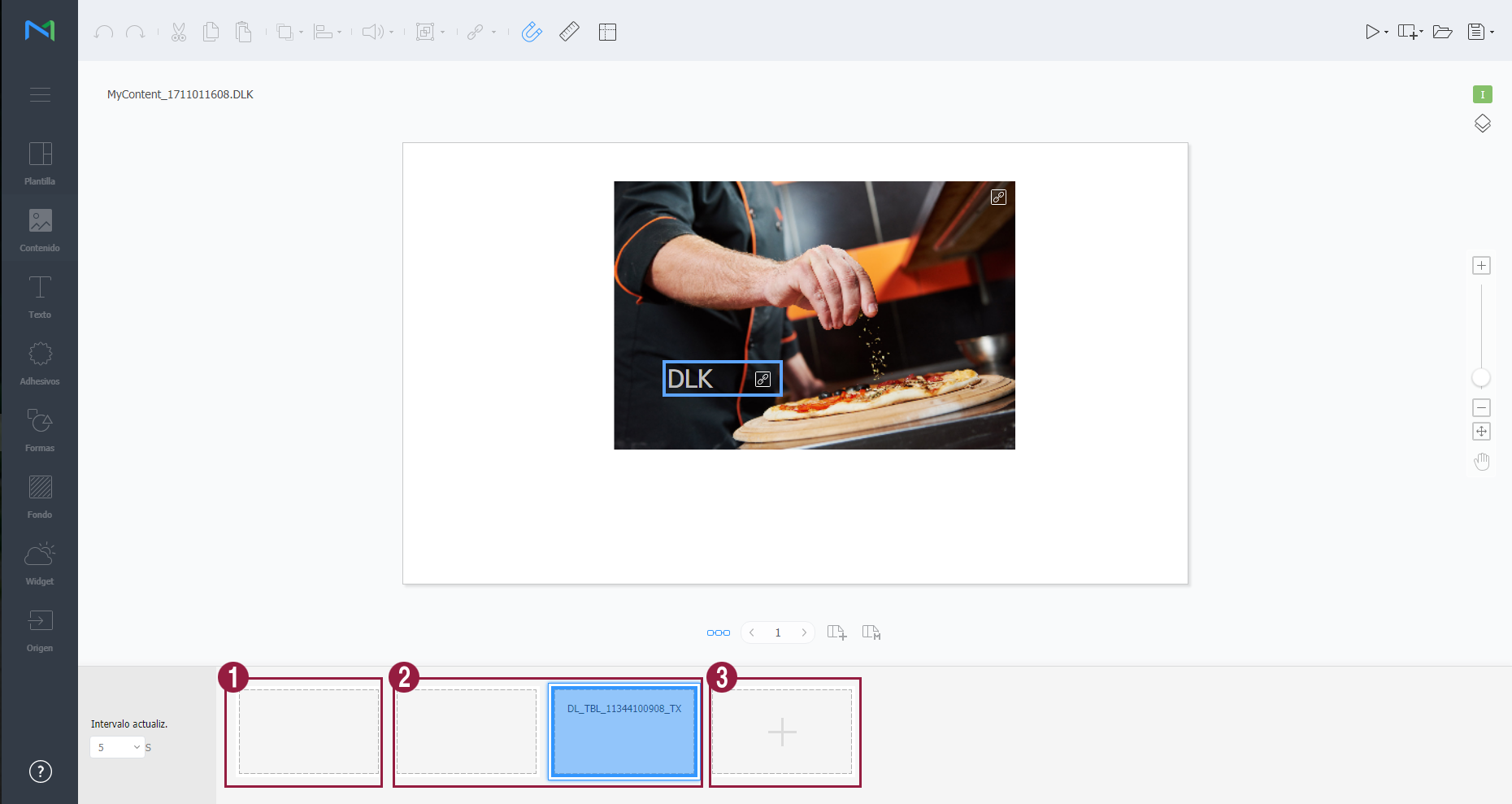
  1. Importe una plantilla DataLink o un contenido DLK.
  2. Seleccione un elemento DataLink.
    Aparecerá la ventana de administración de DataLink.
  3. Administre DataLink, utilizando los siguientes elementos de menú:

    Stylesheet
    classscreen

    1establezca los intervalos para actualizar los elementos DataLink.
    2
    • Para eliminar datos añadidos, coloque el puntero del ratón sobre el elemento de datos que desee eliminar y haga clic en .
    • Para editar datos añadidos, coloque el puntero del ratón sobre el elemento de datos que desee editar y haga clic en .
    3Añada datos.

Edición de contenido DLK

Importe y edite contenido DLK guardado.

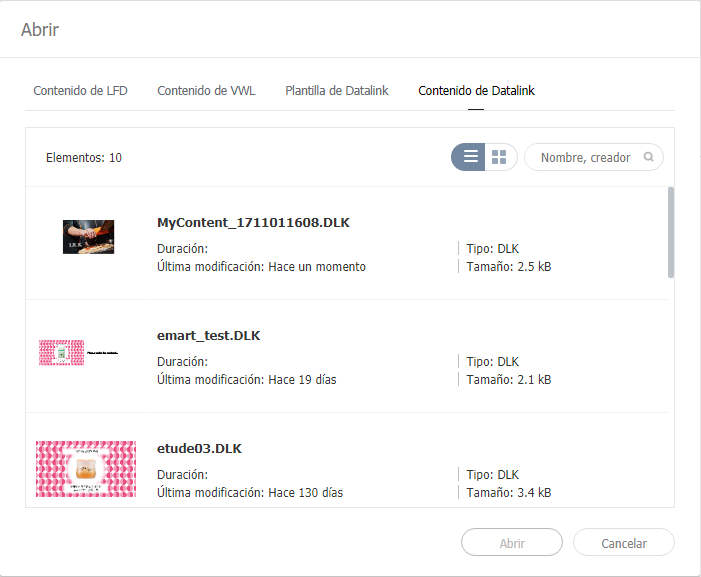
  1. Haga clic en en la pantalla Web Author.
  2. Haga clic en la pestaña Contenido de Datalink.

    Stylesheet
    classscreen
  3. Seleccione un archivo de contenido y haga clic en Abrir.
  4. Edite el contenido DLK siguiendo el mismo método que para crear contenido DLK.


Sv translation
languagepl

Użyj funkcji DataLink, do tworzenia dynamicznych treści wykorzystujących elementy zmieniające się w czasie rzeczywistym. Zmapuj do treści dynamicznych ogólne pliki multimedialne dodane do MagicInfo Server lub dane zewnętrzne zebrane na serwerze DataLink.

Uwaga:

  • DataLink to internetowa aplikacja, która zbiera dane zewnętrzne w określonych odstępach czasu i przesyła je do MagicInfo Player, dzięki czemu można odtwarzać treści dynamiczne. Szczegółowe informacje na temat DataLink podane są w instrukcji użytkowania MagicInfo DataLink.

Tworzenie szablonów DataLink.


Do tworzenia szablonów DataLink służy Web Author.

  1. Dodaj elementy do strony z treściami.
    Uwaga:
    Funkcja DataLink działa tylko z elementami stanowiącymi obrazy, wideo i tekst.

  2. Wybierz element, na którym chcesz zastosować funkcję DataLink i kliknij   na pasku narzędzi edycji elementów. Możesz wybrać kilka elementów jednocześnie.
    Element wyświetla ikonę.

  1. Po wybraniu elementu skonfiguruj ustawienia szczegółowe.

/ 

Wybierz różne elementy DataLink, zgrupuj je lub rozgrupuj.

Konfiguracja ustawienia DataLink.

  • Transition Duration (Czas trwania przejścia): Ustaw przedział czasowy dla aktualizacji elementów DataLink.
  • Sync Data (Synchronizacja danych): Wybierz, czy dane mają być synchronizowane.
  • Keep Previous Data (Zachowaj poprzednie dane): Wybierz, czy zachować poprzednie dane.
  1. Po konfiguracji wymaganych ustawień kliknij  .
  2. Skonfiguruj szczegóły zapisywania i kliknij Save and Create DLK (Zapisz i utwórz DLK).
    Treści zostały zapisane jako szablon DataLink.

Edytowanie szablonów DataLink.

Import i edycja zapisanego szablonu DataLink.

  1. Kliknij   na ekranie Web Author.
  2. Kliknij zakładkę Datalink Template (Szablon Datalink).

  1. Wybierz szablon i kliknij Edit LFT (Edycja LFT).
  2. Edytuj szablon DataLink używając tego samego sposobu, co przy tworzeniu szablonu DataLink.

Tworzenie plików DLK z treściami


Szablon DataLink służy do tworzenia treści DLK do rozesłania w MagicInfo Player. Treści DLK można tworzyć dodając plik mediów lub tekst, albo importując zapisane ustawienia DataLink Server.

Importowanie szablonów DataLink.

Importowanie szablonu DataLink w celu utworzenia treści DLK.

Uwaga:

  1. Kliknij  na ekranie Web Author.
  2. Kliknij zakładkę Datalink Template (Szablon Datalink).

  1. Wybierz szablon i kliknij Create DLK (Utwórz DLK).
    Wyświetla się strona tworzenia treści DLK.

Tworzenie treści DLK przez ręczne wpisanie danych

  1. Zaimportuj szablon DataLink.
  2. Wybierz element DataLink.
    Wyświetla się okno zarządzania DataLink.

  1. Aby dodać dane kliknij  .
  2. Wybierz Direct Input (wprowadzanie bezpośrednie) i kliknij Add (Dodaj).

  1. Wpisz szczegóły i kliknij Save (Zapisz).

(Text) (Tekst):

Wpisz tekst.

Tag (Znacznik)

W razie konieczności dodaj znacznik do tekstu. Wybierz znacznik z listy znaczników i kliknij Save (Zapisz). Istnieje możliwość dodania więcej niż jednego znacznika.

Uwaga

  • Plik z treściami zawierający znacznik odtwarzany jest tylko na urządzeniu posiadającym ten sam znacznik.
  • Aby przypisać znacznik do tekstu najpierw sprawdź, czy znacznik jest zapisany na MagicInfo Server. Szczegółowe informacje na temat dodawania znaczników podane są w części ► Dodawanie znaczników
  • Szczegółowe informacje na temat używania znaczników podane są w części ► Konfiguracja ustawień znaczników

Tag MatchType (Typ dopasowania znacznika)

Jeżeli przypisano więcej niż jeden znacznik ustaw warunki dopasowania.


  1. Po konfiguracji wymaganych ustawień kliknij  .
  2. Skonfiguruj szczegóły zapisywania i kliknij Save (Zapisz).
    Treści zostały zapisane jako treści DLK.

Tworzenie pliku DLK razem z DataLink Server

Tworzenie pliku z treściami DLK przez zmapowanie danych zapisanych w DataLink Server na szablon DLK.


Tworzenie pliku DLK razem z DataLink Server

Aby utworzyć plik z treściami DLK razem z DataLink Server sprawdź, czy nawiązane jest połączenie MagicInfo Server z DataLink Server. Szczegółowe informacje na ten temat podane są w części ► Zarządzanie zewnętrznymi serwerami


Elementy będące slajdami

Nie ma możliwości zmapowania danych DataLink Server na elementy będące slajdami.


  1. Zaimportuj szablon DataLink.
  2. Wybierz element DataLink.
    Wyświetla się okno zarządzania DataLink.

  1. Aby dodać dane kliknij  .
  2. Wybierz Link Data (Powiąż dane) i kliknij Add (Dodaj).

  1. Wpisz szczegóły i kliknij Save (Zapisz).

Select Data (Wybierz dane)

Wybierz tabelę DataLink zapisaną w DataLink Server. W tabeli DataLink wybierz pozycje danych, których chcesz użyć i kliknij Save (Zapisz).

Tag (Znacznik)

W razie potrzeby możesz dodać znaczniki do pozycji danych. Wybierz znacznik z listy znaczników i kliknij Save (Zapisz). Istnieje możliwość dodania więcej niż jednego znacznika.

Uwaga

  • Plik z treściami zawierający znacznik odtwarzany jest tylko na urządzeniu posiadającym ten sam znacznik.
  • Aby przypisać znaczniki do pozycji danych najpierw sprawdź, czy znaczniki są zapisane na MagicInfo Server. Szczegółowe informacje na temat dodawania znaczników podane są w części ► Dodawanie znaczników

Znaczniki DataLink

Dodawanie znaczników DataLink. Aby dodać znacznik DataLink wybierz kolumnę z tabeli DataLink i kliknij OK. Szczegółowe informacje na temat używania znaczników podane są w części ► Zarządzanie znacznikami

Conversion Table (Tabela konwersji)

Korzystając z tabeli podstawiania danych zastąp dane w tabeli DataLink tekstem, obrazami lub wideo. W oknie Select Conversion Table (Wybierz tabelę konwersji) wybierz obiekt do zastąpienia i kliknij OK.

Tag MatchType (Typ dopasowania znacznika)

Jeżeli przypisano więcej niż jeden znacznik ustaw warunki dopasowania.


  1. Po konfiguracji wymaganych ustawień kliknij  .
  2. Skonfiguruj szczegóły zapisywania i kliknij Save (Zapisz).
    Treści zostały zapisane jako treści DLK.
  1. Zaimportuj szablon DataLink lub treści DLK.
  2. Wybierz element DataLink.
    Wyświetla się okno zarządzania DataLink.
  3. Zarządzaj DataLink używając następujących pozycji menu:


1

Ustaw przedział czasowy aktualizacji elementów DataLink.

2

  • Aby skasować dodane dane, najedź wskaźnikiem myszy na pozycję danych do usunięcia i kliknij .
  • Aby edytować dodane dane, najedź wskaźnikiem myszy na pozycję danych do edycji i kliknij .

3

Dodaj dane.


Edycja treści DLK

Import i edycja zapisanych treści DLK.

  1. Kliknij   na ekranie Web Author.
  2. Kliknij zakładkę Datalink Content (Treści Datalink).

  1. Wybierz plik z treściami i kliknij Open (Otwórz).
  2. Edytuj treści DLK używając tego samego sposobu, co przy tworzeniu treści DLK.